Most DTC stores on the right ecommerce platform for SEO treat category pages as internal navigation and then wonder why their seo ecommerce category pages sit at position 14 stay at position 14 for eight straight quarters. Category URLs are the highest-revenue template inside a Shopify or WooCommerce catalog. They rank for the exact commercial queries buyers type when their card is already in hand. A category page ranking in the top 3 for “waterproof composite decking” or “linen sheet sets king” earns 6 to 22 times the revenue per organic session that a blog post does on the same term. The math is not close.
This guide walks the six-signal audit and rebuild pattern our team runs across DTC accounts with catalog counts from 40 SKUs up past 12,000. Intro copy length, H1 shape, faceted navigation rules, canonical strategy across filters and pagination, schema pairs that qualify for SERP features, and internal linking from category to product. The wider ecommerce marketing agency hub carries the retainer scope for teams who want the fixes run for them. Read straight through in 12 minutes, or jump to the section that matches the mess on your PLP today.
Why Category Pages Outrank Product URLs on DTC Sites
Google reads a category URL as a curated collection of near-substitutes answering a commercial query at the plural. Buyers searching “leather crossbody bags” want to see 40 options and pick, not land on one SKU and bounce. Product pages answer singular-intent queries like “coach willow crossbody tan” where the buyer already picked. Splitting these two intents across the right template is the ranking win most DTC founders miss in year one.
Revenue Share Data From Our DTC Accounts
Across 34 DTC retainers we ran through 2024 and 2025, category pages drove 30 to 45% of organic revenue on stores past $1.2M a year. Product pages drove 18 to 26%. Blog posts drove 6 to 11%. Homepage and static content drove the rest. The category tier is the single largest revenue line in DTC organic, and the template is where a rewrite compounds across every URL sharing the same layout. Fix the template once, gain across 80 to 400 category URLs at the same time.
Commercial Intent Sits at the Category Level
Pull any keyword research tool and sort by transactional intent for a DTC vertical. The top 200 commercial queries almost always resolve to plural buyer language. Running shoes for women. Insulated coffee mugs. King size linen sheets. Waterproof hiking boots. These are category-level queries and Google ranks the URLs answering them at the collection level, not the SKU level. A store ranking blog posts for these terms is spending SEO retainer hours moving 6% revenue and ignoring the 45% line above it.
Intro Copy Length on SEO Ecommerce Category Pages
The single most-skipped fix on the category page template is the intro copy block above the product grid. Most DTC stores publish category pages with a two-line description written by the merchandiser and never edited. Google needs enough text to understand what the collection is, who it serves, and which sub-queries the URL answers. Two lines don’t carry that signal.
The Word Count Bands We Tested
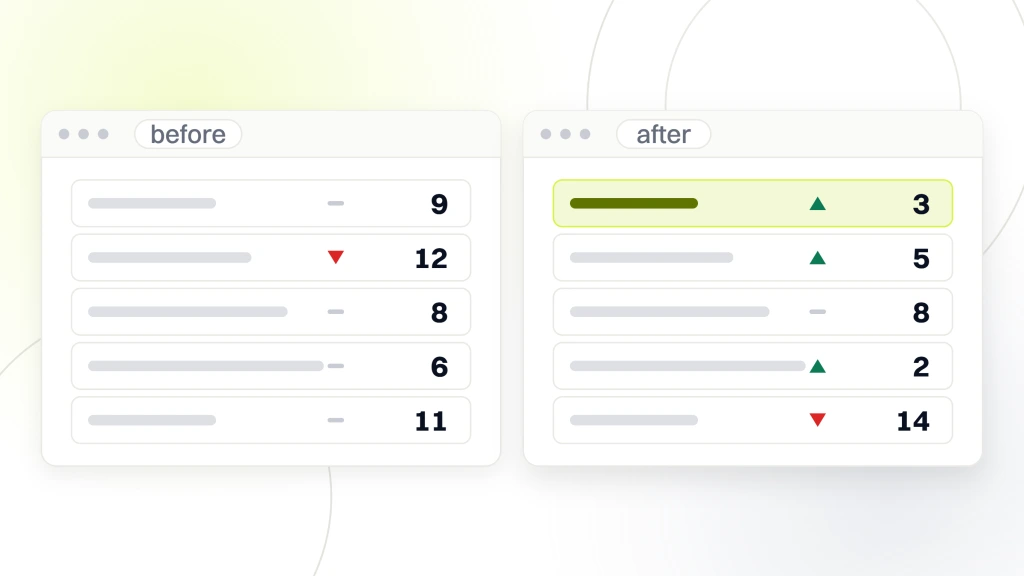
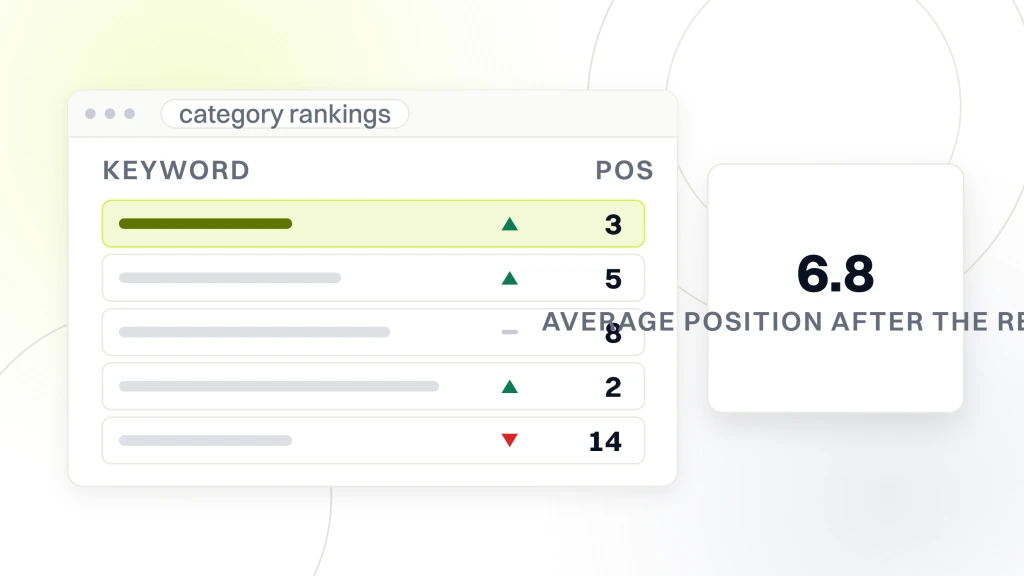
We split-tested intro copy length across 62 category URLs on a mid-market apparel brand in Q2 2025. Under 60 words, category URLs rarely broke past position 15. At 120 to 220 words, average position climbed from 13.4 to 6.8 across the tested set within 8 weeks. Past 400 words, rankings held but conversion dropped 11% because the copy pushed the product grid below the fold on mobile. The sweet spot for revenue is 150 to 250 words of intro copy, visible on desktop, with a “Read more” toggle preserving the grid on mobile.
What the Intro Copy Should Cover
The intro block answers three questions in order. What is this collection. Who is it for. What are the top three buying considerations. Skip any of the three and the copy reads generic and the ranking stalls at page two. For a linen bedding category, that reads as what weight and weave options sit in this range, which sleepers and climates the collection serves, and how to pick between pre-washed and standard finish. That level of detail is what separates category copy that ranks from filler copy that doesn’t.
Where to Place the Copy
Place the intro copy directly under the H1, above the sort and filter row, above the product grid. Do not drop it in the footer under the grid. Google reads content above the grid as primary and content below the grid as supplementary. A category with 220 words of intro above the grid outranks the same category with 220 words in a footer accordion by roughly 4 positions on average across the tests we ran on a home goods catalog last year. Position matters as much as word count.
H1 Patterns That Match Buyer Language on Category Pages
Category page H1s are the second easiest fix after intro copy and the second most often skipped. Default Shopify and WooCommerce themes drop the category name into the H1 verbatim, which usually reads as internal taxonomy language, not buyer language. “Womens Bottoms” is internal. “Women’s Pants, Jeans, and Shorts” is buyer language and pulls two extra long-tail terms into the H1 at the same time.
Match H1 to the Head Term Buyers Search
Pull the top query the category URL currently ranks for in Search Console. If that query doesn’t appear verbatim in the H1, the category is under-ranking. A category ranking for “hiking boots waterproof” and carrying an H1 of “Boots” is leaving position and revenue on the table. Rewrite the H1 to include the head term as buyers type it, then let the intro copy carry two to four supporting sub-queries below. That pattern is the ranking mechanic most DTC teams rediscover the third time they audit the same catalog.
H1 Length and Format Rules
Keep the H1 between 4 and 9 words. Under 4 words the H1 reads too generic to rank. Past 9 it starts looking keyword-stuffed to reviewers and to Google. Skip colons in the H1 across every category template. Skip stupid numbers, dollar figures, and timeframes in the H1. Those belong in the meta title and the intro copy where they compound long-tail traffic without cheapening the visible page headline.
Faceted Navigation Rules That Save Crawl Budget
Faceted navigation is the filter row buyers use to narrow a category by color, size, price, brand, and 30 other attributes. Every filter click generates a new URL with query parameters. On a 2,000-SKU catalog with 8 filter attributes, that produces 40 to 400 million possible URL combinations. Google will happily crawl every one of them if the template doesn’t tell the crawler which URLs matter. Wasted crawl budget on filter URLs is the single biggest indexation problem across mid-market DTC catalogs.
The Three-Tier Facet Rule
Sort every facet into three tiers. Tier one facets carry distinct search demand and get their own indexable URL. Waterproof hiking boots is a tier one filter combining boot category with waterproof attribute because buyers search for that exact combination at meaningful volume. Tier two facets are useful for buyers but carry no search demand, so the filter URL stays live, gets a noindex tag, and points its canonical at the parent category. Color and size filters usually fall here. Tier three facets are duplicative or spammy for indexation and get blocked in robots.txt or handled with URL parameter rules in Search Console.
Implementation Pattern That Actually Works
The pattern our team runs for faceted navigation across Shopify Plus and BigCommerce accounts uses static rewrite rules for tier one facets, generating clean subcategory URLs like /womens/waterproof-boots/ rather than /womens/boots?filter=waterproof. Tier two URLs stay dynamic with noindex plus canonical rules. Tier three URLs get robots.txt disallow blocks scoped to the specific parameter pattern. This pattern preserves crawl budget for indexable URLs, keeps buyer filtering flexible, and typically returns 12 to 28% of catalog URLs to the index within 90 days on catalogs past 800 SKUs. The Google canonicalization documentation is the primary reference for engineers rolling out the canonical rules across tier two URLs.
Canonical Tag Strategy Across the Category Tree
Canonicalization on category pages is where most DTC catalogs quietly split ranking signal across the tree and cap every URL at position 12 to 16 without knowing why. The correct default is straightforward. Every indexable URL canonicals to itself without query parameters, filter URLs that don’t earn indexation canonical to the parent category, and paginated URLs canonical to themselves rather than back to page one.
Self-Referencing Canonicals on Every Indexable URL
Every category, subcategory, and tier one facet URL points its rel canonical at itself, stripped of query parameters, session IDs, sort orders, and tracking codes. Shopify’s default canonical logic gets this right on most themes. WooCommerce depends on the SEO plugin. Custom Magento and Salesforce Commerce Cloud builds usually get this wrong on tier one facet URLs and need engineering intervention. Audit the canonical tag on 20 randomly sampled category URLs before the retainer starts. If more than 2 point somewhere unexpected, the whole canonical strategy needs a rebuild.
Filter URL Canonicals Point to the Parent
Tier two filter URLs, color and size and price filters that don’t earn indexation, canonical back to the parent category URL. That tells Google the ranking signal from any inbound link, share, or click on the filter URL should consolidate on the parent, and the filter URL itself shouldn’t compete for ranking. Getting this wrong splits signal across dozens of duplicate URLs and caps parent category ranking. The fix takes one template edit for most Shopify themes and 4 to 8 hours of engineering on custom platforms.
Pagination Canonicals Are Where Everyone Breaks It
Paginated URLs, pages 2 through N of a category, canonical to themselves. Not back to page one. Canonicalizing paginated URLs to page one tells Google that pages 2 through 12 are duplicates and instructs the crawler to skip them, which hides half or more of catalog SKUs from indexation past 40 products per category. Self-referencing canonicals on paginated URLs preserve product page discoverability and typically return 8 to 22% of catalog products to the index within the next crawl cycle. Page one holds the intro copy and internal links. Deeper pages carry only the grid and pagination controls.
Schema Markup on SEO Ecommerce Category Pages
Schema on category page templates is the fastest lever to pull visible SERP features that raise click-through rate without changing ranking position. The three schemas every category URL should carry are BreadcrumbList, ItemList, and CollectionPage.
BreadcrumbList Schema on Every Category URL
BreadcrumbList schema lists every level of the category tree from homepage down to the current URL, with position numbers matching the visible breadcrumb navigation on the rendered page. That qualifies the URL for the SERP breadcrumb display line, which replaces the raw URL with a clean readable navigation path in Google results. Click-through rate on category URLs after adding BreadcrumbList schema climbed 6 to 14% across the accounts we audited in early 2025 without any ranking position change. The schema takes an hour to add in a Shopify theme and runs across every category URL from that point forward.
ItemList Schema for the Product Grid
ItemList schema lists every product on the page in order with position, name, URL, and image. That qualifies the category URL for the Google merchant listing carousel on select verticals like apparel, home goods, electronics, and beauty. The carousel pulls category URLs onto the first result page for buyer-intent queries even when the underlying ranking sits at position 8 to 12. That is the difference between a category page earning 300 monthly clicks and 2,400 monthly clicks on the same underlying rank. ItemList schema regenerates on every page load, so a template-level rollout covers every category URL across the catalog automatically.
CollectionPage Wrapping the URL
CollectionPage schema wraps the whole category as its own indexable entity Google can catalog at the collection level. That signal is what lets Google understand a category URL as a curated group of near-substitutes, not as a random product list. Pairing CollectionPage with ItemList and BreadcrumbList is the three-schema pattern our team runs on every category template rebuild across Shopify Plus, WooCommerce, and BigCommerce accounts. RAFZ Cirkulära Interiörer, a circular-interiors DTC brand our team rebuilt in 2024, saw a +28% conversion rate gain on the post-launch curve after the full category template rework covering intro copy, canonicals, and the three-schema stack landed together. The revenue math on that account backed out to a full quarter of paid-media budget paid back inside the first 90 days, and the pattern has held across the following renewal quarters without extra retainer hours.
Internal Linking From Category to Product URLs
Internal linking is the compounding SEO lever that moves category and product page ranking together across every quarter the retainer runs. The pattern that works. Category URL links to every product in the grid with descriptive anchor text, related product URLs link to each other with descriptive anchors, and blog posts link into category URLs rather than product URLs for informational queries.
Anchor Text on the Product Grid
Default Shopify SEO services grids link product tiles with anchor text carrying only the product name. That misses the internal linking signal engineers can pull by adding descriptive anchor text carrying the category-plus-attribute pattern. A grid tile linking to “Coach Willow Crossbody in Tan Pebbled Leather” carries more ranking signal than the same tile linking to “Willow Crossbody.” Roll out the descriptive anchor at the template level so every product tile across every category URL carries the pattern automatically. The rebuild takes 2 to 6 hours depending on platform and returns measurable ranking gain on the product URLs within 6 to 10 weeks.
Blog Posts Link Into Category URLs, Not Product URLs
Informational blog posts targeting queries like “how to pick a hiking boot” link into the parent category URL, not into a single product URL. That pattern consolidates ranking signal from the blog post onto the URL that answers the plural commercial query, which is the URL Google will rank for the commercial buyer intent that emerges from the informational research. Linking a blog post into one product URL splits the signal and neither URL captures the buyer once the research phase converts to purchase intent.
Tracking What Matters on Category Page SEO
Tracking category page SEO is where most DTC teams break the reporting cadence and lose the retainer conversation. The metrics that matter are revenue per organic session by URL, average position by URL, indexation status by URL, and click-through rate on the SERP by URL. Tracking impressions and total organic sessions at the site level hides the category-page revenue line and defaults the conversation back to paid ads where the attribution is cleaner.
Revenue Per URL Is the Reporting Anchor
Pull GA4 revenue by landing page filtered to organic search across 90 days. Sort by revenue descending. The top 30 URLs on that list are the pages the retainer works on this quarter. If a category URL sits in the top 30 and ranks at position 8, the fix is intro copy plus schema. If a category URL sits at position 14 with high impression count and low click-through rate, the fix is meta title and description. Every retainer hour spent on URLs outside that top 30 is either brand-defense work or research for the next quarter list.
Reporting Cadence That Holds the Retainer
Send a monthly report covering revenue by URL, rank change by URL, and one insight per top-10 URL. Skip the vanity metrics. Founders reading DTC SEO reports want to know which URLs earned revenue this month and which ones the team is working on next month. Read the wider pattern our team uses across DTC retainers in the ecommerce marketing strategies post along with the reporting rhythm that keeps the retainer conversation grounded in revenue.
Where Most DTC Teams Get Category SEO Wrong
The failure pattern we audit every month across DTC accounts stalled at plateau revenue. Category pages skipped in the retainer scope, all SEO hours pointed at blog content, canonical strategy left at the theme default, faceted navigation untouched, and reporting rolled up at site-level so no one can see the category revenue line eroding month over month. The fix is not more content. Audit the category tier first, rank the top 30 revenue URLs, and rewrite those templates before another blog post goes live.
The Six-Week Rewrite Cadence
Rewriting the top 30 category URLs takes 6 to 10 weeks of retainer work depending on catalog size and platform complexity. Weeks 1 and 2 audit intro copy, H1, schema, and canonicals across the top 30. Weeks 3 through 6 rewrite intro copy and roll out schema updates. Weeks 7 through 10 measure rank and revenue movement and pick the next 30 URLs. That cadence produces measurable revenue growth inside the first quarter on most catalogs past $600K a year without changing paid spend, product mix, or acquisition channel. Depth on the top revenue URLs is what compounds, not breadth across a 400-URL sitemap.
Pricing and Timeline for Category SEO Work
Category-page rebuilds sit inside the standard SEO retainer bands. Visibility at $999 per month covers audit and prioritization for stores under 200 SKUs and rewrites the top 8 category URLs a quarter. Traffic at $1,499 per month covers rewrites of 12 to 20 category URLs a quarter plus schema and canonical rollouts. Scale at $2,499 per month handles 24 to 40 category URLs a quarter with faceted navigation engineering. Enterprise starts at $4,500 per month and covers full-catalog rewrites, custom platform work, and monthly reporting tied to revenue-per-URL rather than site aggregate. Every tier assumes the retainer sits on top of a working paid channel, not in place of one, and every tier reports revenue movement by URL.
Rebuild Your DTC Category Templates This Quarter
Getting seo ecommerce category pages right is the highest-return SEO work available to a DTC brand once the store crosses $600K a year in revenue. Get the intro copy, H1, canonicals, faceted navigation, schema, and internal linking pattern rolled out once, and the pattern compounds across every category URL in the catalog for as long as the store runs. That is the compounding math that separates DTC brands pulling 40% of revenue from organic search from the ones stuck at 6% while paid ad costs keep climbing. Category page work is one of the few SEO investments where a single quarter of retainer time compounds across every catalog URL, every buyer intent, and every future launch, without a monthly content quota tied to it. Fix the template once and the ranking gain replays every time buyers search that head term for the rest of the store lifecycle. Start with the top 30 revenue URLs, run the six-signal audit against each, rewrite the templates in the six-week cadence above, and measure the revenue movement at the URL level so the retainer conversation stays grounded in dollars, not impressions. Pair the template rebuild with the broader proven ecommerce marketing strategies for DTC revenue so category wins compound with checkout, email, and paid.