Web application design and development is the scope you sign for when a contact form is not enough. You are building a working software product delivered through the browser. User accounts. Role-based permissions. Custom workflows. Database logic that changes every day. The scope is closer to a SaaS product build than a marketing site launch. The cost is 3 to 10 times higher. The timeline is 8 to 52 weeks. The team is 4 to 8 people, not 1 to 2. Every founder who signs a contract before understanding the scope difference ends up rebuilding at month nine.
This guide walks through what the scope actually covers in 2026. Real scope. Real stack picks. Real cost tiers. Real timelines. How to tell an application team from a website shop pitching an app project. Where custom app budgets get burned. When to pick web-first over a mobile combo. And what a clean engagement looks like from discovery through year-two retainer.
Web application design and development cost tiers in 2026
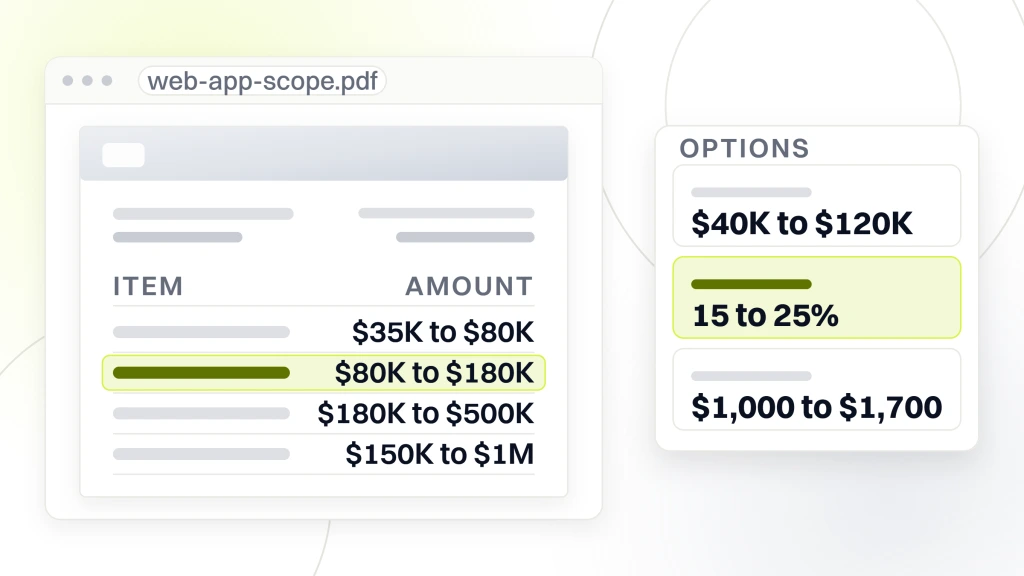
The scope lands in four cost tiers in 2026. MVP scope runs $35K to $80K over 8 to 14 weeks, with 3 to 6 screens and a single user role. Standard multi-role runs $80K to $180K over 14 to 26 weeks, with 8 to 20 screens, 2 to 4 roles, plus billing and notifications. Enterprise starts at $180K and climbs to $500K over 26 to 52 weeks, adding SSO, audit logs, and compliance. Custom SaaS runs $150K to $1M over 26 to 78 weeks, with the full product wrapper of billing, admin panel, and customer portal. Every tier assumes a US or Western European team paid at market rates with a paired designer plus developer.
For example, overseas teams cut the number by 40 to 60% but add project management overhead, timezone friction, and code quality variance. The net saving on a $150K project drops from $75K to $30K after accounting for the extra PM hours and the 15 to 25% rework we typically see. Fair pricing on a custom build lands between raw overseas rates and top-tier US agency rates. A hybrid team with a US or European PM plus a Latin American or Eastern European engineering pod usually wins on quality-adjusted cost.
MVP scope worth defining first
In short, the MVP tier of $35K to $80K is where every founder should start. Build 3 to 6 core screens. Single user role. Basic auth. Postgres database. Deploy on Vercel or Fly.io. Skip billing and add it later. Skip the admin panel and add it later. Skip notifications and add them later. Get to a live product in 8 to 14 weeks and learn what users actually do. Every SaaS product we have built that skipped MVP scope and went straight to full-feature scope launched 4 to 8 months late with features nobody used. MVP first. Full scope later on real data.
Enterprise tier lands honestly above $180K
Enterprise scope starts at $180K and climbs from there. SSO with SAML or OIDC. Audit logs on every user action. Role-based access control with fine-grained permissions. Compliance work (SOC 2, HIPAA, GDPR). Data export tools. Admin panel with impersonation. Rate limiting. Multi-tenant architecture. Any team that quotes enterprise scope under $150K is either underquoting to win the deal or skipping half the checklist. Compliance work alone adds 15 to 30% to the base build number, and skipping it in year one shows up as a failed audit in year two.
Web and mobile app design and development or launch web-first
Launch web-first, mobile second. That is the single highest-value strategy decision on any web-plus-mobile conversation. A combo scope doubles the initial cost, doubles the team size, doubles the QA surface, and delays launch by 4 to 6 months. Most applications get 80 to 90% of user activity through the browser in year one. Launch the web application first. Learn what users actually do. Scope mobile on real usage data 6 to 12 months later. Companies that launch both in the same window usually rebuild the mobile app inside 18 months.
Still, some scopes force a mobile-first build. Field service applications where users work outside on tablets. Consumer applications where mobile usage is the entire product (photo sharing, ride-hailing, delivery). Healthcare intake where clinicians use iPads. Any scope where mobile usage will hit 50% of activity in year one justifies a combo build from day one. Everything else goes web-first, then adds a mobile companion once the browser build proves the demand.
- Web-first fits. Internal ops tools, admin panels, B2B SaaS dashboards.
- Web-first fits. Booking systems, project boards, customer portals.
- Combo fits. Field service applications with heavy tablet use.
- Combo fits. Consumer applications where mobile is the entire product.
- Combo fits. Healthcare intake with clinician iPads.
- Native mobile fits. Camera-heavy, sensor-heavy, or offline-first products.
Mobile app cost on top of web scope
For instance, a companion mobile app on top of an existing web application runs $40K to $120K in 2026 for a standard scope of 8 to 20 screens with parity to the browser experience. React Native shares 60 to 80% of the codebase with a React web app and cuts the cost by 30 to 40% versus native iOS plus Android builds. Flutter is the other cross-platform pick and runs about the same cost. Native builds (Swift plus Kotlin) run 40 to 60% higher than cross-platform but deliver a smoother experience on device. Pick cross-platform for SaaS-style scope. Pick native for consumer scope where the last 10% of polish decides retention.
Web design and mobile app development company timing
Any vendor that pitches a same-week launch of both platforms is quoting fantasy. Real timing runs 8 to 14 weeks for the web MVP, then 6 to 12 months of learning on real users, then 10 to 18 weeks for the mobile companion. Total time from kickoff to mobile launch runs 12 to 20 months. Founders who compress that into 6 months usually rebuild the mobile app inside year two on the wrong assumptions. Timing is a scope input, not a wish.
A real web app build scope story
For example, Rocket Software, a SaaS product team, came in with a launch scope that most agencies would have quoted at $180K enterprise pricing. We scoped it honestly against the four tiers. Standard multi-role fit. $110K build over 18 weeks. Two paired designer-developers plus a shared backend engineer. Real activation-focused screens instead of a 40-screen wishlist. We launched on time. Inside the first launch window, activation rate ran at 300% of the pre-launch baseline. Week-one signups landed at 3,000 customers. Daily subscribers ran at 400+ from week two onward. That is a working outcome measured on real activation numbers, not on design awards.
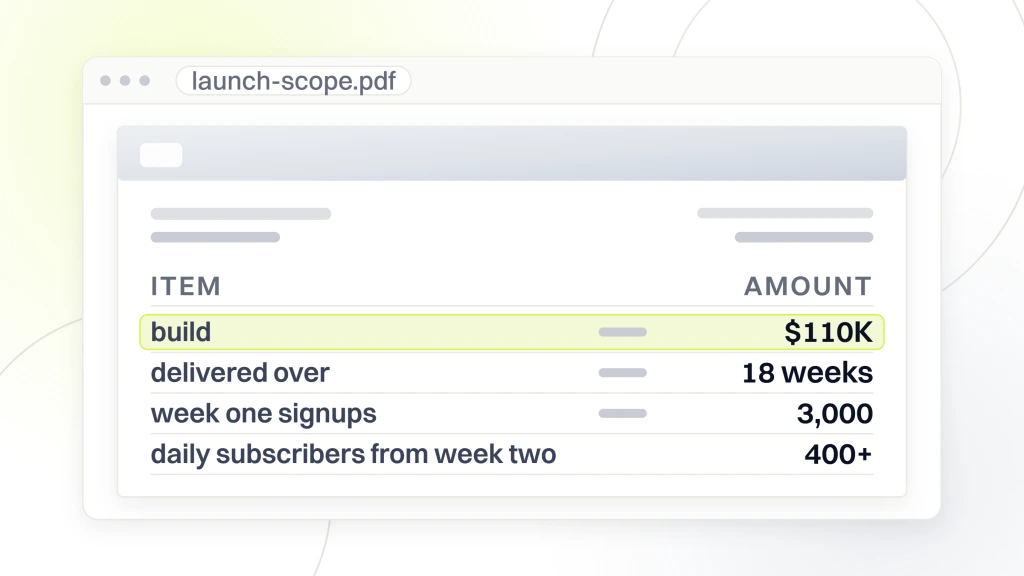
The scope worked. We forced the three artifacts at kickoff (user journey, screen inventory, database schema) and refused to quote until every artifact was signed off. Two competing agencies quoted the same scope inside 48 hours with no schema conversation. Both quotes came in $40K under ours. Rocket ran the payback math and picked the honest quote. Twelve months later, both cheaper agencies would have hit their published rebuild rate on scope creep and burned another $80K on rework. That is the difference between a real custom web design and development services team and a website shop pitching an application project.
Payback math on the application spend
Take current hours spent on the workflow the application will replace. Multiply by hourly cost. Multiply by 52 weeks. That is annual manual cost. A $60K build that saves 15 hours per week at $80 per hour saves $62K per year. Payback lands at 12 months. Every subsequent year of the application is pure margin. Founders who run this math before signing usually sign faster than founders who wait for a Pinterest mood board to arrive from the design team.
First-year total worth budgeting
Build cost runs $35K to $250K depending on tier. First-year hosting and infrastructure runs $3K to $18K. First-year retainer runs 15 to 25% of the build. First-year support tooling (error tracking, analytics, uptime) runs $2K to $8K. Total first-year investment runs $45K to $340K depending on tier. Founders who budget the whole year up front avoid the six-month surprise conversation with the CFO. Founders who budget only the build fight that conversation every quarter of year one.
Ownership clauses on a web app build contract
Ownership on a web application project is much bigger than on a marketing site. In short, you own everything. You own the code repository. You own the database. You own the hosting accounts (Vercel, AWS, Fly.io). You own the auth provider account (Auth0, Clerk, Supabase). You own the domain. You own the analytics accounts. You own the error tracking (Sentry). Every third-party service tied to the application runs under your billing. Any agency that hedges on any one ownership line is not the team to hire.
Still, watch for the database trap. Some agencies host the database on their infrastructure with an easier-for-us-to-maintain pitch. That is vendor lock-in dressed up as service. When you leave the agency, the database has to migrate, and the migration eats 2 to 6 weeks of engineering time depending on data volume. Force database ownership on your infrastructure from day one. Any team that pushes back is telling you what the exit conversation will look like on year three.
Code repository on your GitHub organization
The code lives in your GitHub or GitLab organization. The agency has commit access as a paid contractor. Not the other way around. Any vendor that keeps the repository on their side is one CTO departure away from you losing the product. Code ownership is boring, and boring is the point. Force this into the contract before signing. The team that agrees without pushback is the team you can trust with year-two work.
Data ownership and export tools
You own the data. You need an export tool that dumps the full database to a portable format (SQL, CSV, JSON) on demand. Any scope that skips the export tool is planning to keep the data hostage on retainer. Force the export tool into the MVP scope. It runs 6 to 12 engineering hours to build and saves you a 6-week migration project two years later when you switch teams. Every real agency includes an export tool without pushback. Every rental agreement leaves it out on purpose.
Retainer scope after the launch
Every web application launch ends with a retainer offer. Not optional. In short, live products need ongoing care from someone who knows the codebase. A live application needs ongoing security patches, framework upgrades, dependency updates, bug fixes, feature additions, and performance monitoring. The retainer runs 15 to 25% of the build annually. An $80K MVP points to a $1,000 to $1,700 monthly retainer for standard scope. Any team that will not commit to retainer scope in the proposal is either padding it for later or has never actually maintained an application at your scale.
Real retainer inclusions on any engagement cover monthly framework and dependency updates, monthly security patch review, weekly uptime and error monitoring, quarterly load-test on peak endpoints, monthly Core Web Vitals check on the customer portal, ongoing bug triage with a defined response SLA, and a small feature-addition budget of 5 to 15 engineering hours per month. Retainers priced under 10% of build annually are reactive only. Retainers priced above 30% are padding scope you probably do not need. See web.dev on Core Web Vitals for the specific metrics the retainer report should include, and Smashing Magazine on web application security for the security patch checklist.
Security patch cadence
For example, web application dependencies (Node packages, Python libraries, framework versions) get security patches every week. Every application we run gets a monthly automated Dependabot pass, a quarterly full audit, and a same-week emergency patch on any critical CVE. Skipping this cadence for 6 months on any real web application is how you end up with a compromised database at month 12. Every retainer must include this cadence. Any agency that treats it as an add-on is quoting the wrong product.
Feature-addition budget inside the retainer
For instance, a small monthly engineering budget of 5 to 15 hours covers small feature additions without triggering a change-order proposal. This is where retainer clients get real value. The tweaks that make the application better every month without a 3-week negotiation. Any retainer that treats every small change as a separate quote will exhaust both sides inside 6 months. Bake the small-change budget into the base retainer. Everyone wins.
How to scope a web application design and development project honestly
Start with three artifacts before signing anything. A user journey diagram covering every role in the application. A screen inventory listing every screen users will see. A database schema showing every table, relationship, and access rule. Skip any one artifact and the build number is a guess dressed up as a proposal. That is the honest test of a real product team.
Real scoping produces these three artifacts at kickoff, not after signing. Any scoping session that skips one of them is guessing at the build. Guessing at the build means guessing at the number. Guessing at the number means the midpoint invoice will surprise everyone at week nine. Force the artifacts on the discovery loop.
Get the three artifacts from the agency before signing. Not after. Any team that will not produce them at kickoff is planning to define them in flight, which means every ambiguity becomes a change order. The best team for your scope will walk you through all three artifacts in the second discovery call and rework them once on your feedback before the proposal lands. That reworking loop is the highest-value 3 hours you will spend on the whole project.
User journey per role
Draw the user journey for every role. Customer signs up, verifies email, completes profile, uses the product, submits a support ticket, cancels the subscription, exports data. Admin logs in, manages users, reviews audit logs, exports reports. Each role has its own journey and its own screens. Any team that scopes with only one journey is scoping only one role. Multi-role scope always lands in multi-role budget.
Screen inventory with named screens
List every screen. Login. Signup. Password reset. Dashboard. Profile. Settings. Billing. Users list. User detail. Reports index. Report detail. Admin panel. Audit log. Data export. Notification center. Each named screen becomes a design deliverable, a development ticket, and a QA test case. Screen inventory at kickoff turns a $40K guess into a $52K firm quote. That precision is what real scoping produces on day one.
Red flags on a web app vendor inside two conversations
Still, some signals show up inside the first two conversations if you know what to look for. A quote inside 48 hours with no schema conversation. A portfolio with only marketing sites. A team with no named backend engineer. A pitch that skips ownership clauses. A retainer offer described as post-launch talk. A stack recommendation that arrives before any user journey discussion. A proposal that lists MVP scope at enterprise pricing or the reverse.
The single biggest red flag on any pitch is a team that will not walk you through their own architecture on a past project. Every real agency can pull up a past client’s architecture diagram (redacted) and explain the auth flow, the database schema, and the deployment pipeline in 15 minutes. Any team that hedges on this walkthrough is either new to application scope or hiding a poor track record. Both are fine reasons to keep looking.
Portfolio that shows only marketing sites
A portfolio of 30 marketing sites and one application-like project is a website shop pitching an application project, not the custom web development services team you actually need. Real application-focused agencies show you 5 to 20 builds, with architecture diagrams, screen inventories, and revenue outcomes. Any portfolio without a dedicated application section is signaling scope you should not sign. Ask up front for two applications in your scope band before scheduling the next call.
Pricing that skips MVP versus enterprise scope math
For example, a $25K quote on enterprise scope is a red flag. A $250K quote on MVP scope is a red flag. Any quote that lands outside the tier ranges for your scope is a signal, not a deal. MVP tier runs $35K to $80K. Standard multi-role runs $80K to $180K. Enterprise runs $180K to $500K. Match the scope to the range. Any team quoting far outside the range is either underquoting to win the deal or overquoting to fund another client’s overrun. Both are avoidable if you scope honestly at kickoff.
Where to start on your web app shortlist
Start with three shortlisted teams that have delivered web applications in your scope band. Not marketing site portfolios with one application mixed in. Actual application-focused portfolios. Ask each for architecture diagrams, screen inventories, and revenue outcomes on two past projects. Compare the three side by side. The winner is usually visible inside 30 minutes of side-by-side reading. Every founder who runs this comparison signs the right team on the first try.
Ready to scope the real thing. For the full stack conversation, see our custom web development services. If the scope is closer to a marketing rebuild plus a small application layer, our web design and development services covers the entry path. For post-launch scope, our monthly website maintenance packages map the retainer for standard scope. And for the cost math side of this conversation, our web design and development cost guide walks through the tier pricing in full.