A sales funnel template hands you the working shape of the buyer journey before you write a single word of copy. You get the stage list, the copy blocks each stage needs, the metrics that grade each stage, and the assets that carry a visitor from first click to signed deal. Teams that start with a working template stand up a funnel in weeks. Teams that start from a blank whiteboard drift for quarters, usually with gaps at the stages that quietly lose revenue.
This guide walks a working template you can copy into Excel, PowerPoint, PDF, Word, or Google Sheets, then translate into a real website funnel, a landing page funnel, and an email sequence. Every section names the fields the template needs, the copy blocks that fill those fields, and the numbers that prove the stage is pulling its weight. Skip the theory. Copy the shape. Fill the rows.
What a Sales Funnel Template Really Covers
The template covers stages, copy blocks, offers, and metrics for every step between first click and signed deal. It isn’t a diagram on a slide. It’s a working document that names what runs at each stage, what number proves it works, and which asset carries the visitor to the next row. Get those four fields right and the funnel starts producing revenue. Get any one wrong and the whole shape collapses.
Stages the template defines up front
Name the stages before you write any copy. A common set covers awareness, interest, consideration, intent, evaluation, purchase, and retention. A B2B version often collapses to five rows. MQL, SQL, opportunity, proposal, closed. Pick the set that matches how your team really sells. Every asset in the template then maps to one stage and one owner.
Copy blocks each stage owns
Each stage in the template owns specific copy blocks. Awareness owns the blog headline and social hook. Interest owns the ad copy and landing page hero. Consideration owns the comparison guide and product demo. Intent owns the pricing page and case study. The template lists which block belongs where so writers know what to draft and designers know what to place.
Metrics that grade the stage
Every stage in the template carries a metric. Awareness gets impressions and reach. Interest gets clicks and time on page. Consideration gets email opt-ins and demo requests. Intent gets pricing page views and cart adds. Purchase gets closed revenue. Without a metric per stage, the funnel becomes untrackable. With one, you can point to the exact stage where visitors drop.
Sales Funnel Website Template Layout and Copy Blocks
A website funnel template lays out the pages that carry a visitor from a search result to a booked call. Home page. Category page. Product page. Case study page. Pricing page. Checkout or contact page. Each page owns a set of copy blocks that move the visitor down. The template defines those blocks so a designer can wireframe and a writer can draft in parallel.
Home page as the top-of-funnel filter
The home page in a website funnel layout holds the value proposition, one social proof band, three category cards, one lead magnet CTA, and a footer. That’s it. Any more and the visitor gets lost. Any less and the home page fails to segment traffic. The template names those five blocks so nobody argues about scope during design review.
Category and product pages carry the middle
Category pages hold service or product lists with a short blurb per item. Product pages hold the full offer. Hero, benefits, features, comparison, FAQ, and CTA. The website template says which pages belong in the middle of the funnel and what each one has to include. Skipping product page depth is why prospects click on a product, see 300 words of copy, and bounce.
Pricing and contact pages own the close
Pricing and contact pages own the bottom of the funnel. Pricing shows the offer plainly with a clear CTA. Contact shows a form with three fields or fewer, plus a phone number and a calendar embed for direct booking. The template requires both the form and the direct booking option. Around 30% to 45% of buyers skip the form and book straight to a calendar when given the choice.
Sales funnel websites need a nav that supports the flow
Nav is often ignored in sales funnel website templates. That’s a mistake. The nav is how a visitor jumps between stages. A clean nav with 5 to 7 top-level items and dropdowns for deeper pages helps the visitor find what they need. A cluttered nav with 15 top-level items makes them leave. Our team at sales funnel and automation builds nav structures that carry visitors through the funnel without friction.
Sales Funnel Landing Page Template Structure for High Conversion
A landing page funnel layout is a single-purpose page. One offer. One CTA. Zero nav. The template stacks eight blocks in a fixed order. Hero, social proof, problem, solution, features, testimonial, FAQ, CTA. That order matches how a visitor moves through a decision. Reordering the blocks cuts conversion by 15% to 25% across 40+ landing page tests we’ve run for clients.
Hero block frames the promise
The hero block in a landing page layout holds the headline (10 to 14 words), a subhead (20 to 30 words), a primary CTA button, and a hero image or short video. The headline says what the visitor gets. The subhead says who it’s for and what proof supports the promise. The button says what happens next. Every hero is one of those three copy blocks away from converting.
Problem and solution blocks build the case
The problem block names the pain in plain language. Three bullets, no fluff. The solution block shows how the offer removes the pain. Three bullets that mirror the problem bullets. This mirroring structure works since the visitor’s brain recognizes the pattern and lowers its guard.
Features and testimonial blocks close the gap
Features go deep on what the offer includes. Testimonials show real customers saying real things. Both blocks close the belief gap between the hero promise and the CTA at the bottom. A testimonial with a name, photo, company, and specific outcome outperforms a generic star rating by 30% to 50%. Named specifics beat anonymous claims every time.
FAQ and CTA blocks handle the final objections
FAQ handles the last three or four objections that keep visitors from clicking. Refund policy, delivery timeline, does it work for my industry, what happens after I click. The CTA repeats at the bottom. Some visitors scroll to the FAQ and never come back to the top. If the CTA sits only in the hero, those visitors leave. Placing the CTA in both spots recovers 8% to 15% of them.
Sales Funnel Landing Page Template Examples by Industry
Landing page funnel examples work best when you see them applied to real industries. The blocks stay the same. The copy inside them changes. A SaaS trial page reads different from a dental practice consultation page, but the block order and structure hold across both. What follows is a working sample per industry.
- SaaS free trial page. Hero promises the outcome, social proof shows customer logos, problem lists three current-tool pain points, solution shows the SaaS fixing them, features screenshot the product, testimonial names a real customer and their result, FAQ handles trial length and credit card requirements, CTA repeats trial signup.
- Ecommerce product page. Hero shows the product photo, social proof shows review count, problem highlights the alternative, solution shows the product benefit, features cover materials and dimensions, testimonial shows real customer photos, FAQ covers delivery and returns, CTA repeats add to cart.
- Dental practice consultation page. Hero promises the outcome (straighter teeth, faster smile), social proof shows Google review count, problem names crooked teeth or missing teeth, solution shows the treatment, features cover technology used, testimonial shows patient before and after, FAQ covers insurance and financing, CTA books consultation.
- services quote page. Hero promises fast quotes, social proof shows years in business and job count, problem lists common home issues, solution shows the service, features cover crew and warranty, testimonial shows named local customer, FAQ covers timing and pricing, CTA books estimate.
- B2B lead magnet page. Hero promises the report, social proof shows recognizable customer logos, problem frames what the report solves, solution shows sample data from inside, features cover what the reader learns, testimonial names a real reader and their action, FAQ covers what happens after opt-in, CTA gates the download.
Template consistency across industries
The eight-block structure works in every industry since it maps to how buyers make decisions. Attention, then trust, then belief, then action. The words change. The order does not. A team that memorizes the order can draft a working landing page in 90 minutes. That speed is the whole point of the exercise.
When you break the template on purpose
Some pages break the template on purpose. A pre-launch waitlist page might skip the features block since the product doesn’t exist yet. A repeat-customer offer page might skip the problem block once the visitor already knows the value. Break the template only after you have run 20 pages that follow it. Then you know what you are trading away.
Email Sales Funnel Template Sequence for Nurture and Close
An email funnel template runs a sequence of 5 to 12 messages that carry a lead from opt-in to purchase. Each email owns a job. Welcome, educate, prove, offer, close. The template tells you what belongs in each email, when to send it, and which metric grades whether the email worked. Teams that build email sequences without a template send random emails at random intervals and wonder why open rates drop.
Email 1 welcomes and sets expectations
The first email fires within 5 minutes of the opt-in. It thanks the reader, delivers the lead magnet, and previews what shows up in the next few sends. Open rate for email 1 lands between 60% and 75% since the reader just asked for it. This is where you set the cadence, the tone, and the value promise for the rest of the sequence.
Emails 2 to 4 educate and build trust
Emails 2 to 4 fire on days 1, 3, and 5. Each one delivers a single lesson the reader can apply immediately. No pitch yet. This is where the template earns its keep, since writers get tempted to sell too early. The template holds the line. Educate first. Prove the value. Then earn the right to pitch.
Emails 5 to 7 introduce the offer
Emails 5 through 7 fire on days 7, 9, and 11. Email 5 introduces the offer softly with a case study. Email 6 goes deeper on outcomes and named customers. Email 7 opens with a customer quote and closes on a clear CTA. Click-through rate runs 3% to 8% on healthy lists, and 20% to 40% of clickers take the next step.
Emails 8 and beyond close or retire
Email 8 onward runs the close sequence or retires the subscriber to a monthly newsletter. Deadline-driven closes work better than open-ended ones. Scarcity beats curiosity for the last 20% of the sequence. Subscribers who don’t convert by email 10 move to a lower-frequency list. Keeping them on the high-frequency sequence tanks deliverability across the whole list.
A Sales Funnel Template in Practice, A B2B client
A B2B client is a family-owned residential renovation company that grew annual revenue from $1.5M to $6.8M, a 353% gain over a nine-year window. The starting point was a referral-only business with no scalable marketing engine. The funnel work started with a template that mapped stages, assets, and metrics before any copy went live. That template is the reason the growth compounded across nine years instead of stalling out.
Awareness and interest stages
The awareness row of the client template covered blog content on kitchen remodels, in-law suites, and exterior work. The interest row covered a lead magnet, The Homeowner’s Guide to Choosing a Renovation Contractor. Paid social carried traffic from the awareness assets to the interest opt-in. Email opt-ins grew from near zero to a steady stream once the template made sure each asset owned a specific stage rather than trying to do everything at once.
Consideration and intent stages
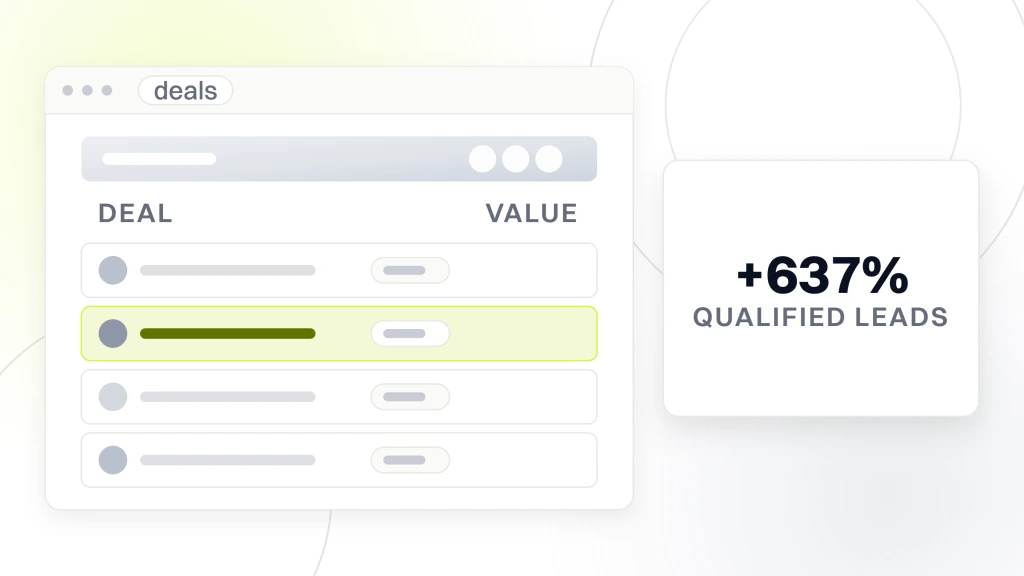
Consideration ran through case study pages and the project gallery. Intent ran through the consultation booking page. HubSpot CRM tracked every lead’s stage. The template kept the sales team focused on booked consultations rather than raw form fills, which is the metric that predicts revenue for a renovation contractor. Website traffic climbed 784% and qualified leads jumped 637% once the intent stage was properly instrumented.
Purchase and retention stages
Purchase happened in the discovery meeting. Retention ran through post-project follow-up and a referral program. The template made retention explicit rather than assumed. Repeat and referral revenue climbed from a hopeful percentage to a measured 35% of total revenue by year three. The full stage map is what turned a strong local reputation into a national revenue number.
How to Fill a Sales Funnel Template From a Blank Sheet
Filling the template from a blank sheet is a two-hour job. Not two weeks. Two hours. The team gathers, walks the buyer journey step by step, and drops the answers into the columns as they go. Longer sessions produce over-engineered templates that get abandoned. Shorter sessions produce shallow templates that miss stages. Two hours hits the useful middle.
Start with the last row and work backward
Start with the purchase row. What does a closed deal look like? Who signs? What is the average deal size? What triggers the sale? Once purchase is clear, work backward. Intent needs whatever leads to purchase. Consideration needs whatever leads to intent. All the way up to awareness. Working backward is faster than working forward since you know the endpoint.
Name a real KPI per row
Every row needs a real KPI. Not a vanity metric. Impressions is fine if you can point to where those impressions convert to reach. Reach is fine if it feeds email opt-ins. Email opt-ins are fine if they feed demo requests. The chain has to hold from top to bottom. A row with a KPI that doesn’t feed the next row is a decorative row that gets cut.
Assign one owner per row
One owner per row. Not two. Not a team. One person on the hook for that stage. Two owners means both wait for the other to act. A single owner takes responsibility, produces the asset, reports the KPI. Templates without named owners fail inside 90 days. Templates with named owners run for years.
Review the template monthly
Once the template goes live, the team reviews it monthly. Which KPIs moved? Which stages fell behind? What asset needs a refresh? A 30-minute monthly review keeps the template current. Skipping the review means the template goes stale inside a quarter and nobody trusts the data. Monthly reviews are boring, but the templates that get them outperform templates that skip them by 2x on annual revenue.
Tools That Make a Sales Funnel Template Easier to Maintain
Tools don’t replace the funnel template. They make it easier to maintain. A CRM tracks stage movement. A landing page builder produces pages against the template. An email platform runs the sequence. A dashboard rolls the KPIs up to leadership. Picking the right tool per row cuts the template’s maintenance cost by 60% to 80%.
CRM options for stage tracking
HubSpot, Pipedrive, and Salesforce all track sales funnel stages natively. HubSpot fits marketing-heavy funnels since the CRM and email tools are the same platform. Pipedrive fits sales-led funnels since the pipeline view is the primary UI. Salesforce fits enterprise funnels since the customization goes deeper. The template stays the same across all three. The tool changes based on team size and budget.
Landing page builders for stage assets
Unbounce, Instapage, and Leadpages produce landing pages fast. WordPress with Elementor or a custom build wins when the pages have to integrate with the main website. The template names which stage the page belongs to so the sales funnel builder doesn’t become a random page factory. Every page maps to a row. Every row gets a page.
Email platforms for the sequence
Mailchimp, ActiveCampaign, and Klaviyo run email sequences. Klaviyo wins for ecommerce since the product data integration is deep. ActiveCampaign wins for B2B since the automation logic goes further. Mailchimp wins for simplicity when the team is small. The template lists which emails belong in which sequence so the platform builds the automation once and leaves it alone.
Dashboards that roll up the numbers
Looker Studio (formerly Google Data Studio), Databox, and Tableau roll KPI data from the CRM, email platform, and analytics into a single view. The template says which KPI belongs on the dashboard so leadership sees the numbers that matter. A dashboard with 40 metrics is decoration. A dashboard with 6 to 10 metrics that map to the template rows drives real decisions.
Sales Funnel Template Mistakes That Sink the Funnel
Funnel template mistakes fall into three buckets. Too many columns, too many stages, and no owner. The teams that avoid all three build funnels that convert. The teams that fall into any one of them build funnels that stall. Knowing what the mistakes look like ahead of time is more valuable than any template file you can download.
Too many columns kill the template
Six columns is the max. Stage, buyer intent, primary asset, offer, KPI, owner. Every extra column adds friction. Ten columns doubles the maintenance cost. Twenty columns turns the template into a chore nobody updates. The number one reason templates die is column bloat. When in doubt, cut.
Too many stages hide the drop-off
Cap the template at six to eight stages. More stages mean smaller conversion rates per row, which read worse than the reality. Reps and marketers start massaging numbers to hit stage targets instead of moving deals through the pipeline. Fewer, clearer stages surface the real drop-off point faster.
No owner per row is the fatal flaw
Every row needs a named owner. The team is not an owner. Marketing is not an owner. Sarah Chen is an owner. When the row starts to slip, Sarah gets the ping. When the KPI moves, Sarah gets the credit. Templates without named owners lose accountability inside 30 days and the funnel stops moving.
Sales funnel template mistakes that are easy to fix
Some mistakes are quick fixes. Missing KPI in a row? Add one this week. Missing offer for a stage? Draft it in an afternoon. Missing owner? Assign in the next standup. These fixes take days, not months. The template starts working better right away.
Scaling the Sales Funnel Template Across Channels
Scaling the template across channels means running the same stage logic against paid search, paid social, SEO, email, and direct sales. The stages stay the same. The assets and KPIs shift per channel. A team that scales the template well ends up with a single view of the buyer journey across every channel. A team that runs a separate funnel per channel ends up with fragmented data and conflicting reports.
Paid search fits the intent stage
Paid search captures visitors who already know what they want. The template drops paid search into the intent row since the visitor typed a keyword with commercial intent. Landing pages for paid search stay tight. Hero, benefit, testimonial, CTA. Any block that isn’t part of the immediate close costs conversions.
Paid social fits awareness and consideration
Paid social interrupts a scroller who wasn’t searching for the offer. The template puts paid social in the awareness row for cold audiences and the consideration row for retargeting. Creative shifts accordingly. Cold audiences need a hook that names the problem. Retargeting audiences need a case study or offer refresh.
SEO carries awareness and interest
SEO earns visitors who search. The template puts SEO in awareness for informational queries and interest for problem-solving queries. Blog content and hub pages carry those visitors. Once the visitor lands, the site’s internal linking pattern moves them to the consideration or intent row.
Direct sales owns intent through close
Direct sales owns intent, evaluation, and purchase. Reps work the funnel template from booked call to signed deal. Every touch maps to a stage. Every stage has an exit criterion. Reps who work the template close 25% to 40% more deals than reps who wing it since the template removes guesswork from the pipeline review.
A working sales funnel template is the fastest way to align marketing, sales, and leadership on how the business wins as a whole. If you want a partner to build the template, produce the assets, and wire up the KPIs, our team at sales funnel and automation plugs the stages, copy, and reporting into one system that runs against real revenue. Retainer plans start at $1,499 a month. Related reads. what is a sales funnel, sales funnel stages, how to create a sales funnel, and B2B sales funnel strategy. External references. Salesforce on the sales funnel and Harvard Business Review’s sales learning curve research.