
Website Maintenance for Chiropractors Made Practical
- Website maintenance takes 2 to 4 hours a month.
- Outsourced maintenance costs $60 to $300 per month.
- Skipping backups means the site cannot recover from a crash.
- Page speed drift is the fastest way to lose booking rate.
- Run an annual UX audit against the seven habits.
- What Website Maintenance for Chiropractors Actually Covers
- Monthly Website Maintenance for Chiropractors Checklist
- How Page Speed Impacts Chiropractor Website Performance
- What Website Maintenance for Chiropractors Costs
- Chiropractor Website Maintenance Security Basics
- Real Numbers From a Chiropractic Website Under Maintenance
- Mistakes in Chiropractor Website Maintenance
- Chiropractor Website Maintenance DIY vs Outsourced
- Annual Audit That Catches What Monthly Maintenance Misses
- Tools for Website Maintenance for Chiropractors
Website maintenance for chiropractors is a short, boring monthly checklist that keeps booking rates from drifting. Nothing fancy. Nothing that requires a full-time developer. Just a specific list of things to check on the same day each month so the site stays fast, secure, and pointed at the right booking flow. This guide walks the checklist, what each item costs, what happens when you skip it, and how to know whether to run it yourself or pay someone else.
The short version. Website maintenance for chiropractors covers speed audits, security patches, plugin updates, backup verification, uptime monitoring, form testing, and analytics review. Total working time: two to four hours a month for a single-location practice. Total cost: $60 to $220 a month if you outsource. Skipping it costs an entire redesign inside 18 months when the site drifts back to slow, broken, and off-brand. Read straight through in ten minutes.

What Website Maintenance for Chiropractors Actually Covers
Website maintenance for chiropractors covers eight recurring tasks that keep a well-built site from decaying. Every item on the list ties back to either the site’s booking rate or the practice’s exposure to security and uptime risk. Practices that run the checklist monthly hold their booking-rate gains for years. Practices that skip it watch the gains erode within twelve months.
The eight recurring tasks
WordPress core, theme, and plugin updates. Security patches and vulnerability scans. Backup verification, not just backup existence. Uptime monitoring and downtime response. Speed audits against Lighthouse and Core Web Vitals. Booking form tests on iOS Safari and Android Chrome. Analytics dashboard review against the baseline. Broken link and 404 sweep across the top pages.
What sits outside maintenance
Content updates, new blog posts, new service page copy, SEO work, and paid campaigns all sit outside maintenance scope. Those are growth projects. Maintenance is the boring work that keeps growth projects from getting wiped out by drift. Confusing the two is why so many practices pay their maintenance provider for work they didn’t scope for and skip the actual maintenance itself. Clarify the boundary in writing before you sign any maintenance retainer with any outside provider. That single hour of upfront clarity saves several months of confusing back-and-forth about scope across the first year of the relationship together.
Monthly Website Maintenance for Chiropractors Checklist
Print this checklist and run it the first Tuesday of every month. Two to four hours total for a single-location practice site. Each item takes 15 to 30 minutes when you know what you’re doing and everything is in the same order every month. Rhythm is what makes maintenance sustainable.
- Run WordPress core, theme, and plugin updates in a staging environment first.
- Verify the last three daily backups actually restore, not just exist.
- Run Lighthouse on the homepage and top three service pages.
- Test the booking form and callback form on a real iPhone and a real Android.
- Check uptime report for the past 30 days and note any incidents.
- Sweep for 404s and broken outbound links using Screaming Frog or a plugin.
- Review analytics dashboard for booking rate, bounce rate, and traffic sources.
- Rotate any expiring SSL, license, or API keys before they fail.
Why staging matters for updates
WordPress plugin updates conflict about 8 to 12 percent of the time on a moderately customized site. That’s not “the site breaks.” That’s “a subtle bug appears somewhere on the site.” Running updates on staging first catches those bugs before they hit patients trying to book. If you don’t have staging, use a maintenance-mode plugin and update during the practice’s lowest-traffic hour of the week.
Why backup verification is the real gate
A backup that exists but doesn’t restore is worse than no backup because it produces false confidence. Once a month, take the most recent backup, restore it into staging, and verify the site works. That test takes 20 minutes and saves the practice from the catastrophic day the site crashes and the “backup” turns out to be corrupted. See WordPress’s official backup documentation for the current recommended practices.
How Page Speed Impacts Chiropractor Website Performance
Page speed impacts chiropractor website booking rate more than any single design element. Google’s Core Web Vitals research shows 32 percent of mobile visitors bounce past three seconds. Every second above 2.5 seconds costs bookings. Speed drift is what happens when a well-built site slowly loses its speed advantage over months of plugin creep and unoptimized new images.
Where speed drifts first on chiropractic sites
The most common speed drift comes from three sources. New images uploaded at full-size without compression. New plugins added by the marketing lead who wanted “just one feature” and never removed the last three. Tracking pixels stacked from three ad platforms over a year and never audited. Any one of these adds 300 to 800 milliseconds to first paint. Together they push a 2-second site to 5 seconds inside a year, quietly, without a single obvious moment of failure.
The monthly speed audit that catches drift
Once a month, run Lighthouse on the homepage and the top three service pages. Compare against last month’s numbers. If any page moved more than 10 percent slower, find the change that caused it. This 15-minute test catches speed drift in month one instead of month twelve when the booking rate has already dropped. Log the numbers in a shared sheet so trends are visible across quarters. See Google’s Core Web Vitals guide for the current thresholds and what to target.
Most plans have backups nobody's tested. Restore last month's backup to a staging URL this week. If it fails, the plan is theater and you're a bad Monday from a rebuild.
What Website Maintenance for Chiropractors Costs
Website maintenance for chiropractors runs $60 to $300 a month depending on scope. Solo providers land at $60 to $120. Boutique agencies with chiropractic focus run $180 to $300. In-house handling runs about $50 in tools plus 3 hours of internal time.
| Tier | Monthly cost | What’s included | Best fit |
|---|---|---|---|
| DIY with tools | $50 to $80 | Hosting, backup tool, uptime monitor | Marketing lead in house |
| Solo provider | $60 to $120 | Hosting, updates, basic monitoring | Solo practice, tight budget |
| Boutique agency | $180 to $300 | Full checklist, monthly report | Growing single or multi-location |
| Enterprise | $500 plus | SLA, dedicated engineer | DSO or franchise group |
Where the ROI usually lands
A $200 monthly maintenance retainer that prevents one six-hour downtime event pays for itself several times over. At a $2,400 lifetime value per patient and a $2,400 monthly ad spend, six hours of downtime during business hours costs roughly $600 to $1,200 in lost bookings. That’s four to six months of maintenance recovered in one avoided incident. See our chiropractor website cost guide for how maintenance fits into the total ownership cost picture.
Where practices try to save and shouldn’t
The most common cut is dropping the maintenance retainer to save $200 a month. Then a plugin conflict takes the booking form offline during Monday morning intake calls. Twelve hours of lost bookings across a busy day at a single-location practice runs $800 to $2,000 in lifetime patient value. Pay the $200 and keep the site working.
Chiropractor Website Maintenance Security Basics
Security is where maintenance stops being optional. A hacked chiropractic website exposes patient data, incurs HIPAA notification obligations if any protected health information touched the site, and can take the site offline for days while cleanup happens. The security items on the maintenance checklist are the cheapest insurance in the practice’s marketing stack. Every hacked chiropractic site we’ve cleaned up traced back to the same handful of causes, and every one of them is preventable with a monthly checklist and a $75 security plugin subscription.
The four security musts
SSL certificate that auto-renews. Strong admin passwords with two-factor authentication. Weekly vulnerability scans through a plugin like Wordfence or Sucuri. Backup off-site and separate from the hosting provider. Skip any one of these and the site is one bad Tuesday away from a headline. Every hacked chiropractic site we’ve cleaned up was missing at least two of the four.
What HIPAA actually applies to on the site
HIPAA compliance on a chiropractic website applies wherever protected health information is captured or displayed. That usually means the booking form, the callback form, the patient portal link, and any embedded booking widget. If patients enter symptoms, insurance details, or condition-specific information on the site, the form provider needs a business associate agreement. See HHS’s HIPAA covered entities guidance for what’s actually in scope.
Real Numbers From a Chiropractic Website Under Maintenance
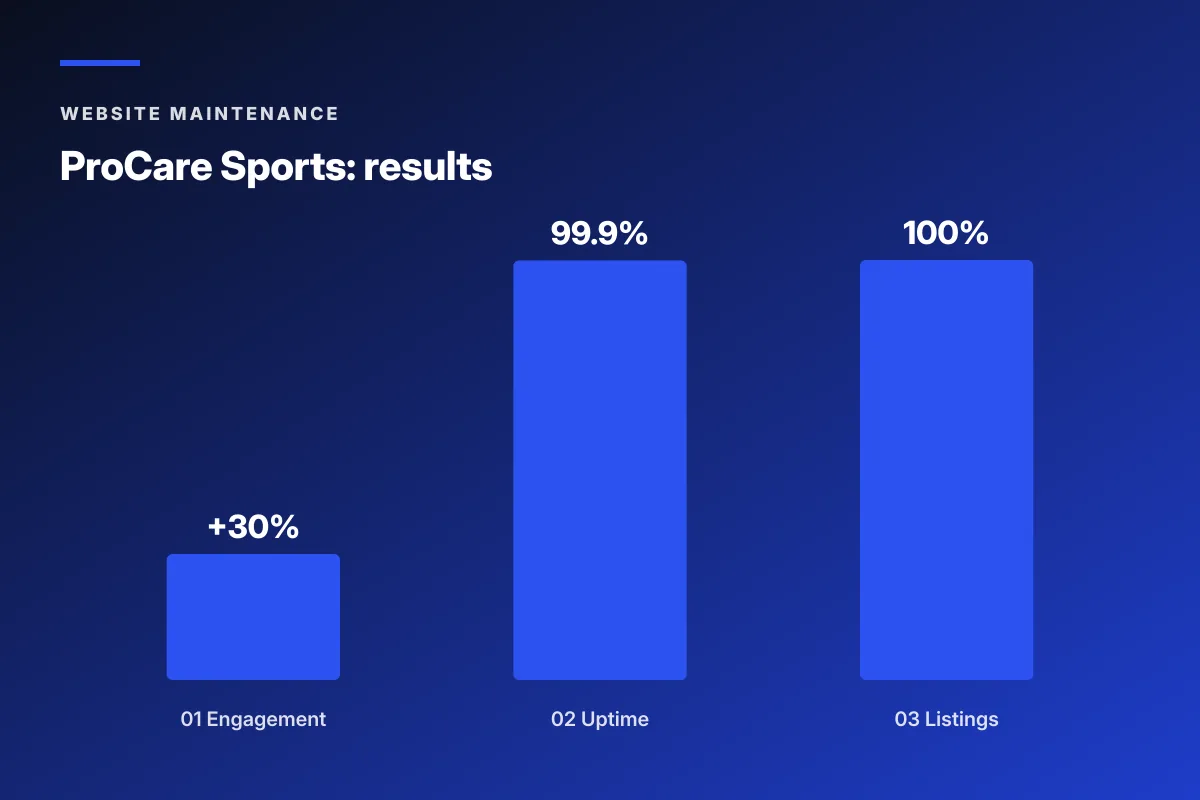
ProCare Sports, a San Diego sports chiropractic clinic, moved from a neglected site to a monthly maintenance cadence after the full rebuild. Here’s what the twelve months after the rebuild looked like with maintenance running and what a comparable practice without maintenance experienced over the same window.
What the maintenance covered
Monthly WordPress core, theme, and plugin updates on staging first. Weekly vulnerability scans. Daily off-site backups with monthly restore tests. Uptime monitoring with SMS alerts. Monthly Lighthouse audits. Booking form tests on both iOS and Android. Analytics review against the baseline. Total time: 3 hours a month at the provider level.
The twelve-month result
Uptime held at 99.9 percent across the year. Site speed stayed under 2 seconds mobile every month. Zero security incidents. Booking rate held the post-rebuild gain of 30 percent higher engagement without drift. Listing accuracy across Google and Yelp stayed at 100 percent. Every quarterly review confirmed the site was performing at or above the rebuild baseline.
What the comparable unmaintained site experienced
A similar-scale single-location practice that skipped maintenance saw uptime drop to 96 percent inside eight months, one plugin conflict that took the booking form offline for 14 hours during a Monday intake window, and Lighthouse mobile performance drift from 88 to 62 over the same period. Booking rate followed the speed drift down about 20 percent. That’s roughly 10 patients a month lost to preventable drift.

Mistakes in Chiropractor Website Maintenance
Most maintenance failures are structural, not technical. The practice skipped the calendar entry, or the provider quietly stopped running the tasks and hoped nobody noticed. Here are the six failure modes we see most often when a new client shows up with a broken site and no idea why.
The plan on Monday: automate every update, run a full penetration test, and launch a security bug bounty by Friday. The plan on Friday: log into WordPress admin and click the four update buttons that have been red for six months. Most of us have been that Monday. Fewer of us click the four buttons before the next Monday’s ambitions arrive.
- Turning on “auto-update everything” without a staging environment.
- Skipping backup verification because backups appear to exist.
- Ignoring plugin deprecation notices for months.
- Letting SSL certificates expire because auto-renew failed silently.
- Adding a new plugin every time the practice manager sees a feature ad.
- Assuming the hosting provider’s “managed” service covers full maintenance.
The auto-update trap
Auto-updating every plugin sounds convenient until one of them breaks the booking form at 3 AM on a Sunday. The Monday intake team notices the form is broken only after the third patient calls to complain. Auto-updates belong on staging first, then on production after a manual smoke test. That workflow adds five minutes and prevents most of the incident-response overhead.
The “managed hosting” assumption
Managed WordPress hosting covers server-side updates and basic security. It does not cover plugin updates, form testing, analytics review, or booking flow verification. Practices that assume managed hosting equals full maintenance discover the gap the day something breaks. Read the hosting provider’s scope statement and fill the gap with either DIY or an outside maintenance provider.
Chiropractor Website Maintenance DIY vs Outsourced
DIY maintenance works when a practice has a marketing lead or office manager comfortable with WordPress. Outsourced maintenance works when nobody in the practice wants to touch the admin panel. Both are legitimate. The failure mode is choosing DIY without designating a specific person on the practice side and expecting maintenance to happen on its own.
When DIY makes sense
DIY works when the practice already has a marketing lead in-house who owns 4 to 6 hours a month for the checklist. Cost: $50 to $80 in tools plus internal time. The lead needs comfort with WordPress admin, plugin updates, and basic troubleshooting. If nobody in the practice fits that description, DIY fails inside three months. Pick outsourced instead of pretending someone has time.
When outsourced makes sense
Outsourced maintenance makes sense for single-location practices without a marketing lead, multi-location groups where centralized ownership is easier than per-location DIY, and any practice where a booking-flow outage costs meaningful revenue. Cost: $180 to $300 a month. The provider owns the checklist, sends a monthly report, and takes SMS alerts on downtime. See our chiropractor marketing services for the full stack, retainer starts at $599 a month.
The hybrid model most growing practices use
Growing practices often split maintenance. The provider handles updates, backups, security, and speed. The in-house marketing lead handles content updates, analytics review, and booking form tests. That split keeps the provider’s cost lower and the practice’s involvement grounded in the parts they actually care about. It also builds internal knowledge over time in case the provider relationship changes.
Annual Audit That Catches What Monthly Maintenance Misses
Monthly maintenance keeps the site healthy. An annual audit catches the slow drift that monthly work can miss. Once a year, run a bigger sweep: content refresh, service page reviews, brand consistency check, and a fresh look at whether the site still matches the practice’s current offer.
Content freshness against the current practice
Practices change offerings faster than websites reflect them. A new provider joined mid-year. A service was added. Pricing changed on a package. Once a year, walk through every page and check whether the copy still matches the current practice. That single review usually surfaces two to five outdated items that would embarrass the practice if a patient noticed.
Photo refresh cadence
Real practice photos read as authentic for about three years before they start to feel dated. Once a year, look at the photos with fresh eyes. If the receptionist in the hero photo left the practice last summer, that’s a signal it’s time to book another session. A $400 to $1,200 local photographer session every 18 to 24 months keeps the visual layer honest and prevents the site from looking frozen in time.
Full UX audit against the seven habits
Once a year, score your site against the seven booking-rate habits: speed, hero focus, real photos, reviews above the fold, sticky booking, header phone, one-condition-per-page. Standards drift. What passed last year may not pass this year. Pick the two lowest items and fix them in the following quarter. See best websites for chiropractors for the deeper scoring rubric.
Tools for Website Maintenance for Chiropractors
A short stack of tools covers most of the website maintenance for chiropractors checklist. Two are free. Three cost under $150 combined per month. Every tool on this list ties back to a specific task on the monthly checklist and eliminates the need to run that task by hand.
UpdraftPlus or Duplicator for backups
Both plugins handle scheduled backups to off-site storage like Google Drive, Dropbox, or Amazon S3. Free tiers cover a single-site practice. Paid tiers start around $70 a year and add restore automation. Whichever you pick, do a manual restore test once a month. A backup you haven’t verified is a backup you can’t count on when the site actually crashes.
Wordfence or Sucuri for security
Both plugins cover firewall, malware scanning, and login protection for WordPress. Free tiers cover a single-location practice. Wordfence Premium adds real-time IP blacklists at $119 a year. Sucuri Platform includes malware removal service starting at $200 a year. For most single-location chiropractic sites, the free tier plus strict admin passwords is enough.
UptimeRobot for monitoring
UptimeRobot pings the site every five minutes and sends SMS or email alerts when it’s down. Free tier covers 50 monitors, which is enough for the homepage, top three service pages, and the booking form endpoint. Paid tier at $84 a year adds one-minute ping intervals and SSL expiration monitoring. Either tier catches downtime before the practice manager finds out from a patient.
Website maintenance for chiropractors is unglamorous, cheap, and worth every hour. Set a monthly calendar entry, run the checklist, and let the site keep booking patients while your competitors’ sites drift back to slow, broken, and off-brand. See chiropractor website design and chiropractor business website examples for the sibling walk-throughs.
Frequently asked questions
What does website maintenance for chiropractors include?
Website maintenance for chiropractors covers eight recurring tasks. WordPress core, theme, and plugin updates. Security patches and vulnerability scans. Backup verification, not just backup existence. Uptime monitoring and downtime response. Speed audits against Lighthouse and Core Web Vitals. Booking form tests on iOS Safari and Android Chrome. Analytics dashboard review against the baseline. Broken link and 404 sweep across the top pages. Total time for a single-location practice site is two to four hours per month. Content updates, new blog posts, SEO work, and paid campaigns all sit outside maintenance scope and get billed separately as growth projects.
How much does website maintenance for chiropractors cost?
Website maintenance for chiropractors runs $60 to $300 per month depending on scope and provider. DIY with tools costs $50 to $80 in software plus 3 to 4 hours of internal time. Solo providers offering hosting plus updates land at $60 to $120. Boutique agencies with chiropractic focus offering full maintenance plus monthly reports run $180 to $300. Enterprise plans with SLA and dedicated engineer start at $500. A $200 monthly retainer that prevents one six-hour downtime event pays for itself several times over because six hours of downtime during business hours can cost $600 to $1,200 in lost bookings at a single-location practice.
Can chiropractors do their own website maintenance?
Yes, when the practice already has a marketing lead or office manager comfortable with WordPress admin, plugin updates, and basic troubleshooting. DIY maintenance costs $50 to $80 in tools plus 3 to 4 hours of internal time a month. The failure mode is choosing DIY without designating a specific person on the practice side and expecting maintenance to happen on its own. If nobody in the practice fits the description of a comfortable WordPress user, DIY fails inside three months. Pick outsourced maintenance instead of pretending someone has time to run the monthly checklist.
How often should chiropractic websites be maintained?
Chiropractic websites should be maintained monthly for the standard checklist and audited annually for the deeper review. The monthly checklist covers updates, backups, speed audits, security scans, form tests, and analytics review. The annual audit covers content refresh, service page reviews, photo refresh cadence, and a full UX audit against the seven booking-rate habits. Some tasks, like uptime monitoring and vulnerability scans, run continuously through automated tools that alert on incidents. That layered cadence catches drift at every timescale without requiring daily attention.
What happens if a chiropractor skips website maintenance?
A neglected chiropractic website loses about 20 percent of its booking rate inside 12 months from a combination of speed drift, security drift, and content drift. Speed drifts because unoptimized new images and plugin creep add load time. Security drifts because unpatched vulnerabilities accumulate. Content drifts because the site starts to say things that no longer match the practice. In the worst cases, the site gets hacked, the booking form breaks, or the site goes offline during business hours. Each of those events costs more than a full year of maintenance in one incident. Maintenance is the cheapest insurance in the marketing stack.
Does managed WordPress hosting cover website maintenance?
Managed WordPress hosting covers server-side updates and basic security. It does not cover plugin updates, form testing, analytics review, or booking flow verification. Practices that assume managed hosting equals full maintenance discover the gap the day something breaks. Read the hosting provider's scope statement carefully and fill the gap with either DIY internal ownership or an outside maintenance provider. Managed hosting plus a $75 to $150 maintenance retainer usually covers everything a single-location practice needs. Skipping the retainer leaves the plugin update layer, form testing, and analytics review unowned.
How does page speed impact a chiropractor website's booking rate?
Page speed impacts chiropractor website booking rate more than any single design element. Google's Core Web Vitals research shows 32 percent of mobile visitors bounce past three seconds. Every second above 2.5 seconds costs bookings. A site that loads in 5 seconds mobile books at roughly half the rate of a site that loads in 2 seconds mobile with the same design and copy. Speed drift is what happens when a well-built site slowly loses its speed advantage over months of plugin creep and unoptimized new images. The monthly speed audit catches this drift in month one instead of month twelve when the booking rate has already fallen.
Book your free 30-minute strategy call.
No spam, no sales rep. We use your email to schedule your call with a senior strategist. That is it.
More from the blog
View all articles → Website Maintenance
 WordPress Website Maintenance Packages That Keep the Site Safe and Fast
Read article Website Maintenance
 Pet Website Maintenance Checklist for Ecommerce Pet Brands
Read article Website Maintenance