WordPress website maintenance packages sit in the boring middle of your marketing stack. Nobody pitches them at a conference. Nobody screenshots the monthly report to LinkedIn. Then a plugin breaks the checkout, a security patch goes unapplied, or a background PHP update takes the whole site down at 4 PM on a Friday. That is when the retainer earns its money. Most WordPress owners buy the wrong plan, pay too much for too little, or skip the retainer entirely and eat the outage. This WordPress website maintenance packages guide fixes that.
You will get the full inclusion list, the pricing bands by site size, the checklist of tasks a real WordPress retainer covers monthly, quarterly, and annually, and the questions that tell you if the vendor is doing the work or just billing for it. Read straight through in about 10 minutes. Then match your site to the right tier and move on with your week.
What WordPress website maintenance packages cover
WordPress website maintenance packages are monthly retainers that keep the core, themes, plugins, and hosting patched, backed up, monitored, and tuned. Real packages include security scans, uptime monitoring, backup verification, and page speed tuning. Fake packages bill $49 a month for a login screen you never open.
Real WordPress website maintenance packages cover three cadences. Monthly work handles plugin and theme updates, core WordPress updates on the security channel, backup verification, uptime reports, and a short performance check. Quarterly work covers deeper audits. Database cleanup, image compression sweep, plugin bloat review, and a broken link scan. Annual work covers SSL renewal verification, hosting stack review, security posture audit, and a rebuild plan if the theme or PHP version is falling behind. You want all three in writing before you sign anything.
Monthly scope every WordPress website maintenance package needs
Every monthly scope needs the same 7 items or it is not a real retainer. Core WordPress updates on the security channel, applied within 48 hours of release. Plugin updates, tested on staging first for anything running the checkout, forms, or booking flow. Theme updates when the vendor publishes them, with child theme integrity checks. Verified backups, tested by restoring one file to confirm the archive is usable. Uptime monitoring at 60-second intervals with a real notification chain. Basic malware scanning with Wordfence or Sucuri on the free tier. And a one-page monthly report your CEO can read in 90 seconds.
Quarterly deep work
Quarterly work inside WordPress website maintenance packages is where average retainers coast and good ones separate themselves. Database optimization with wp-sweep or WP-Optimize, targeting expired transients, spam comments, revision bloat, and orphan meta rows. Image compression sweep across the media library, catching everything uploaded since the last quarter. Plugin bloat review with an honest question. Do you still use each one, and does the tradeoff on load time still make sense? Broken link scan across the whole site, external and internal. A page speed rerun on the top 10 pages by traffic. And a spot check on schema markup so RankMath keeps issuing valid JSON-LD after every core update.
WordPress website maintenance packages start with security updates
WordPress security updates carry the same weight as your hosting bill. Skip them and the site is one plugin CVE away from a defacement, a spam injection, or a full malware compromise that pushes you off Google entirely. Every serious retainer prices security work as the first line item, not the last.
The WordPress security stack has 5 layers. Core WordPress security releases, patched within 48 hours by the retainer. Plugin CVE monitoring through Wordfence Central, Patchstack, or WPScan. Firewall at the hosting or plugin layer, filtering malicious traffic before it hits your login screen. Two-factor authentication on every admin account. And regular access reviews, pruning old contributor and editor accounts left over from the site build 3 years ago that nobody has revoked since. Reference the WordPress security developer guide for the underlying model.
Patch cadence that keeps the site protected
Patch cadence matters more than patch coverage. A retainer that patches once a quarter leaves you exposed for weeks after a public CVE lands. The right cadence looks like this. Security core releases within 48 hours, plugin CVE fixes within 72 hours, minor plugin updates on a weekly batch, major plugin updates on staging first with a rollback plan. That schedule keeps you patched before the automated bots that scrape the disclosure feeds find your site. Cadence discipline separates a $150 retainer that works from a $500 retainer that does not.
Malware response inside the retainer
Real WordPress website maintenance packages handle malware response tightly. Ask the vendor what happens if the site gets compromised at 2 AM Sunday. A real retainer answers with a specific response time, a written playbook, and a named person on call. The playbook. Isolate the site, pull a clean backup, run a full Wordfence or Sucuri scan, identify the entry point, patch it, restore the site, run a post-mortem, and file a report. Retainers that do not have that answer will disappear during the actual incident and reappear with an emergency invoice for $2,500 you did not budget for.
WordPress website maintenance packages handle plugin updates without breaking the site
WordPress plugin updates are where most sites break. Someone clicks the auto-update toggle, WooCommerce pushes a minor version, a payment gateway plugin has not caught up yet, and the checkout throws a 500 error for 6 hours during the busy Saturday you were counting on. Real WordPress website maintenance packages solve this with staging environments, tested rollouts, and rollback plans, not blanket auto-updates.
The safe rollout has 4 steps. Pull a fresh staging copy on the first of the month. Apply the queued plugin updates on staging. Run a smoke test across the checkout, forms, booking flows, and the top 3 landing pages. If nothing broke, apply to production during a low-traffic window with a live rollback ready. If something broke, file a ticket with the plugin vendor, keep production on the old version, and note the pinned version in the retainer log. This process takes 2 hours a month for a small business site and prevents the outages that eat 3 days of revenue.
| Update type | Cadence | Where it runs first |
|---|---|---|
| WordPress security core | Within 48 hours of release | Staging then production |
| WordPress minor core | Within 1 week | Staging then production |
| Plugin CVE fix | Within 72 hours | Staging then production |
| Plugin minor updates | Weekly batch | Staging then production |
| Plugin major updates | Monthly, tested | Staging with rollback plan |
| Theme updates | As vendor publishes | Child theme integrity check |
| PHP version bumps | Yearly, tested | Full staging regression |
Staging workflow the retainer should already own
Ask your WordPress website maintenance packages vendor to show you the staging environment. Not a screenshot. The actual URL. If they hesitate, the retainer is not running staged updates. It is running roulette on your production site. Managed hosts like Kinsta, WP Engine, and Cloudways include one-click staging. Cheaper hosts like Bluehost and GoDaddy shared plans usually skip it. If the vendor cannot produce staging on demand, either the hosting is wrong or the process is missing. Both need to change before you renew.
Pinned plugin versions and why they matter
Sometimes a plugin update introduces a bug the vendor has not fixed yet. The right response. Pin the working version, document the reason, and watch the plugin issue tracker for a fix. Bad retainers just push the update anyway and blame you when the site breaks. Every maintenance log should list pinned versions with a reason. This document is the one you will reference when a new dev asks why WPForms is stuck on version 1.8.4. The pinned-version log is one of the cheapest and highest-value artifacts a retainer produces.
Backups and disaster recovery inside a WordPress website maintenance package
Backups are the layer everyone thinks they have and nobody tests. Most sites run one of 3 backup plugins, dutifully generate a nightly archive, upload it to Google Drive, and then discover during an actual restore that the archive is corrupted, the database export is truncated, or the plugin cannot handle a site over 5 GB. Real WordPress website maintenance packages verify backups by restoring them, not by trusting the plugin success email.
The backup layer needs 3 copies across 2 locations. On-site backup on the hosting server, daily. Off-site backup to S3, Backblaze, or Wasabi, weekly. Version-controlled backup for the theme and child theme in a Git repository, on every deploy. Test-restore one file monthly to confirm the archive works. Test-restore the full site quarterly to confirm the disaster recovery process is real. If the retainer only runs one nightly backup with no restore testing, you do not have backups. You have unverified files. That distinction matters the day the site is down and you need to prove otherwise.
- Daily automated backup on the hosting server
- Weekly off-site backup to independent storage
- Monthly single-file restore test
- Quarterly full-site disaster recovery drill
- Retention. 30 days on-site, 90 days off-site, 365 days for annual snapshots
- Documentation. A written restore playbook stored outside the site
Restore testing as the honest test
The only backup that matters is the one that restores cleanly. Every quarter, the retainer pulls the latest off-site archive, spins up a fresh staging environment, and restores the full site there. Time the process. Fix anything that fails. Document the runbook. Sites that go through this drill quarterly recover from real disasters in 30 to 90 minutes. Sites that never test their backups usually spend 12 to 48 hours in a panic reinstall the first time something serious breaks. Restore testing is the single highest-return line item in the entire maintenance program.
Backup plugins worth using in 2026
The reliable stack. UpdraftPlus for full-site backups on smaller WordPress sites, BlogVault for managed WooCommerce sites where transactional data changes hourly, and Duplicator Pro for migration-heavy workflows. Skip the free-tier plugins that gate the restore behind a paywall or limit archive size to 500 MB. Pay for the paid tier so restores are one click, not a support ticket. The cost delta is $70 a year. The value is measured in hours saved during an outage.
Performance tuning that lives inside the WordPress website maintenance package
Performance is not a one-time redesign task. It drifts every month. A plugin adds a script, a theme update loads a new font, an image gets uploaded at 3 MB instead of 300 KB. Left alone, a WordPress site loses 1 to 3 PageSpeed points a month. The retainer catches that drift before it costs you Core Web Vitals rankings.
Monthly performance work covers 4 checks. PageSpeed Insights on the home page and top 3 landing pages, noting any drop below 90 mobile. Image compression sweep on the media library, catching anything uploaded above 200 KB. Query monitoring in the admin, watching for plugins that add 500-plus database queries per page load. Cache warming on the top 50 pages after any core or theme update. These 4 checks together take 45 minutes a month and preserve the page speed work the last redesign already paid for.
Cache layer maintenance
Cache maintenance is one of the quietest lines inside WordPress website maintenance packages, and the cache is the first layer to break and the last one people check. WP Rocket, LiteSpeed Cache, or WP Super Cache each need a monthly clear-and-rebuild after major updates. Object cache with Redis or Memcached needs a periodic flush when the config drifts. CDN cache at Cloudflare or BunnyCDN needs purging after any code deploy that changes cached assets. Ask the vendor to walk you through the cache stack on a screen share. If they cannot name every layer running on your site, the retainer is not managing them.
Core Web Vitals tracking as part of the retainer
Google Search Console reports Core Web Vitals from real Chrome user data. Every month, the retainer opens Search Console, reviews the Core Web Vitals report, and lists any pages moving from good to needs-improvement or from needs-improvement to poor. Fix the shifts before they become site-wide rank drops. Reference the web.dev Core Web Vitals guide for the current thresholds. The retainer that tracks CWV monthly saves you the emergency call from an SEO consultant 3 months later asking why your rankings dropped 40%.
Pricing for WordPress website maintenance packages by site size
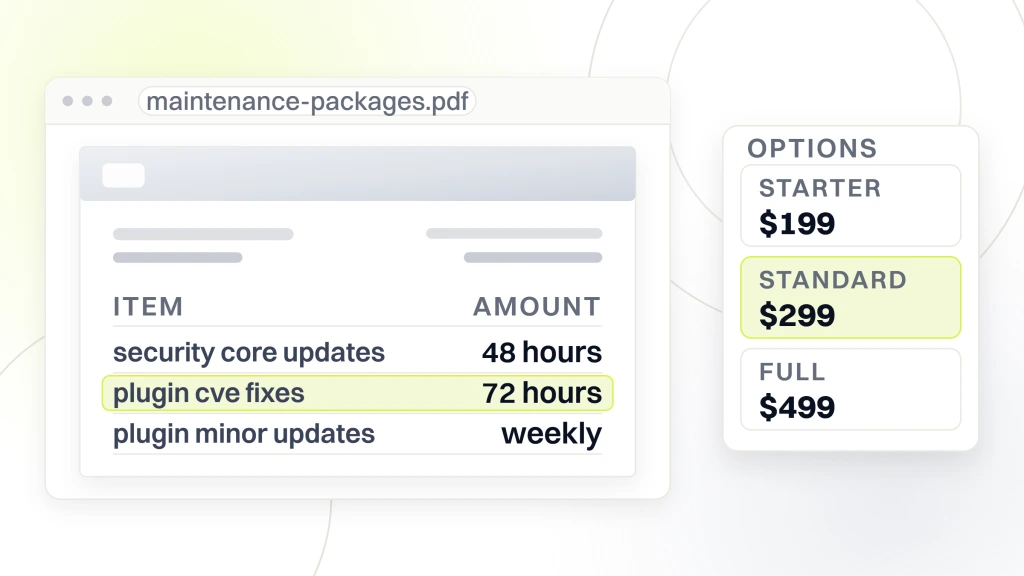
WordPress website maintenance package pricing runs from $75 a month for a 5-page brochure site to $2,500 a month for a large WooCommerce store with custom integrations. Below $75 you are getting a login screen and a hopeful email once a quarter. Above $2,500 you are paying for a fractional dev team, not a retainer. The 3 drivers of the price. Plugin count, transaction volume, and custom code depth. For the build-cost side of the same math, see our WordPress website development cost guide. Redefine Web publishes fixed tiers at $199, $299, and $499 a month so the buying decision stays clean.
The 3 common tiers map cleanly to site size. Small business brochure sites, 5 to 15 pages, 8 to 15 plugins, no ecommerce. $75 to $200 a month. Growing service business sites with lead forms, booking flows, and 20 to 40 plugins. $200 to $500 a month. WooCommerce stores or membership sites with high plugin count, transactional data, and custom code. $500 to $1,500 a month. Enterprise sites with multi-site installs, custom Gutenberg blocks, or custom REST endpoints. $1,500 and up. Every tier should include everything in the 7-point monthly checklist above. The delta buys you response time, deeper testing, and more careful staged rollouts.
What fake pricing looks like
The $29 a month packages advertised on Facebook Ads generally include. Automatic core updates the WordPress dashboard already handles for free, an uptime monitor from the UptimeRobot free tier, and a plugin that generates a weekly PDF nobody reads. Zero staged rollouts. Zero backup verification. Zero security response. The $29 buys a login screen and a manufactured sense of safety. When something breaks, they upsell you a $499 emergency package to fix it. You want the retainer that costs enough to cover the work, not the retainer that costs less than your streaming subscriptions.
What real pricing includes at each tier
Real $199 a month covers the 7-point monthly list, one hour of small edits, quarterly deep work, and a 24-hour response SLA for outages. Real $299 a month adds staged rollout on major plugin updates, monthly restore testing, 3 hours of edit time, and a 4-hour outage response. Real $499 a month adds custom code review, PHP upgrade planning, ecommerce transaction integrity checks, and a 1-hour outage response. You pay for the response time and the depth of testing. Anything cheaper cuts one of those two.
Included versus billable extras every WordPress maintenance retainer clarifies upfront
The scope arguments start when the retainer included tasks blur into extras. Every real retainer specifies the line between what the monthly covers and what triggers a change order. Get this in writing. A one-page scope document saves you 3 angry emails when your team asks for a form redesign and the vendor bills for it separately.
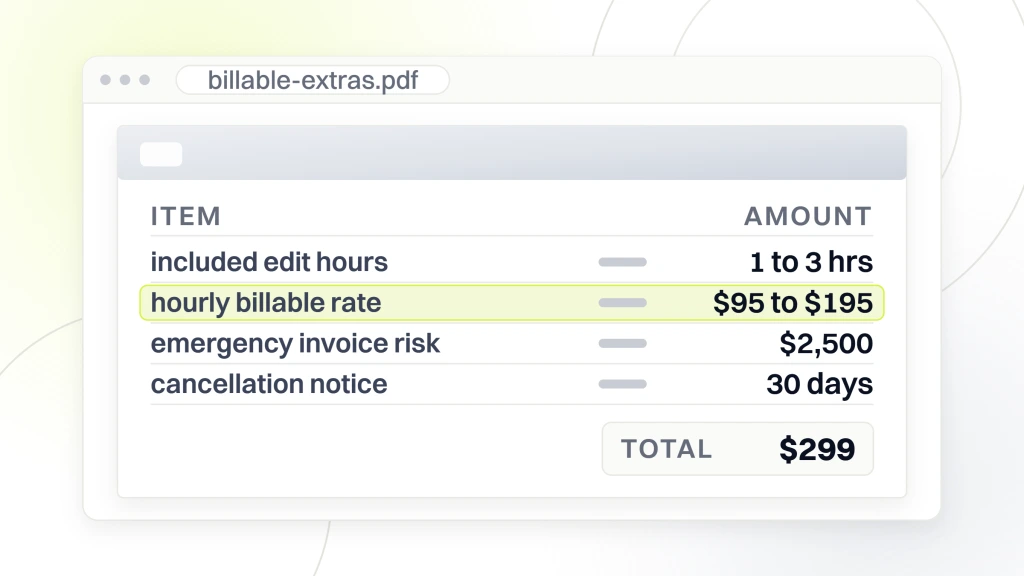
Included in most retainers. Security updates, plugin updates, backups, uptime monitoring, page speed checks, minor edits like changing hours or updating a phone number, small content updates like adding a paragraph or a new team headshot, and monthly reporting. Not included in most retainers. New page builds, new plugin installations, ecommerce product uploads, custom code work, design changes, email deliverability tuning, and third-party integrations. Any change taking more than 30 minutes usually triggers an hourly billable line at $95 to $195 per hour. Ask for that rate upfront so nothing about billing is a surprise.
Edit hours built into the retainer
Most $199-plus tiers include one to 3 hours of small edit work every month. This is the release valve for the constant stream of tiny requests. Updating a headshot, changing a phone number, publishing a blog post, adding a testimonial. Without built-in edit hours, every one of these becomes a billable ticket, and the relationship gets adversarial fast. Ask what the included edit hour count is. If the answer is zero, negotiate one included hour minimum. That single change smooths the entire month.
Scope creep management
Scope creep is where retainers die. Your marketing lead asks for a landing page. The vendor builds it, does not bill for it, then quietly raises the retainer 3 months later. Or the vendor asks for a change order, you say yes, and now the monthly bill is 40% higher than the original quote. Fix this with a written scope, a clear billable-hours process, and monthly reconciliation. Every retainer should include a one-line scope reconciliation in the report. What was included, what was billable, what carries into next month. This boring artifact saves the relationship.
The WordPress maintenance retainer that paid for itself in month one
Host Duplex came to Redefine Web with a polished-looking website that took 8-plus seconds to load. For a premium hosting company, that is a brand-credibility problem. Every visitor who clicked “buy hosting” first sat through 8 seconds of proof that the vendor selling them speed could not run a fast site of their own. The bulky theme carried too many server requests, and every added engagement widget like chat, tracking, and interactions made the drift worse.
Redefine Web rebuilt the Host Duplex site on a lighter WordPress theme, cut 65% of server requests, and folded the engagement tools back in with careful loading rules. Page load dropped 85%. Sub-second first paint on the top pages. Organic traffic grew by roughly 5,000 monthly visits inside the year. Zero downtime through the rebuild and the ongoing retainer window. The maintenance retainer that followed the rebuild paid for itself in the first month by preserving the page speed gains and catching plugin regressions before they cost the ranking work. When the same team runs the build, the ongoing tuning, and the security patch schedule, drift gets caught in weeks instead of quarters.
Transferable plays for your site
The plays transfer to any WordPress site running a customer-facing booking flow or checkout. Stage every plugin update that touches the booking or checkout path. Run a monthly PageSpeed check on the top 3 landing pages. Track Core Web Vitals in Search Console every month. Fix any page that drops below 90 mobile before it becomes a ranking issue. Test-restore backups quarterly. Keep an ongoing plugin bloat review so the retainer never carries dead weight. Every one of these plays runs inside a $299 to $499 monthly retainer for a comparable site.
Integrated retainer beats disconnected vendors
Host Duplex ran hosting, SEO, and maintenance under one contract with Redefine Web. Integration matters. Sites with separate hosting (see our managed hosting comparison), separate maintenance, separate SEO, and separate developers pay more, get slower response times, and lose the compounding benefits of one team seeing every layer. Integrated retainers cost 20 to 30% less than the sum of the individual pieces and produce better results, since the team catches upstream problems before they become expensive downstream.
Uptime monitoring and incident response inside the retainer
Uptime monitoring is the tripwire that tells you the site is down before your customers do. Every retainer should include monitoring at 60-second intervals or shorter, with a real notification chain that reaches a person, not a shared inbox nobody checks on weekends. The right stack. UptimeRobot or Better Stack for external monitoring, a Slack or SMS notification to the on-call engineer, and a documented incident response playbook.
The response playbook. Monitor alerts at minute one. Engineer confirms the outage at minute 3. Root cause identified within 15 minutes for common failures like hosting outage, PHP error, database connection, plugin conflict. Communication to the client within 20 minutes. Rollback or hotfix applied within 60 minutes for anything the retainer team can fix directly. Escalation to hosting support if the issue is upstream. Post-mortem report inside 48 hours documenting the cause, the fix, and the prevention step. Anything short of that is theater.
Common WordPress outages and their causes
Common WordPress outages fall into 6 buckets. Hosting outage from a shared server maxing out. PHP fatal error from a plugin update. Database connection refused from too many concurrent queries. White screen of death from a plugin conflict. 504 gateway timeout from a slow query or a stuck cron job. And SSL certificate expiration when nobody was watching auto-renewal. Each has a documented fix inside 15 to 60 minutes. The retainer should carry every one of these fixes as muscle memory, not first-time investigation. For a sector-specific take on cutting outage counts, see our healthcare website maintenance checklist.
Communication cadence during an incident
The technical fix matters less than the communication during an outage. Silent vendors lose retainer contracts even when the fix was fast. Talk during the outage. Send a message every 15 minutes even when the update is “still investigating.” Confirm resolution the moment the site is back. Send the post-mortem within 48 hours. Clients tolerate downtime. They do not tolerate silence. Every retainer template should include a communication SLA alongside the technical SLA.
Monthly reporting that proves the retainer is working
The monthly report is the proof your WordPress website maintenance packages did the work. Without it, you are paying $500 a month for trust. With it, you are paying $500 a month for documented evidence. Every real retainer produces a one-page report your CEO can scan in 90 seconds and know exactly what got done, what broke, and what is next.
The report has 6 sections. Uptime percentage with any downtime incidents. Updates applied by count for core, themes, and plugins, plus any pinned versions. Backup verification results with the last successful restore test date. Page speed scores for the top 5 pages. Security events (any scans run, any incidents, any pruning of user accounts). Next month planned work with any risks flagged. That is it. 6 sections, one page, delivered by the fifth of each month. Vendors that send 12-page PDFs full of Grammarly-generated filler are hiding the fact that nothing meaningful got done.
Metrics that matter in a maintenance report
The metrics that hold up under scrutiny inside WordPress website maintenance packages. 99.9% uptime or better, mobile PageSpeed on the top pages, plugin patch lag (how many days between CVE disclosure and patch applied), and backup restore success rate (should be 100%). Everything else is noise. Vendors that pad reports with “content management support hours” or “strategic optimization initiatives” are stretching thin work across marketing prose. Skip the pretty adjectives and read the numbers.
Quarterly review inside the retainer
Every quarter, the vendor should schedule a 30-minute review call. Walk the numbers. Discuss any pinned plugins that need attention. Plan any larger work for the following quarter, like a PHP version bump, WordPress major upgrade, plugin audit, or hosting review. Adjust the retainer scope if the site has grown. This call is where the retainer transitions from a monthly transaction to a real strategic relationship. Vendors that skip the quarterly review coast into complacency. Vendors that hold it stay accountable to the outcomes.
How to pick a WordPress maintenance retainer vendor
Pick a WordPress maintenance retainer vendor by testing their process on the sales call. Ask about patch cadence. Read a sample report. Talk to 2 current clients. Look at the technical stack. If the vendor pushes a hosting relationship they earn from, ask about it openly. Good vendors answer directly.
7 questions to ask any prospective retainer vendor. What is your patch cadence for security releases? Show me a sample monthly report from a real client. Walk me through your staging workflow. When was the last time you tested a full-site restore, and how long did it take? What is your outage response SLA in writing? What plugins are on the do-not-run list? What is the escalation path when something breaks after hours? Vendors that answer all 7 in a 30-minute call earn the contract. Vendors that cannot are still selling the illusion of maintenance.
Ask for two client references
Every serious vendor has clients willing to take a 5-minute reference call. Ask for 2. Not one. Not a testimonial video. A real phone call with a real client. The questions to ask on that call. How long have you worked with them? How do they handle emergencies? What is the response time on regular tickets? Has the retainer ever broken your site? Would you renew if you had to decide today? 5 questions. 5 minutes. This one call surfaces more truth than a dozen sales pages.
Contract clarity from day one
The contract should spell out the scope, the SLA, the billable-hours rate, the cancellation terms, and the data ownership. Standard Redefine Web maintenance retainers run a 6-month initial term, then continue on a rolling basis. Data ownership stays with the client from day one. Cancellation runs on 30 days notice after the initial term. Backups belong to you, not the vendor. If the vendor holds your backups hostage during a switch, that is the retainer you should never have signed. Read the contract before you sign it. Ask questions. Get clarity in writing on anything unclear.
In-house versus agency WordPress website maintenance package
Some businesses ask whether to handle WordPress maintenance in-house instead of hiring an agency. The math usually favors the agency for small and mid-size sites. A part-time developer costs $60,000 a year minimum for the time and expertise required. A quality retainer runs $2,400 to $12,000 a year. Below the point where you need a full-time developer for other reasons, the agency retainer is 4 to 20 times cheaper for the same coverage.
The in-house case gets stronger above a certain complexity threshold. Sites with heavy custom code, custom Gutenberg blocks, custom REST endpoints, or multi-site installs benefit from a dedicated developer who knows the codebase daily. Ecommerce stores at $2M-plus revenue benefit from a dedicated technical operations person. B2B SaaS product marketing sites often justify an in-house developer for the marketing site since product velocity and marketing velocity intertwine. Everyone else pays less and gets better coverage from an agency retainer. When you are ready to look at the full stack we run for growth-focused sites, our website maintenance service page walks the tiers. For the strategic layer that ties maintenance to growth, our WordPress development service covers the build side.
Hybrid model for scaling teams
The hybrid model works well for growing businesses. An in-house marketer or content lead handles the day-to-day content updates, blog posts, and small edits. The agency retainer handles the technical layer. Security, updates, performance, backups, uptime. This split keeps content velocity high without exposing the site to technical risk. The marketer never touches the plugin update screen. The agency never writes the blog copy. Everyone stays in their lane and the retainer stays cheap. This model scales from $299 a month up through mid-market ecommerce without needing a major restructure.
Knowledge transfer inside the retainer
Even with a full WordPress website maintenance package running, your team should know how the site runs. Ask the vendor for documentation. Hosting login, DNS records, plugin list with reasons, custom code inventory, backup restore playbook. Store all of it in a shared drive your team owns. This is not distrust of the vendor. It is basic operational hygiene. The day you switch vendors, migrate hosts, or bring maintenance in-house, this documentation saves you weeks of archeology. Good vendors hand over this documentation as part of onboarding without being asked.
Where to start on your WordPress website maintenance package this week
WordPress website maintenance packages start with an audit. Log into the site. Look at the plugins page. Note anything with a pending update. Check the last backup date. Test the hosting support response time by opening a low-priority ticket. Run the home page through PageSpeed Insights. Screenshot the current mobile score. That baseline is your before picture. Every retainer conversation from here on should reference these numbers.
Then request quotes from 3 vendors. Ask each the 7 questions above. Read the sample reports. Call 2 references from each. Pick the one that answers directly and produces the report you would trust. Sign a 6-month contract. Track the numbers month over month. Adjust the tier as the site grows. Reference our website maintenance package pricing post for the current market rates. For the inclusion breakdown, our what is included in a website maintenance package guide covers every line item. And if you are weighing whether the retainer is worth it, our do you need a website maintenance package post walks the math. Review the Kinsta WordPress maintenance guide and the WP Rocket maintenance task list for third-party references on the standard task set.