A website maintenance package sits in the pile of contracts every owner signs and rarely reads. You approve the retainer, the vendor promises monthly updates, security, and support, and three months in you learn security means a free Wordfence scan, updates means clicking auto-update in the dashboard, and support means email replies inside 72 hours. This guide walks the full website maintenance package inclusion list a real retainer should carry, tier by tier, so you know what belongs in the scope before month four arrives and the surprise invoice lands.
Below you will find the seven-point monthly core, the quarterly deep-work list, the annual big-ticket items, the edit hours structure, the reporting standard, and the exclusion patterns worth pushing back on. Read straight through in about twelve minutes. Then compare your current retainer against the checklist and decide if you are getting the coverage the sticker price implies. It is the reference every buyer wishes they had before signing their first retainer contract.
What every website maintenance package includes at the core
Every real monthly website maintenance package includes seven items on a monthly cadence: security patches, plugin updates, theme updates, verified backups, uptime monitoring, page speed checks, and a written report. Anything missing means the retainer is not complete. Retainers that bundle all seven together for under $75 a month are almost always running on free-tier tools with no human oversight behind them, and you find that out the first time a plugin conflict takes the site down at 2 a.m.
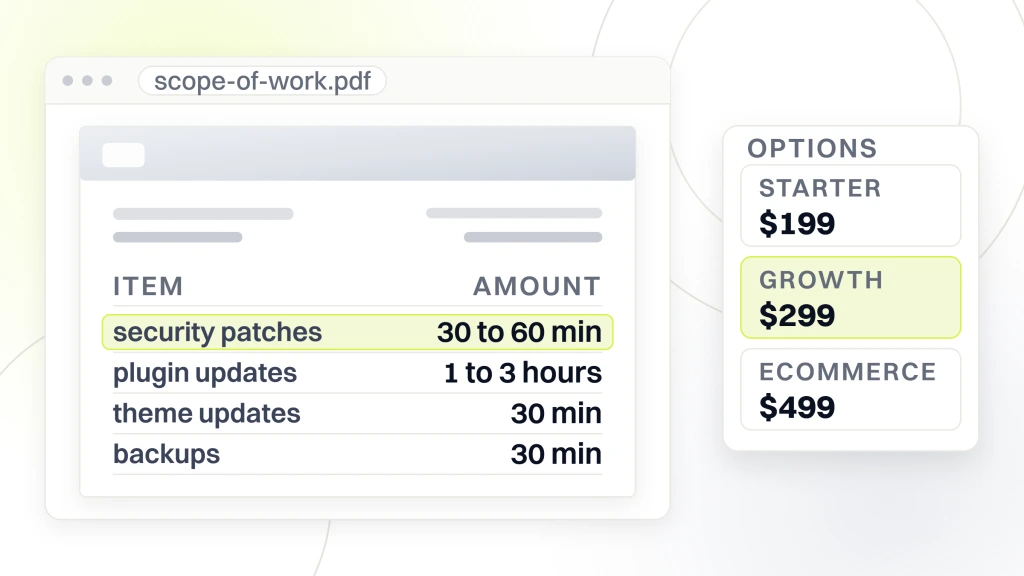
These seven items map to real hours of work. Security patches applied inside 48 hours run 30 to 60 minutes of scanning, testing, and applying. Plugin updates on a weekly batch run 1 to 3 hours. Theme updates on release run 30 minutes with child theme integrity checks. Backup verification with monthly restore testing runs 30 minutes. Uptime monitoring with active response chain runs 15 minutes of setup plus continuous automated coverage. Page speed checks on the home page and top three landing pages run 30 minutes. The monthly one-page report runs 20 minutes. Total: 3 to 6 hours per month at minimum for a small site, more once traffic, plugins, and ecommerce enter the picture.
Pricing tracks the hours honestly. Our own retainer tiers run $199, $299, and $499 per month, and each tier lists the seven inclusions in the contract before signing. If a vendor cannot map the monthly fee to the hours it buys, the fee is guesswork, not scope.
Security work in the monthly core
Security inclusion covers three layers. Core WordPress security patches applied inside 48 hours of release. Plugin CVE monitoring through Wordfence Central, Patchstack, or WPScan, with fixes applied inside 72 hours of disclosure. A monthly login audit that removes stale admin accounts, resets weak passwords, and confirms two-factor authentication on every admin user with elevated permissions. Real retainers document all three in the report. Retainers pretending to cover security just claim it without listing what got done.
The 48-hour patch window matters more than most buyers realize. Public CVE disclosure for popular plugins gets scanned by bots inside hours. Sites that patch inside 48 hours dodge the automated waves. Sites that wait a week get hit. If your vendor cannot tell you the average patch lag from their last quarter, that number is longer than they want to admit.
Update workflow in the monthly core
Update inclusion covers WordPress core, active themes, and every installed plugin. The workflow: pull staging on the first of the month, apply queued updates, run a smoke test against the checkout, forms, and top landing pages. If everything passes, apply to production during a low-traffic window with rollback ready. If something breaks, open a ticket with the plugin vendor, pin the working version, and log the reason. That pinned-version log is the artifact every retainer should produce. It becomes the reference the day a new developer asks why WPForms is stuck on version 1.8.4.
Staging is not optional. Retainers that update straight against production save an hour a month and lose a full day of billable emergency work the first time an update breaks a form. The math is bad every way you cut it.
Quarterly deep work in a real website maintenance package
The quarterly cadence is where average retainers coast and good ones stand apart. Quarterly scope covers database optimization, image compression sweep, plugin bloat review, broken link scan, schema markup check, and a page speed rerun across the top ten pages by traffic. Each item runs 1 to 2 hours per quarter. Stacked together they surface the drift that daily maintenance cannot catch.
- Database optimization: expired transients, spam comments, revision bloat, orphan meta rows
- Image compression sweep: catches every upload since the last quarter above 200 KB
- Plugin bloat review: honest question on whether each installed plugin still earns its slot
- Broken link scan: internal and external links across the whole site
- Page speed rerun: top ten pages by traffic, note any drops below 90 mobile
- Schema markup validation: confirms RankMath still issues valid JSON-LD after core updates
- SEO baseline check: primary keyword rankings on the top 20 tracked queries
Vendors that skip the quarterly sweep are betting on nothing drifting between monthly reports. In practice, one quarter of no cleanup lets database bloat push admin load times over 4 seconds, spam comments cross 5,000, and image weight sneak past 8 MB per page. The site slows quietly. The client blames Google. Nobody blames the vendor.
Database cleanup that keeps the site fast
WordPress databases accumulate junk over time: expired transients, spam comments awaiting review, post revisions from every save, orphan meta rows from deleted plugins. Left alone, the database grows 5 to 20% a year with content that adds zero user value. Quarterly cleanup with WP-Optimize or wp-sweep drops the wp_options and wp_postmeta table sizes back to baseline, keeping admin dashboard load times fast and shrinking backup archive size. A well-maintained WordPress database sits at 100 to 500 MB. A neglected one crosses 5 GB inside three years. Cleanup takes 15 minutes quarterly and saves hours down the road.
Plugin bloat review
Every quarter, review every installed plugin against the honest question: do we still use this? Sites accumulate 10 to 30 plugins across their lifespan, and roughly 20 to 30% of those become dead weight. Old contact form plugins replaced by newer ones. Analytics plugins left behind by a previous vendor. Redirect plugins bypassed by server-level rules. Removing dead plugins shrinks update surface area, cuts security exposure, and gains an average of 5 to 15 points on mobile PageSpeed. The bloat review is a 30-minute quarterly task that compounds every year the site stays online.
Broken link scan
Broken links drop pages out of Google’s index and frustrate readers. A quarterly scan with Screaming Frog or Ahrefs picks up every 404 that appeared since last quarter: renamed pages nobody redirected, external references that went dark, PDF assets that got moved. Fix each one on the same day the scan finishes so no ranking drops between the scan and the patch. Sites that run a quarterly broken link scan carry sub-1% dead-link ratios. Sites that never scan drift past 5% inside two years.
Annual big-ticket work in a website maintenance package
Annual work covers items that do not fit the monthly or quarterly cadence but must happen once a year. PHP version planning, WordPress major version audits, SSL renewal verification, hosting stack review, security posture audit, and a full disaster recovery drill. Retainers that do not include annual work usually push each of these to a paid change order, which turns a routine annual audit into a $2,000 project instead of a covered line item.
PHP version planning matters since WordPress supports specific PHP versions, and each version reaches end-of-life. Sites running PHP 7.4 in 2026 face security and performance issues, plus incompatibility with modern plugins. The annual review assesses the target PHP version, tests on staging, then coordinates the hosting bump. WordPress major version audits do the same for the WordPress platform itself. Both items are 4 to 8 hour projects annually that keep the site current without triggering a costly emergency migration.
SSL renewal verification is a 10-minute task that saves a full outage. Every year, confirm the certificate is set to auto-renew, that the renewal succeeded last cycle, and that no browser flags a mixed-content warning on the top ten pages. Manual renewals get forgotten. Auto-renewals fail silently. The annual check catches both cases before the browser warns a real customer.
Annual disaster recovery drill
The annual disaster recovery drill is the honest test on your backups. Pull the latest off-site archive. Spin up a fresh staging environment on a different host if possible. Restore the full site. Time the process. Document every step. Fix any failure points. Sites that run this drill annually recover from real disasters in 30 to 90 minutes. Sites that never test their backups usually spend 12 to 48 hours in a panic reinstall the first time something serious breaks. The drill runs 2 to 4 hours annually and is the highest-return line item on the whole retainer.
Security posture audit
The annual security audit reviews everything a monthly scan misses. User account inventory: prune stale contributors, editors, and administrators. Login attempt log review: look for patterns pointing at targeted attempts. Firewall rule review: check that hosting-level or plugin-level firewalls carry the latest CVE blocklists. Two-factor authentication compliance: confirm every admin account has 2FA enabled. Session token expiration: reset any long-lived tokens issued outside standard workflow. Each of these tasks runs 15 to 45 minutes annually. Stacked together they take a security posture from acceptable to defensible against real attackers. Reference the WordPress security guide for the current baseline.
Edit hours included in a website maintenance package
Edit hours are the release valve on every retainer. Without them, every small change triggers a billable ticket. With them, the client and vendor work smoothly through routine content changes. Real website maintenance package inclusions carry one to ten edit hours a month depending on tier. Anything beyond bills at the vendor’s hourly rate, usually $95 to $195 per hour.
The included edit hours block matters more than most buyers appreciate on day one. Sites without included hours generate 4 to 8 billable tickets a month for small content tweaks, and each ticket carries admin overhead that adds up to 15 to 30 minutes of billing time on both sides. Sites with 2 to 3 included hours skip that overhead entirely. The vendor knocks out changes in the same session. The client gets a monthly log instead of a stream of invoices. Every buyer we onboard from a competitor mentions the same relief.
| Tier | Included edit hours | Typical use |
|---|---|---|
| Starter ($199/mo) | 1 to 2 hours | Occasional content edit |
| Growth ($299/mo) | 2 to 3 hours | Monthly blog and small updates |
| Ecommerce ($499/mo) | 3 to 5 hours | Product edits, promo updates |
| Enterprise (custom) | 5 to 10 hours | Landing pages, campaign builds |
What counts as an edit hour
Edit hours cover changes that do not require developer intervention. Content updates: publishing blog posts, editing service pages, updating team bios. Copy tweaks: changing hours, phone numbers, promotional banners, testimonials. Image swaps: uploading new headshots, replacing hero images, refreshing gallery photos. Small design fixes: adjusting spacing, changing button colors, tweaking mobile responsiveness. Form edits: adding a field, changing a notification email, updating confirmation copy. Menu changes: adding items, reordering navigation, updating footer links. Anything on that list should count as included on any tier above Starter.
What does not count as an edit hour
Bigger work does not fit inside edit hours. New page builds run 2 to 8 billable hours per page. New plugin installations with configuration run 1 to 3 billable hours. Ecommerce product uploads at scale bill per product. Custom code work always bills separately. Design changes touching the theme structure bill by the hour. Integrations with third-party services run 2 to 10 billable hours per integration. Get this list in the contract so nothing about billable versus included is a surprise later. The clearer the line, the smoother the retainer.
Monitoring and reporting inside a website maintenance package
Monitoring inclusion covers uptime, performance, and security. Real retainers run uptime monitoring at 60-second intervals or shorter, with notifications through Slack, SMS, or PagerDuty routed to a real person. Performance monitoring runs monthly PageSpeed checks and Core Web Vitals reviews. Security monitoring runs continuous plugin CVE scans and monthly login audits. All three streams feed the monthly report at the top of the following month.
Reporting inclusion is the artifact that proves the retainer is working. The monthly one-page report should list: uptime percentage with any incidents, updates applied (core, themes, plugins, count and pinned versions), backup verification results with the last successful restore test date, page speed scores for the top five pages, security events (scans run, incidents handled, user accounts pruned), and next month’s planned work with any risks flagged. Six sections, one page, delivered by the fifth of the month. Anything longer is padding.
Uptime monitoring standard
The uptime standard for a serious retainer runs at 60-second check intervals from multiple geographic regions with a notification chain that reaches a person inside three minutes. Free-tier UptimeRobot at 5-minute intervals is acceptable for Starter tier. Better Stack or StatusCake at 60-second intervals is standard for Growth and above. Enterprise tier often adds synthetic monitoring that runs a full checkout or lead form submission every 5 minutes to catch functional failures the ping-based monitors miss.
Performance tracking through Core Web Vitals
Google Search Console reports Core Web Vitals from real Chrome user data. Every month, the retainer opens Search Console, reviews the Core Web Vitals report, and lists any pages moving from good to needs-improvement or from needs-improvement to poor. Fix the shifts before they turn into site-wide rank drops. Reference the web.dev Core Web Vitals guide for the current thresholds. Real retainers track CWV monthly and flag any regression on the next report. Fake retainers claim performance monitoring without ever opening Search Console.
Abels Residential case study on a complete website maintenance package
Abels Residential, a London-based real estate lettings agency, ran a Web plus SEO engagement with us that included the full maintenance package on their WordPress lettings platform. The site handles rental inquiries, property listings, and lead capture across a competitive London market. The retainer covered the seven-point monthly core, quarterly deep work, and a full annual audit that surfaced two PHP compatibility issues before they turned into emergencies.
Results across the engagement: 20-plus qualified rental leads per month, 300-plus keywords ranked, and page load times at 2 seconds on the main service pages. The maintenance retainer preserved those numbers month over month by catching plugin conflicts on staging before they hit production, keeping the site fast through routine WordPress updates, and running the security scans that kept the admin login secure across 12 months with no incident. Every line item on the retainer earned its slot.
Transferable inclusions for lead-generation sites
The inclusions transfer to any lead-generation site running WordPress. Staged testing on the form flow. Quarterly page speed audits on the money pages. Monthly Core Web Vitals review through Search Console. Two included edit hours a month for content updates. Every one of these is a Growth-tier standard, running $299 monthly. Sites that skip any of them usually lose organic ranking, break the form, or lose data on a bad backup inside 12 to 18 months. The Abels retainer never hit any of those failure modes since the process caught each risk on the checklist.
The annual audit paid for itself
Abels Residential’s annual audit surfaced two PHP compatibility issues that would have broken the site during the next major WordPress core release. Cost to fix inside the annual audit: 4 hours, absorbed by the retainer. Cost to fix during an emergency post-outage: 12-plus hours of downtime, panic support hours, and lost lead revenue on 300-plus tracked keywords. The annual audit paid for itself before it happened. This is the pattern the retainer prevents you from ever noticing, since the emergency never happens in the first place.
What a website maintenance package should not exclude
Push back on any retainer that excludes core coverage. Security patches, backup verification, uptime response inside SLA, monthly reporting, and quarterly deep work should never sit outside the retainer. If a vendor charges extra for outage response, walk away. Legitimate exclusions are project work: new page builds, custom code, integrations with third-party services.
Legitimate exclusions typically include: new page builds, new plugin installations with custom configuration, ecommerce product uploads at scale, custom code work, design changes touching theme structure, third-party integrations, and content creation (blog posts, whitepapers, videos). These are project work priced at hourly rates or project bundles. Retainers that quietly include content creation in the retainer are subsidizing it from your maintenance budget, which usually means the maintenance suffers first when the content queue backs up.
Red flag exclusions
Red flag exclusions signal a vendor selling the illusion of maintenance. Emergency response as an extra charge signals the vendor will not respond during outages without a surcharge. Backup restoration as an extra signals the vendor will not honor their own backup coverage. Plugin conflict resolution as an extra signals the vendor pushed updates without staging. Monthly reporting as an extra signals the vendor does not want to prove what got done. Every one of these is a walk-away signal. The retainer that hides its scope in exclusions is the retainer that will disappear during the actual work you paid to prevent.
The honest project line
Every retainer has a project line where routine maintenance ends and project work begins. Real vendors draw the line in the contract. Anything under 30 minutes of dev time is included. Anything over 30 minutes triggers a change order at the hourly rate. This kind of scope clarity smooths the entire relationship. Ambiguous vendors let scope creep run for a month, then send a surprise invoice for 8 hours of unbilled work. The 30-minute rule is one of the fairest structural elements in maintenance contracts.
Website maintenance package inclusions scale by tier
Each tier keeps the same inclusion categories but scales the depth. Starter at $199 per month includes the seven-point monthly core, quarterly light-touch work, and one to two edit hours. Growth at $299 adds staged rollouts on any form-touching update, monthly Core Web Vitals reviews, and two to three edit hours. Ecommerce at $499 adds weekly backup verification, transaction integrity checks, PCI compliance work, and three to five edit hours. Enterprise runs on custom scope with custom code review, PHP upgrade planning, a dedicated engineer on call, and five to ten edit hours.
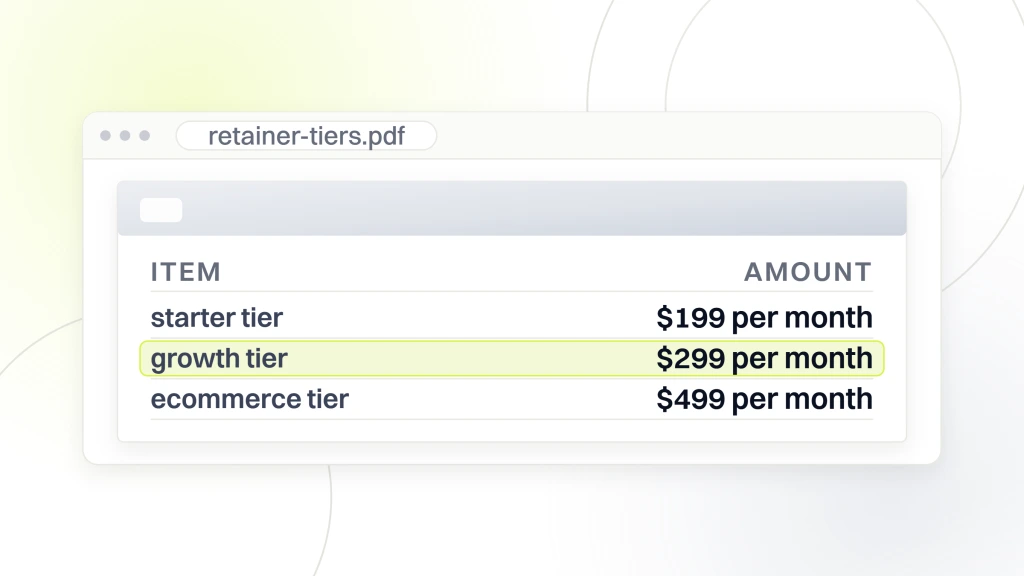
The tier that fits your site depends on three factors: how many plugins run on the site, whether transactions happen in real time, and how much custom code sits under the theme. A five-page dentist site with no forms fits Starter. A chiropractic site with online booking fits Growth. A WooCommerce store fits Ecommerce. A multi-site enterprise install fits Enterprise. Match your site to the tier honestly. Overpaying on Enterprise for a brochure site wastes money. Underpaying on Starter for a WooCommerce site loses revenue during the first outage.
When to upgrade the tier
Upgrade the tier when the site’s complexity moves up a band. Adding ecommerce triggers a jump from Growth to Ecommerce. Adding custom Gutenberg blocks or a custom REST endpoint triggers a jump to Enterprise. Doubling plugin count triggers a jump within the tier. Retainers that stay locked at Starter as the site grows into Growth or Ecommerce complexity eventually break during a routine update. Renegotiate the tier every 6 to 12 months as the site changes.
When to downgrade the tier
Downgrade when the site simplifies. Removed an ecommerce section. Consolidated 40 plugins down to 15. Migrated custom code to a standardized plugin. Downgrading is fair. Talk to the vendor about the change. Most will accommodate a tier drop without breaking the contract, since a slightly smaller monthly commitment beats losing the client entirely. Downgrade discussions also help you sanity-check whether the vendor is honest about scope in both directions.
Process inclusions in a website maintenance package
Process inclusions are the invisible items that determine whether the technical work actually happens. Staging environment for testing updates. Version-controlled deployments. Communication protocol during outages. Quarterly review calls with the client. Documentation shared with the client. Onboarding runbook produced during setup. Offboarding process defined in the contract. Each of these is a process, not a technical task, but the retainer works or fails on them.
Ask the vendor to walk you through each process on the sales call. Show me the staging environment. Show me the last monthly report. Walk me through an outage response from your log. Show me a client’s documentation. Show me the onboarding checklist. Vendors that produce these artifacts on demand are running a real operation. Vendors that promise them for later are still figuring out how to run the operation. Trust the artifacts, not the promises.
Staging environment as a core process inclusion
The staging environment is where every plugin update gets tested before it hits production. Managed hosts like Kinsta, WP Engine, and Cloudways ship one-click staging. Cheaper shared hosts do not. If your vendor cannot produce staging on demand, either the hosting is wrong or the process is missing. Both need to change before you renew. Staging is not optional. Retainers that skip staging are testing updates in production, which is where the outages come from.
Quarterly review call
Every quarter, the vendor schedules a 30-minute review call. Walk the numbers. Discuss any pinned plugins that need attention. Plan any larger work for the following quarter. Adjust the retainer scope if the site has grown. This call is where the retainer transitions from a monthly transaction to a real strategic relationship. Vendors that skip the quarterly review coast into complacency. Vendors that hold it stay accountable to the outcomes you signed up for.
Where to start evaluating website maintenance package inclusions this week
Print the seven-point monthly checklist. Print the quarterly list. Print the annual audit list. Compare each against your current retainer. Note gaps. Ask your vendor about each gap. The vendor should either produce evidence the item runs or acknowledge the gap and quote a tier upgrade to close it. If the vendor deflects on any single item, you have your answer about what a website maintenance package looks like on paper versus in practice.
Then read the last three monthly reports the vendor sent. Count how many of the seven monthly items appear in each report. If any are missing, ask why. If the vendor responds with process specifics, they are doing the work. If they respond with vague reassurance, they are not. Reference our WordPress website maintenance packages guide for the platform-specific inclusion detail. Our website maintenance package pricing post covers the tier math. If you are still deciding whether the retainer is worth it, our do you need a website maintenance package post walks the argument. For the full service, our monthly website maintenance packages service page lists inclusions by tier. Also review the Kinsta maintenance checklist and the WP Rocket task list for third-party references.
What should a monthly website maintenance package include at minimum? A real monthly website maintenance package includes seven items on a monthly cadence: security patches applied inside 48 hours, plugin updates on a weekly batch, theme updates on release, verified backups with monthly restore testing, uptime monitoring at 60-second intervals, page speed checks on the top pages, and a written one-page report by the fifth of the following month. Retainers missing any of these seven are not complete.
How many edit hours does a website maintenance package include? A website maintenance package includes one to ten edit hours a month depending on tier. Starter tiers ship one to two hours for occasional content edits. Growth tiers ship two to three hours for monthly blog work. Ecommerce tiers ship three to five hours for product and promo updates. Enterprise tiers ship five to ten hours for landing pages and campaign builds. Anything beyond the included allotment bills at the vendor’s hourly rate.
Is hosting included in a website maintenance package? Yes, our website maintenance package tiers bundle managed WordPress hosting into every retainer at $199, $299, and $499 per month. Vendors that charge separately for hosting add a hidden $30 to $80 per month on top of the retainer, and the split creates finger-pointing when performance issues cross the hosting-versus-code line. Bundled hosting removes the ambiguity.
What is not included in a typical website maintenance package? A website maintenance package does not include new page builds, new plugin installations with custom configuration, ecommerce product uploads at scale, custom code work, design changes touching theme structure, third-party integrations, or content creation. These are project work priced at hourly rates or fixed project bundles. Real vendors draw the line at 30 minutes of dev time and quote change orders above that mark.
How do I know if my current website maintenance package is worth the price? Ask your vendor for the last three monthly reports and check for the seven core inclusions by name. Ask for the last quarterly deep-work log. Ask for the annual disaster recovery drill result. If the vendor produces those artifacts inside 24 hours, the retainer is real. If the vendor delays or deflects, the retainer is a placeholder invoice and you are paying for scope that does not run.
What size site fits each website maintenance package tier? A five-page brochure site with no forms fits the Starter tier at $199 per month. A lead-generation site with online booking and a monthly blog fits Growth at $299. A WooCommerce store with recurring product updates fits Ecommerce at $499. A multi-site install or a heavily customized enterprise property fits the custom Enterprise scope. Match the site to the tier honestly to avoid overpaying or under-covering.
How often should a website maintenance package include backups? A real website maintenance package includes daily automated backups stored off-site, with monthly restore testing to confirm the archives are usable. Weekly full backups plus daily incrementals is the standard for Growth tier and above. Ecommerce sites step up to hourly incrementals during business hours to protect order data. Backups that never get restore-tested are a promise, not a safety net.
Get website maintenance package inclusions that match the invoice
The right website maintenance package inclusions turn the retainer from a monthly invoice into a real safety net. Seven monthly items, six quarterly items, five annual items, two to three edit hours, a one-page report by the fifth of the month, and a staging environment that catches conflicts before they hit production. That is the honest scope. Anything less is a retainer selling the promise of maintenance without the practice. Read your last three reports this week and start the conversation with your vendor. If the answers do not add up, our monthly website maintenance packages team can walk you through the tier that fits.