A website maintenance package hits every business owner as a straight cost question. Is the retainer worth it, or can the site coast on updates you run yourself. Some owners write the check happily after living through one Friday-night outage. Some skip it since the site is small and the risk feels tame. Both camps have a fair point. This guide walks the honest math on when a website maintenance package earns its keep, when you can skip it, and the site profiles that sit in each camp so you can make the call without regret or overpayment.
You’ll get the risk-versus-cost frame, the site profiles that fit each side, the DIY option with its real time cost, the tier map for when you do buy in, and the exact outages a website maintenance package prevents that a DIY setup misses. Read straight through in about 10 minutes. Then run the decision through the checklist and pick the answer that fits your site, not the answer a vendor pushes on you.
Who needs a website maintenance package and who doesn’t
You need a retainer if your site generates leads or revenue, runs on WordPress or another CMS with regular updates, or would lose real money during a 24-hour outage. You don’t need one if the site is a personal blog with zero commercial impact, sits on a fully-managed platform like Squarespace or Wix, or you already have an in-house developer covering the same tasks weekly.
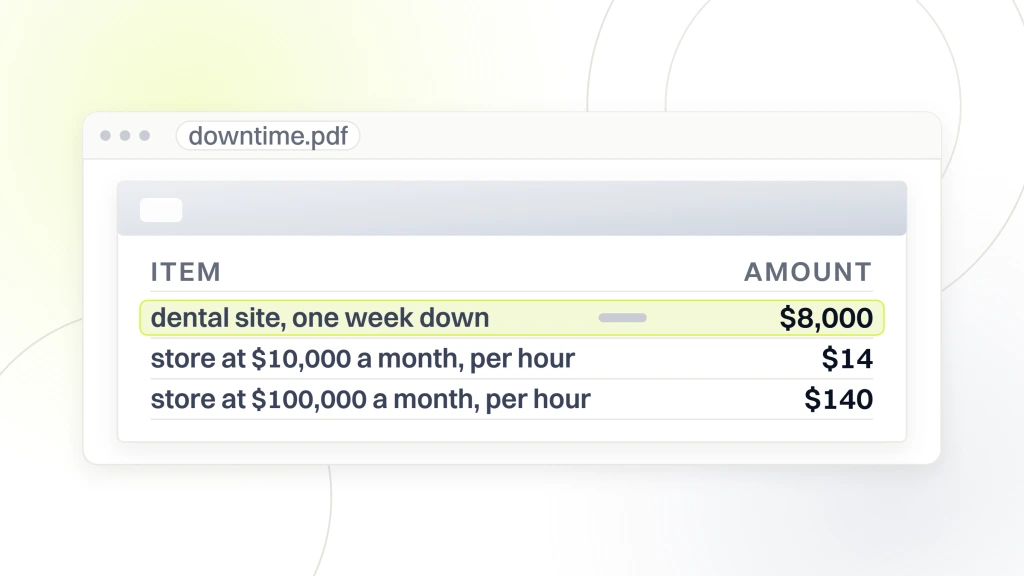
The dividing line isn’t site size or budget. It’s operational risk. A 5-page dental site with 40 monthly patient inquiries loses roughly $8,000 in a week of downtime. A retainer at $299 a month costs $3,588 a year to prevent that outage from ever happening. The math wins every time. A personal blog with zero commercial traffic loses zero dollars in a week of downtime. A $299 retainer costs $3,588 a year to prevent an outage that doesn’t cost anything. The math loses. Every buyer sits somewhere on this spectrum.
Lead-generation sites need the retainer
Any site whose primary job is generating leads should carry a website maintenance package. Dental practices, chiropractic clinics, law firms, HVAC companies, plumbers, roofers, real estate agencies, marketing agencies. Every one of these has a form somewhere on the site that feeds a CRM or a booking system. When that form breaks, leads disappear. A retainer keeps the form working through routine plugin and core updates. It pays for itself the first time a broken update would have taken the form offline for a full week.
Ecommerce sites need the retainer more
Ecommerce sites are the highest-risk category and the highest-return category for a retainer. Every plugin update on a WooCommerce site risks the checkout. Every hour of checkout downtime is lost sales. A store doing $10,000 monthly revenue loses roughly $14 an hour. A store doing $100,000 monthly revenue loses $140 an hour. A retainer that prevents even one weekend outage per year pays for itself twice. Ecommerce owners who skip the retainer usually learn the lesson expensively inside 12 to 18 months.
Cost of downtime versus retainer cost
The retainer decision is at heart a cost-of-downtime calculation. Multiply your monthly revenue attributable to the site by the fraction of a month lost to a typical outage. Compare that to the retainer’s annual cost. If the retainer costs less than one outage per year would cost you, buy it. If it costs more, skip it or downgrade the tier.
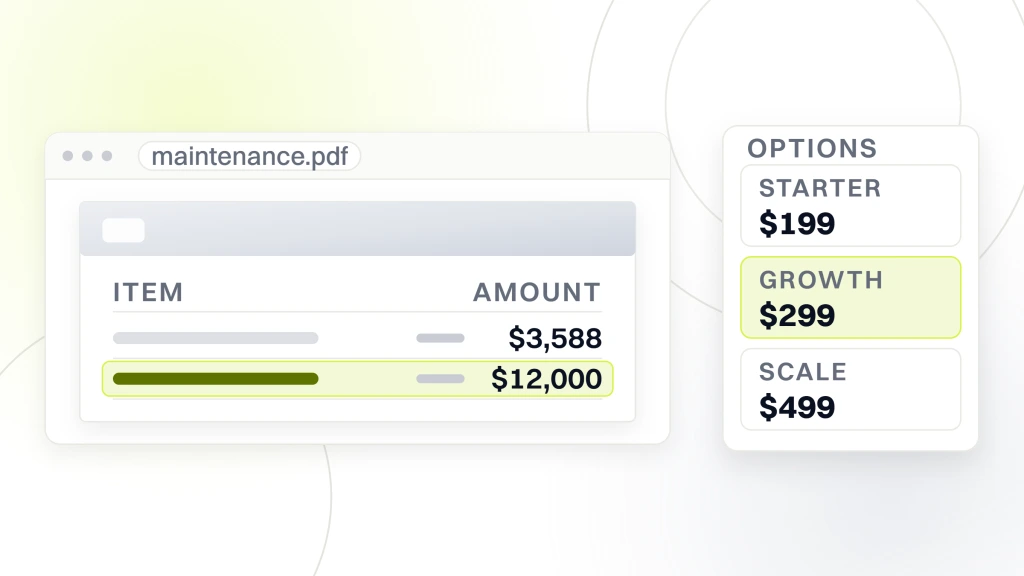
Redefine Web runs three published tiers so the math is easy to plug into. Starter sits at $199 monthly for smaller lead-gen sites. Growth sits at $299 monthly for busier lead-gen and light ecommerce sites. Scale sits at $499 monthly for stores and high-traffic marketing sites. Every tier includes staging, backups, uptime monitoring, security patching, and a real response chain. Pick the tier that matches your monthly revenue and your outage tolerance.
Outage frequency on unmaintained sites
Sites without an active retainer experience 2 to 4 outages per year on average. Common causes. A plugin update that breaks the checkout. A WordPress core update that conflicts with a theme. A PHP version bump that breaks a legacy plugin. An SSL certificate expiration nobody watched. A security compromise from a delayed patch. Each outage lasts 4 to 48 hours depending on how quickly someone diagnoses it. The math. 2 outages a year at 12 hours each is 24 hours of downtime annually. Apply your hourly revenue loss to that number and you have the real cost of skipping.
What the retainer prevents
A real retainer prevents 90% of routine outages by staging every update, running security scans, patching CVEs inside 72 hours, and monitoring uptime with a live response chain. The remaining 10% (hosting outages, DNS issues, upstream failures) still happen, but the retainer’s incident response gets the site back faster. Sites on active retainers hold the 99.9% uptime commitment, written into the SLA with service credits behind it. Sites without report 98 to 99% uptime. That delta runs to tens of hours of downtime per year, which is real money at any commercial revenue level.
Benefits of a website maintenance package beyond outage prevention
Outage prevention is the headline benefit. The rest of the value shows up in slower ways. Preserved page speed. Protected SEO rankings. Kept-current PHP and WordPress versions. The compounding effect of continuous small optimizations. Sites without a retainer lose 1 to 3 PageSpeed points a month to plugin bloat and image drift. Retainers catch that drift monthly before it costs rankings.
- Preserved page speed. Monthly PageSpeed checks catch drift before it costs rankings.
- Protected SEO. Core Web Vitals monitoring flags regressions before Google penalizes them.
- Kept-current versions. PHP and WordPress upgrades planned annually, no emergency migrations.
- Continuous optimization. Quarterly database cleanup, plugin bloat review, and broken link scans.
- Documentation. Monthly reports build an ownership record of what changed and why.
- Peace of mind. Someone else watches the site so you don’t have to.
SEO preservation as a benefit
SEO agencies charge $499 to $3,500 a month to build organic ranking. A retainer preserves that ranking by keeping the site fast, healthy, and technically clean. The benefit compounds. Every plugin update caught on staging, every image compressed, every Core Web Vitals regression flagged early preserves ranking that would otherwise drift downward. Sites without retainers often report a 15 to 30% traffic drop after 18 months of drift and blame the SEO agency. The real issue is usually the maintenance layer, not the SEO strategy.
Peace of mind as a benefit
The soft benefit is real. Business owners without a retainer spend an average of 2 to 5 hours a month worrying about the site, checking on it, or fielding small emergencies. Owners with retainers spend zero. That 2 to 5 hours a month at even $50 an hour of your time is $100 to $250 in opportunity cost. Add the emotional cost of the outage-that-hasn’t-happened-yet running in the back of your mind. The retainer buys back both.
DIY as the alternative to a retainer
DIY maintenance is a fair option if you have the time, the technical skill, and the discipline to run the tasks weekly. The reality. Most business owners don’t. DIY looks cheap on paper. Free. Zero recurring cost. The hidden cost is your time and the risk of missing a critical update that lands during a busy month.
Honest DIY takes 3 to 6 hours a month for a small site. Weekly plugin update review, 15 minutes weekly. Monthly backup verification, 30 minutes. Uptime monitoring setup and response, 15 minutes weekly. PageSpeed check and fixes, 45 minutes monthly. Security scan and login audit, 45 minutes monthly. That’s 4 to 5 hours committed monthly to a task that isn’t your primary job. Priced at $75 an hour of your time (conservative for a business owner), DIY costs $300 to $375 a month in opportunity cost. Compare that to a $199 Starter website maintenance package that runs the same tasks better.
DIY risks the retainer doesn’t
DIY carries three risks a retainer solves. First, discipline. Owners intend to run weekly updates and miss weeks during busy months. Miss 2 weeks and a CVE lands unpatched. Second, staging. Most DIY owners don’t run staging environments. They apply updates directly to production. When one breaks the site, the fix takes hours instead of minutes. Third, coverage during time off. Vacations, illness, family emergencies. The site keeps drifting through any stretch the owner is out of the loop. Retainers stay on the schedule regardless.
Hybrid DIY plus retainer
Some owners run a hybrid model. DIY the content updates and lightweight tasks, retainer handles the technical layer. This model is fine as long as the roles stay clear. The retainer owns security, updates, backups, uptime, and technical monitoring. You own content, marketing edits, and campaign launches. This split keeps the retainer cheap (usually Starter or lightweight Growth tier) Whereas preserving your control over marketing velocity.
Site profiles that need a website maintenance package versus profiles that don’t
Some site profiles almost always benefit from a retainer. Some almost never do. Most sit in a middle zone where the answer depends on downtime tolerance and personal preference. The profiles that need a website maintenance package share three traits. Lead generation, active WordPress installation, and real revenue impact from downtime.
The profiles that don’t need a retainer share three traits. No revenue impact from downtime, minimal plugin complexity, and either a fully-managed platform or an in-house developer covering the same tasks. Personal portfolios. Static Jekyll or Gatsby sites deployed via GitHub Pages. Squarespace or Wix sites where the platform handles updates. Anything with active in-house dev support already running the checklist. Every one of these has the tasks covered somewhere else or doesn’t need them.
Profiles that need a retainer
Dental, chiropractic, medical, legal, HVAC, plumbing, roofing, real estate, marketing agency, ecommerce, membership, course platform, professional services, and B2B SaaS marketing sites all need a website maintenance package. Every one of these categories runs WordPress at scale, generates leads or revenue through the site, and loses real money during outages. The retainer is the operational backbone that keeps the marketing and sales stack running. Skipping it saves $2,400 to $18,000 a year and costs $10,000 to $200,000 in lost opportunity when the site breaks.
Profiles that don’t need a retainer
Personal blogs, portfolio sites for individuals, hobby projects, and student sites don’t need retainers. Zero revenue impact from downtime means zero return on a website maintenance package. Static sites deployed through GitHub Pages, Netlify, or Vercel still don’t need retainers since there’s no backend to maintain. Fully-managed platforms like Squarespace, Wix, or Shopify handle updates natively, so retainers only add value if you want a human handling content updates and small edits at a defined hourly rate.
Berks Plumbing case study on why a website maintenance package earned its keep
Berks Plumbing, a residential and commercial plumbing business in Berks County, ran a full-funnel PPC, SEO, and web engagement with Redefine Web that included a website maintenance package on their WordPress lead-generation site. The site handles service inquiries across drain, emergency, and commercial work, integrated call tracking, and Local Service Ads plumbing into the lead flow. The retainer landed in the Growth tier at $299 monthly.
Results across the 12-month window. Ad conversions climbed 99%. Cost per lead dropped. Organic users grew. The retainer preserved the environment those numbers grew in. The forms never broke. Page speed stayed above 90 mobile on every service page. The site stayed indexable through every routine update. Every one of those preserved conditions came from the retainer, and every one of them would have been at risk on a DIY schedule that missed 2 or 3 weeks during busy plumbing season.
The math on the retainer for Berks
The retainer at $299 monthly cost $3,588 annually. Cost of one broken week during peak plumbing season (spring, when frozen pipes drive lead volume), roughly $12,000 in lost booked jobs. The retainer paid for itself more than three times over just by preventing one seasonal outage. It plus it preserved the SEO ranking and Local Service Ads position that the PPC and SEO layers were building. Every dollar of retainer went further since the marketing stack ran on top of a stable site.
Transferable model for service businesses
The model transfers to any service business with a lead-generation site. Estimate the revenue lost per hour of downtime. Multiply by the typical outage duration (12 to 24 hours). Multiply by 2 to 4 outages per year. That’s the annual cost of skipping the retainer. Compare to the retainer’s annual cost. If the retainer is cheaper, buy it. For most service businesses at any revenue north of $250,000 annually, the retainer wins the math easily.
When you can skip a website maintenance package entirely
Skipping is a fair choice in specific situations. Sites with zero commercial impact. Static sites that don’t need ongoing CMS work. Managed platforms that handle updates. In-house dev support already running the checklist. Each situation removes the risk that a retainer would otherwise cover.
Skipping is a bad choice when the site is a lead-gen WordPress install, the owner intends to DIY but doesn’t have the discipline, or the site sits on shared hosting without a staging environment. In each of these cases, the money saved on the retainer money will get spent later on emergency response, lost leads, or a rebuild after a compromise. The skip that saves $2,400 a year usually costs $10,000 to $50,000 the year something breaks.
The managed platform exception
Squarespace, Wix, and Shopify handle their own updates. If your site sits on one of these platforms, you don’t need a technical retainer. You may still want a marketing retainer that handles content updates, SEO, and campaign work at a lower hourly rate. That distinction matters. Managed platforms don’t need $499 maintenance retainers. They may benefit from $199 content retainers. Different work, different price.
The in-house developer exception
Some businesses have an in-house developer running the maintenance checklist as part of their regular workflow. If the developer runs security updates weekly, tests plugin updates on staging, verifies backups, and produces a monthly summary, you don’t need a retainer. The internal cost is already covered. Bring in an outside retainer only for specialized work (PHP major migrations, custom Gutenberg block reviews, ecommerce PCI compliance audits) that the in-house developer doesn’t specialize in.
When to commit to a website maintenance package
The right time to buy a website maintenance package is the month before you need it, which is impossible to predict. The next-best time is right after a redesign, launch, or major SEO investment. Retainers preserve the work you’ve already paid for. The worst time to buy is during an outage.
Buy the retainer during the month after a major site event. Launch, redesign, migration, or new plugin rollout. Each of those events introduces surface area where things break, and the website maintenance package catches problems in the first 30 to 60 days that otherwise sit quietly for months. And buy the retainer when your site crosses a revenue threshold that makes downtime expensive. The commercial threshold is roughly $2,000 to $5,000 of monthly revenue attributable to the site. Below that, DIY or Starter tier works. Above, Growth tier or higher earns its keep.
The post-launch commitment window
The 30 to 60 days after a launch or redesign are the highest-value retainer months. New plugins are settling. New forms are collecting leads. New pages are getting indexed. New integrations are stabilizing. Every one of these introduces the possibility of a failure. Retainers during this window catch small issues before they become large ones. Sites that skip the retainer during post-launch usually pay double later during the emergency cleanup.
Seasonal timing for service businesses
Service businesses with seasonal demand should buy the website maintenance package at least 60 days before peak season. Plumbing before winter. HVAC before summer. Landscaping before spring. Retail ecommerce before Q4. The retainer needs a full monthly cycle to stabilize the site before the peak lead volume arrives. Buy the retainer in November for a summer HVAC peak. In August for a Q4 ecommerce peak. Timing the retainer to the season means the peak arrives on a fully-stable site.
Choosing a website maintenance package vendor if you need one
Once you’ve decided to buy, vendor selection matters. Ask the 7 questions before signing. Patch cadence for security releases, sample monthly report, staging workflow, last full-site restore test, outage SLA in writing, do-not-run plugin list, and after-hours escalation path. Vendors that answer all 7 earn the interview. Vendors that dodge specifics are selling packaging, not maintenance.
Get 3 quotes at the same tier. Compare the responses on process, not price. The cheapest quote isn’t the winner. The vendor with the most transparent process is. Cheapest usually costs more later when the emergency response gets billed separately. And ask for 2 client references and call them. 5-minute reference calls surface more truth than a dozen sales pages. Sign a 6-month contract. Track the monthly numbers. Adjust the tier as the site grows.
Contract terms that protect both sides
Standard contract terms. 6-month initial term, then rolling with 30 days notice for cancellation. Data ownership stays with the client from day one. Backups belong to you. Cancellation without penalty after the initial term. Anything less generous is worth walking away from. Reference our website maintenance packages pricing guide for the tier math. Our what’s included in a website maintenance package post covers the full inclusion list. For platform-specific work, our WordPress website maintenance packages guide walks the WordPress tasks. For the full service, our monthly website maintenance packages service page lists the tiers we run.
Trial period versus six-month commitment
Some vendors offer a 30-day or 60-day trial period. Both models work. Trial protects you from the vendor whose sales call was better than their delivery. 6 months gives the vendor room to onboard, absorb the site, and demonstrate value on a second quarterly review. If you’re new to hiring maintenance, take the trial. If you’ve hired before and know the questions, go straight to 6 months. Either way, read the cancellation clause first.
Where to start on your website maintenance package decision this week
Answer 3 questions. How much revenue does the site generate per month. How many hours of downtime per year can you absorb before it costs real money. Do you have the discipline and time to DIY every week without missing weeks. Those 3 answers map to a clear decision. Retainer, DIY, or skip entirely. The answer isn’t universal. It’s specific to your site.
If the answer is retainer, request quotes from 3 vendors at the right tier. Ask the 7 questions. Read the sample reports. Call 2 references from each. Pick the vendor whose answers gave you the highest confidence. Sign a 6-month contract. Track the numbers monthly. Adjust the tier as the site grows. And review the Kinsta maintenance guide, the WP Rocket task list, and the WordPress security guide for third-party references on the standard task set.