Website maintenance packages pricing is the question every business owner Googles the week after a plugin update takes the site down. You want a real number, not a range. You want to know what $199 a month buys versus $299 versus $499. And you want to know if the $29 a month package on the Facebook ad is a bargain or a trap. This guide gives you the tier map, the honest inclusions per band, and the specific site profiles that match each price point in 2026.
You will get the four tiers, what each one includes at a real level of detail, the site profiles that fit each, the hidden costs vendors do not advertise, and the exact questions to ask before signing anything. Read straight through in about twelve minutes. Then match your site to the right tier and stop overpaying or underprotecting the site the rest of your marketing depends on.
What website maintenance packages pricing actually buys in 2026
Website maintenance packages pricing buys three things. Response time, testing depth, and included work hours. Everything else is packaging. The $199 tier gives you automated updates and a monthly PDF. The $299 tier adds staged testing and small edit hours. The $499 tier adds real response SLAs and a named account owner. Beyond that, custom scopes handle multi-site, custom plugins, and near-instant outage response.
Below $99 you are paying for a login screen and a plugin nobody opens. Above $2,500 you are paying for a fractional dev team, not a retainer. Between those endpoints, the price scales with plugin count, transaction volume, and how much custom code the site carries. A five-page dentist site with 12 plugins costs a fraction of a WooCommerce store with 40 plugins and a custom checkout integration. Same maintenance category, wildly different pricing, so the work is genuinely different.
The three drivers that move website maintenance package price
Plugin count is the first driver. Every plugin adds surface area for updates, conflicts, and CVE monitoring. A site with 10 plugins takes 30 minutes a month to update. A site with 40 plugins takes 2 to 3 hours. That single variable moves the retainer by $100 to $300 monthly. Transaction volume is the second driver. Ecommerce and booking sites need staged testing on every checkout-touching update, and that triples the testing time.
Custom code depth is the third driver. Sites with custom Gutenberg blocks, custom REST endpoints, or heavy child theme modifications need developer review on any core or PHP bump. Each layer of custom code roughly doubles the required review time. Add up all three drivers and you can predict within $100 what a vendor should quote you, before the sales call even starts.
Response time is what higher tiers actually sell
The technical work at $499 versus $199 does not differ by 2.5x. The response time does. A $199 retainer might promise 24-hour outage response. A $299 retainer promises 4 to 8-hour response. A $499 retainer promises 1-hour response with a named engineer on call. Speed of recovery is the actual product. Sites that lose $1,000 an hour in revenue when down should never buy the cheapest tier. Sites that lose zero direct revenue can. That is the frame every buyer should use to right-size the retainer.
The website maintenance packages pricing tier map
The four common tiers in 2026 map cleanly to site size and complexity. Every tier should include the core seven-point monthly checklist. Security updates, plugin updates, theme updates, verified backups, uptime monitoring, page speed check, and a monthly report. The difference between tiers is not whether these happen. It is how fast, how deep, and how many included edit hours come with the checklist.
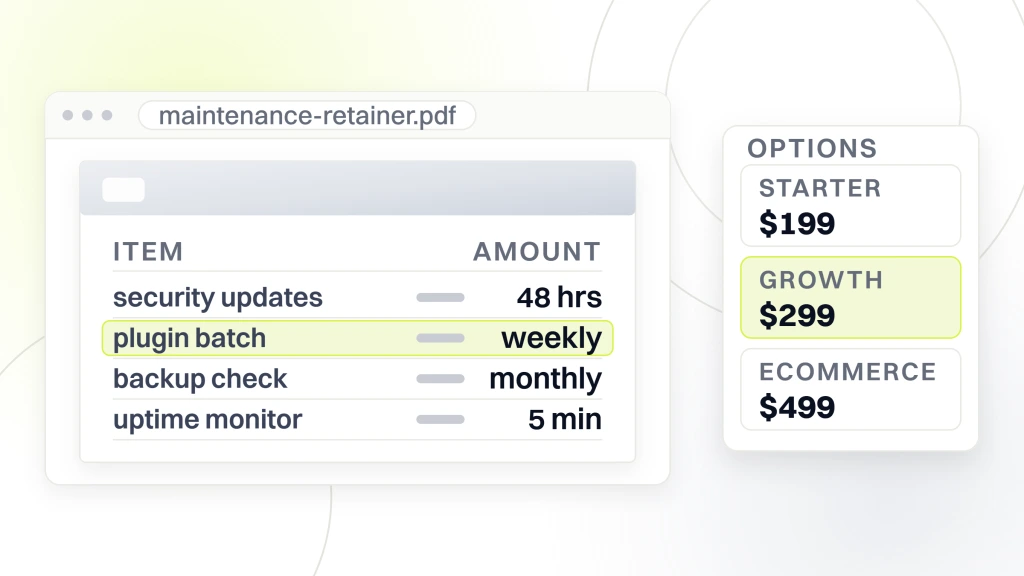
| Tier | Monthly price | Fits | Response SLA |
|---|---|---|---|
| Starter | $199 | Brochure sites, 5-15 pages, 8-15 plugins | 24 to 48 hours |
| Growth | $299 | Service business sites, 20-40 plugins, lead forms | 4 to 24 hours |
| Ecommerce | $499 | WooCommerce, membership sites, transactional data | 1 to 4 hours |
| Enterprise | Custom | Custom code, multi-site, complex integrations | Under 1 hour |
Starter tier at $199 monthly
The Starter tier fits small brochure sites. A dental practice with five services and an about page, a small law firm with six pages, a coffee roaster with a menu and hours. Plugin count under 15. No ecommerce. No membership. The retainer covers core WordPress security updates within 48 hours, plugin updates on a weekly batch, monthly backup verification, uptime monitoring at 5-minute intervals, and one PageSpeed check on the home page. Zero to one included edit hour. Outage response inside 24 to 48 hours. Perfect for the site that generates leads but does not process transactions in real time.
Growth tier at $299 monthly
The Growth tier fits service businesses with lead forms, booking systems, and 20 to 40 plugins. A chiropractic practice with online scheduling. An HVAC company with instant-quote forms. A B2B agency with a landing page library. The retainer adds staged plugin rollout on any form-touching update, quarterly database optimization, monthly Core Web Vitals review, two to three included edit hours, and a 4 to 24-hour outage response. This is the most common tier for growing businesses so the incremental $100 above Starter buys real response time.
Website maintenance package pricing for ecommerce sites
Ecommerce maintenance pricing lands at $499 monthly and up so every plugin update on a WooCommerce site risks the checkout. Real ecommerce retainers stage every update on a fresh clone, test the full purchase flow, verify payment gateway integration, then apply to production during a low-traffic window with rollback ready. That process takes 3 to 5 hours a month at minimum. Below $499 you are not getting it.
Ecommerce retainers add weekly backup verification, not just monthly, so a lost transaction is customer data plus revenue. Faster outage response, usually 1 to 4 hours. Transaction integrity checks so no orders sit in a stuck status. PCI compliance verification if you handle card data directly. Extension marketplace monitoring for the WooCommerce official extensions your site depends on. Every one of these tasks is 30 to 90 minutes of monthly work. Stack them together and the $499 tier reflects real hours, not marketing math.
WooCommerce specifics that move the price
WooCommerce sites carry three price-raising specifics. Payment gateway plugin compatibility, which needs staged testing on every core WooCommerce release. Shipping and tax extensions like ShipStation, TaxJar, or Avalara, each with its own update cadence. And subscription products through WooCommerce Subscriptions, which have their own edge cases for renewals and failed payments. Each of these categories adds 30 minutes to 2 hours of monthly monitoring. Retainers that ignore these categories break the checkout somewhere between month three and month nine.
Membership and course sites
Membership sites running MemberPress, LearnDash, WooCommerce Memberships, or Restrict Content Pro have similar price dynamics to ecommerce. Every update touches the paywall logic. Every core WordPress update risks the user role capability layer. Every plugin conflict can lock out paying members from content they already paid for. Membership retainers usually land in the same $499 band as ecommerce, with strong emphasis on staged testing and role-permission regression checks.
Included edit hours across every retainer tier
Included edit hours are the release valve on every retainer relationship. Without them, every tiny content request becomes a billable ticket, and the vendor relationship gets adversarial fast. The right amount of included time is the amount that covers 80 percent of your typical monthly change requests without triggering a change order.
Starter tier usually includes zero to one hour. Growth tier includes two to three hours. Ecommerce tier includes three to five hours. Enterprise custom scopes include five to ten hours. Anything beyond the included time bills at the vendor hourly rate, usually $95 to $195. Some vendors charge $145 as a mid-market standard. Some charge $195 for named senior developers. The hourly rate matters less than the transparency. A vendor that hides the rate is planning to surprise you with a bill.
- Content updates. Publishing blog posts, editing service pages, updating team bios.
- Copy tweaks. Changing hours, phone numbers, promotional banners, testimonials.
- Image swaps. Uploading new headshots, replacing hero images, refreshing gallery photos.
- Small design fixes. Adjusting spacing, changing button colors, tweaking mobile responsiveness.
- Form edits. Adding a field, changing a notification email, updating confirmation copy.
- Menu changes. Adding items, reordering navigation, updating footer links.
Rollover versus use-it-or-lose-it hours
Some vendors let unused hours roll over to the next month. Some do not. The rollover model rewards you for planning. Save hours in slow months, spend them during a launch. The use-it-or-lose-it model penalizes lulls and creates artificial pressure to invent work. Ask before signing. Rollover retainers usually feel fairer and generate less friction. If a vendor will not roll hours, negotiate a slightly lower base rate or a slightly higher hourly cap. The math usually works out equivalent.
Scope clarity on what counts as an edit hour
Scope arguments happen when small requests balloon into big ones. Get the vendor to write down what counts as included. Content edits, included. New page builds, usually billable. Plugin installations, usually billable. Image compression sweeps, included. Custom code work, always billable. Design changes touching the theme, usually billable. Get this list in the contract. Every hour of that list is smoother than the same hour billed in surprise later.
Hidden costs behind every retainer price
The advertised retainer number rarely tells the full story. Hidden costs show up in month three, month six, or the day the site breaks. Every buyer should surface these before signing so nothing about the total cost of ownership is a surprise. For DTC ecommerce founders needing platform-specific pricing on Shopify, WooCommerce, and BigCommerce, our writeup on ecommerce maintenance package tiers covers the same tier logic priced against annual revenue and integration count.
The six common hidden costs. Emergency response rates that can triple during outages, sometimes $250 to $500 an hour. Plugin license fees for premium plugins the vendor uses but bills through. WP Rocket, Gravity Forms, ACF Pro, WooCommerce extensions. Hosting markup where the vendor resells hosting at 30 to 100 percent margin. New feature builds that get scoped as separate projects at $2,500 to $15,000. PHP or WordPress major version bumps that get billed as annual projects. And offboarding fees when you switch vendors, where the outgoing vendor charges for backup export or documentation transfer.
Emergency response rates
Ask the vendor exactly what happens when the site is down at 2 AM on a Sunday. Real answer, the retainer includes response within the SLA, no additional charge. Sketchy answer, emergency rates apply, usually $200 to $500 an hour above the regular rate. The second model incentivizes the vendor to let small issues become emergencies. Push back. The retainer should absorb outage response. If it does not, the price is not really $499 a month. It is $499 a month plus $2,500 whenever something breaks.
Plugin license passthrough
Some vendors include premium plugin licenses. Some pass through the cost. WP Rocket at $59 a year. Gravity Forms at $259 a year. ACF Pro at $49 a year. WooCommerce Subscriptions at $199 a year. Stacked up, premium plugins can add $500 to $2,000 annually. Ask which model applies. Neither is wrong. Both are OK once you know before signing. The bad version is when the vendor pushes premium plugins into the stack without ever telling you they cost extra.
Berks Plumbing case study on right-sized retainer pricing
Berks Plumbing, a residential and commercial plumbing business in Berks County, ran a full-funnel PPC, SEO, and web engagement with us that included the maintenance retainer on a growing service business site. The site sits on WordPress with service pages for drain, emergency, and commercial work, integrated call tracking, and Local Service Ads feeding the lead flow. The retainer landed in the Growth tier at $299 a month, reflecting the site active lead-generation stack.
The retainer covered the seven-point monthly stack plus staged plugin testing on the form flow (which fed the call tracker and CRM), quarterly page speed audits on the top ten service pages, and two included edit hours a month. Results across 12 months. Ad conversions up 99 percent. Cost per lead down 67 percent. Organic users up 75 percent. The site stayed fast, the forms never broke, and every service page load stayed above a 90 mobile PageSpeed score. The retainer did not drive those numbers alone, and the retainer preserved the environment that let the SEO and PPC teams produce them.
Why the Growth tier fit Berks
Berks needed staged testing so the form passed data to two lead-tracking plugins and a webhook to the CRM. A Starter-tier retainer at $199 would have skipped the staged testing, and any one plugin update could have taken the lead flow offline for days. The Growth tier at $299 bought the testing capacity that kept the funnel intact. That is the right-sizing question every service business should ask. How much per hour does a broken lead form cost, and what tier of retainer prevents it.
Transferable lessons for service business sites
The transfer to any service business site is clean. If your lead flow depends on a form, a booking widget, or a call tracker, you need staged testing on updates. That means Growth tier or higher. If you are just a five-page brochure with a mailto link, Starter tier is fine. The exact price is less important than matching the retainer to the failure cost. Retainers that prevent one broken week per year pay for themselves before you notice.
The $29 broad retainer trap
Every business owner has seen the Facebook ad that promises broad WordPress support for $29 a month. The ad shows a stock photo of a smiling woman wearing a headset who does not actually work at the company. The company is three overseas contractors sharing a Slack channel. The broad edits take three weeks to complete. The broad priority means they respond by end of week. And the broad updates are the same automatic ones your WordPress dashboard already runs for free. That $29 buys the illusion of a retainer. The retainer that would actually protect your site costs $199.
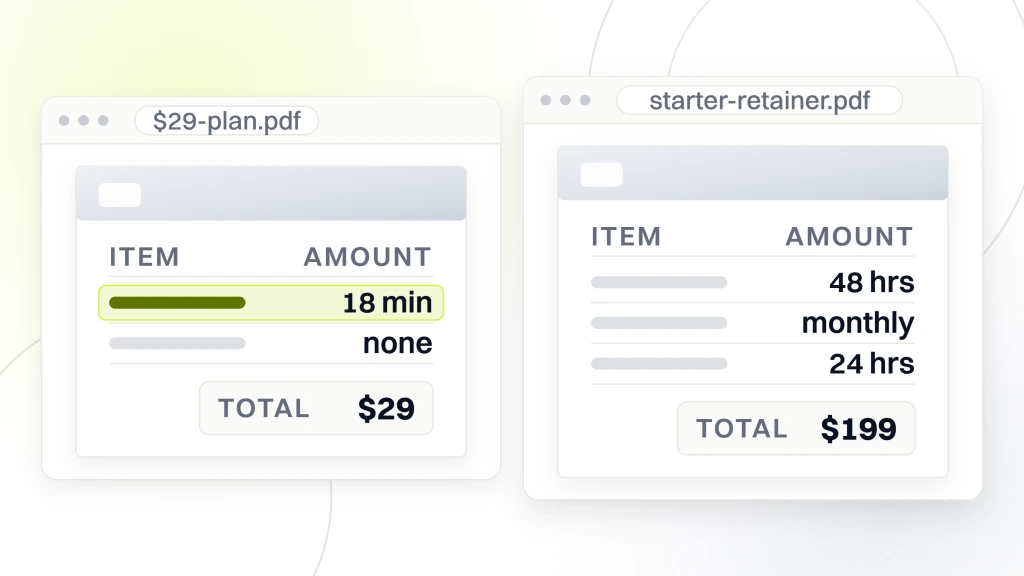
Do the honest math. A qualified WordPress developer bills $95 to $195 an hour. Even at $95, the $29 retainer buys 18 minutes of actual work a month. That is enough to log in and confirm the plugins updated automatically. It is not enough to test the checkout, review the error logs, or verify a backup restored cleanly. Anyone quoting under $99 for real maintenance is either subsidizing the retainer to upsell you later, or they are not doing the work at all. Both endings cost you more than the honest $199 would have.
Annual versus monthly website maintenance retainer cost
Some vendors offer annual pricing with a 10 to 20 percent discount versus monthly billing. The math usually favors annual for stable business relationships and monthly for uncertain ones. Redefine Web contracts are typically six months minimum, then rolling. That structure balances the vendor need for planning with the client need for flexibility.
Annual prepay usually shaves 10 to 15 percent off the sticker rate. On a $499 monthly retainer, that is roughly $600 to $900 in savings over the year. Fair trade if you are confident the vendor will still be around and the relationship will still be working in month 11. Bad trade if you are unsure. The safer path for new vendor relationships is a six-month initial commitment, then continue on a rolling basis. That structure keeps both parties honest without locking the client into a bad fit.
Contract length that protects both sides
Six months is the standard commitment for a maintenance retainer. That length gives the vendor time to complete onboarding, absorb the site into their monitoring stack, run a full quarter of monthly work, and demonstrate value on a second quarterly review. Below three months and the vendor is running at a loss on onboarding. Above 12 months without escape and the client is locked into a relationship that may not work. Six months rolling continuation is the sweet spot both directions.
Cancellation terms to read before signing
Read the cancellation clause. Standard, 30 days notice after the initial term. Fair. Sketchy, 90 days notice or automatic annual renewal without notice. Not fair. Bad, any clause that lets the vendor hold your backups or block your admin access during the transition. Walk away. Standard vendor behavior is to hand over the site cleanly on departure, hand over the final backup, provide login credentials for anything they installed, and answer transition questions for two weeks after termination. Retainers that do not operate that way were not retainers. They were hostage situations.
Retainer price versus in-house salary math
The in-house alternative to a retainer is hiring a part-time or fractional developer. The math heavily favors the retainer for most small and mid-size sites. A part-time developer at 10 hours a week costs $30,000 to $60,000 a year fully loaded. A quality retainer runs $2,400 to $6,000 a year for the same coverage.
The in-house case gets stronger above a certain complexity threshold. Ecommerce stores at $2M-plus annual revenue benefit from a dedicated technical operations person. B2B SaaS product marketing sites often justify an in-house developer for the marketing site so product velocity and marketing velocity intertwine. Multi-site WordPress installs with 20 or more subdomains cross the threshold. Everyone below those thresholds pays less and gets better coverage from an agency retainer. The hybrid model, in-house content lead plus agency retainer for the technical layer, works for most businesses in the $500K to $10M revenue range.
Total cost of ownership comparison
Compare total cost, not sticker price. A $30,000 part-time developer salary is really $30,000 plus benefits at 25 percent, plus recruiting cost at $3,000, plus equipment at $2,000, plus onboarding time at 30 hours of your team calendar. Realistic loaded cost, $42,000-plus in year one and $37,500 in year two. A $499 monthly retainer is $5,988 loaded, no benefits, no recruiting, no equipment. The savings buy you two additional hires elsewhere or two full marketing campaigns. For sites below the complexity threshold, the retainer wins on every metric.
Agency retainer versus freelance retainer
Freelance retainers usually price 20 to 40 percent below agency retainers. The tradeoff is coverage risk. If the freelancer takes vacation, gets sick, or takes on too many other clients, your site is exposed. Agencies distribute coverage across a team. Better SLA reliability, higher price. The right choice depends on your site downtime tolerance. Freelancer if the site can absorb a slow response occasionally. Agency if the site loses real revenue during outages. Both models can work at the same price band with different risk profiles.
How to buy a maintenance retainer on the right tier
The buying process runs across four steps. Baseline the site (plugin count, transaction volume, custom code depth, current downtime tolerance). Match to a tier. Request quotes from three vendors at that tier. Compare responses on process, not price. Then choose based on the vendor whose process gives you the highest confidence.
The baseline is the honest work. Count plugins. Note transaction volume if any. List custom code inventory. Ask yourself, what is the cost per hour of downtime for this business. That number determines the tier. Sites with zero direct downtime cost can buy Starter. Sites at $100 to $500 an hour cost buy Growth. Sites at $500 to $2,500 an hour cost buy Ecommerce tier. Sites above $2,500 buy Enterprise. This exercise takes 20 minutes and prevents two years of overpaying or underprotecting.
The three-quote rule for maintenance
Get three quotes at the same tier. Compare the responses on process, not price. The vendor whose sales call walks you through their staging workflow, their patch cadence, their outage playbook, and their sample monthly report earns the trust before the contract. The vendor that talks about vague benefits and dodges the specifics does not. Cheapest quote is not the winner. The vendor with the most transparent process is. Every dollar you save going with the cheapest quote gets refunded to you as an emergency fee later.
Trial period or full six months
Some vendors offer a 30-day or 60-day trial period. Some go straight to six months. Both models work. The trial protects you from the vendor whose sales call was better than their delivery. The six-month commitment gives the vendor room to run onboarding, absorb the site, and demonstrate value on a second quarterly review. If you are new to hiring maintenance, take the trial. If you have hired before and know the questions to ask, go straight to six months. Either way, read the cancellation clause first.
Seven questions to ask any maintenance vendor before signing
The right seven questions separate the honest vendor from the marketing brochure. Ask them all on the sales call and write the answers down. The vendor that answers all seven with specifics earns the contract. The vendor that dodges any of them tells you exactly what will break in month four.
- Patch cadence. What day of the week or month do you push plugin and core updates.
- Sample report. Can I see a real anonymized monthly report from a current client.
- Staging workflow. Walk me through how a WooCommerce update gets tested before production.
- Last restore test. When did you last restore a client site from backup end to end.
- Outage SLA. What happens when my site is down at 3 AM on a Sunday.
- Do-not-run plugin list. Which plugins do you refuse to install and why.
- After-hours escalation path. Who picks up the phone at 11 PM if the site goes down.
Where to start on your website maintenance packages pricing decision this week
Start by writing down the numbers. Site plugin count. Monthly traffic. Direct revenue impact if the site goes down for one hour. Those three numbers match you to a tier in about five minutes. Then Google three vendors at your tier and email each for a quote. Ask the seven-question set. Patch cadence, sample report, staging workflow, last restore test, outage SLA, do-not-run plugin list, and after-hours escalation path. Vendors that answer all seven earn the interview.
Then pick the one whose answers give you the highest confidence and sign a six-month contract. Track the numbers monthly. Adjust the tier as the site grows. Reference our WordPress website maintenance packages guide for the platform-specific tasks. Our what’s included in a website maintenance package post walks the inclusion detail. If you are still deciding whether the retainer is worth it, our do you need a website maintenance package post walks the math. For the full stack we run, our monthly website maintenance packages service page shows the tiers. Plus review the Kinsta maintenance cost breakdown, the WP Rocket cost guide, and the WordPress security guide for third-party references.