
Healthcare Web Accessibility ADA and WCAG Requirements With a Checklist
- Healthcare web accessibility is legally required under the ADA.
- WCAG 2.1 AA is the working target for every practice site.
- Contrast, keyboard nav, form labels, and alt text catch most sites.
- Overlays are red flags, not fixes, and courts have said so.
- Remediation after a demand letter costs three to five times more.
- What Healthcare Web Accessibility Actually Means
- ADA Compliant Websites Healthcare Practices Actually Build
- ADA Compliance for Healthcare Websites and the Real Cost of Skipping It
- Accessibility Requirements for Healthcare Websites the Full Checklist
- Best Practices for Accessibility in Healthcare Websites at Design Stage
- Comparing Accessibility Testing Approaches for Healthcare Sites
- Healthcare Web Accessibility Case Study From a Real Client
- How to Run a Healthcare Web Accessibility Audit
- Ongoing Healthcare Web Accessibility After Launch
- Getting Healthcare Web Accessibility Right the First Time
Healthcare web accessibility is a legal obligation, a moral obligation, and a booking obligation, in that order for the people who write the checks. Practices that skip accessibility work end up in the same place regardless of specialty. A demand letter arrives. An audit reveals two hundred violations. The remediation costs three times what it would have cost to build the site correctly. And every patient who could not use the original site for six months booked with a competitor. This guide walks through what accessibility actually requires under the ADA and WCAG 2.1 AA, the twenty-something items that show up in nearly every healthcare audit, and the working checklist we run on real practice sites before we sign off on a launch. If you are the practice owner, the marketing lead, or the developer preparing to hand a site to a healthcare client, this is the reference to use before code review starts.
What Healthcare Web Accessibility Actually Means
Healthcare web accessibility means patients with disabilities can use the site. Screen readers, keyboard-only navigation, low-vision zoom, color-blind color pairings, captioned video, and forms that assistive technology can actually parse. If any patient cannot use the site to book a visit, the practice has an accessibility problem.
The legal obligation flows from the ADA. The technical standard the courts and the federal government point to is WCAG 2.1 AA. The two work together. ADA sets the duty. WCAG sets the measurable target.
Why the ADA applies to healthcare websites
Healthcare practices are places of public accommodation under Title III of the ADA. Courts have consistently ruled that a practice’s website is an extension of the physical place of business and carries the same accessibility duty. That is the settled legal position across most federal circuits. Practices that argue the ADA does not apply to their site have almost always lost when tested. The cheaper path is to build to the standard from the start.
WCAG 2.1 AA as the working target
WCAG 2.1 AA is the version of the Web Content Accessibility Guidelines the U.S. Department of Justice consistently references, and it is the version plaintiffs’ firms use to build demand letters. Building to WCAG 2.2 AA gives an even stronger position. Building to WCAG 2.0 A gets a practice in trouble. AA is the working target every healthcare site should hit across every page and every template.
What accessibility is not
Accessibility is not an overlay widget. Overlay vendors sell a script that promises to make the site accessible in one click. Every serious accessibility auditor treats overlays as a red flag, not a fix. Overlays create their own accessibility bugs, do not remediate the underlying markup, and have been the target of successful lawsuits themselves. If your current agency is proposing an overlay as the accessibility solution, that is a signal to change agencies.

ADA Compliant Websites Healthcare Practices Actually Build
ADA compliant websites for healthcare practices share the same skeleton regardless of specialty. Semantic HTML, keyboard-navigable interfaces, form fields with visible labels, color contrast that hits 4.5 to 1 on body text, alt text on every content image, captions on every video, and error states that assistive technology can announce. These are the concrete outputs of building to WCAG 2.1 AA.
Semantic HTML is the base layer
Semantic HTML gives assistive technology the structural information it needs to make a page navigable. Proper heading order. Landmark regions for main content, navigation, and footer. Form labels associated with fields. Lists marked as lists. Buttons that are actually buttons instead of styled divs. Every one of these is invisible to a sighted user with a mouse. Every one of them is critical for a patient using a screen reader or keyboard.
Keyboard navigation as a first-class requirement
Every interactive element on a healthcare site must be reachable and operable with a keyboard alone. Menus. Booking forms. Insurance verification widgets. Provider filters. Every single one. Focus indicators must be visible so the patient can see where they are on the page. Focus traps in modals or booking widgets are one of the most common WCAG failures we see, and they are also one of the easiest to catch with a five-minute keyboard-only test.
Color contrast and low-vision users
Color contrast has to hit 4.5 to 1 for normal body text and 3 to 1 for large text and interface components. Light gray text on white backgrounds is the single most common WCAG contrast failure on healthcare sites. Practices designing to a modern minimal aesthetic have to consciously trade the fashion-forward contrast for the accessible contrast. The math is not negotiable. The design has to bend around it.
ADA Compliance for Healthcare Websites and the Real Cost of Skipping It
ADA compliance for healthcare websites carries a business cost most practices never model. Every practice we audit that skipped accessibility work either got a demand letter within 24 months of launch or paid a settlement to make one go away quietly. The remediation cost after the fact is three to five times the cost of building to standard the first time. The reputational cost with disability advocacy communities is separate and does not appear on the balance sheet.
What a demand letter looks like
A typical ADA demand letter against a healthcare website arrives as a certified mail package. The plaintiffs’ firm names specific WCAG violations on specific URLs, cites relevant case law, and offers a settlement number. The number is usually in the tens of thousands of dollars, with a required accessibility remediation timeline attached. Practices that ignore the letter go to litigation. Practices that respond quickly and remediate visibly usually settle on more favorable terms.
The remediation math
Remediating an existing site to WCAG 2.1 AA costs about 8,000 to 40,000 dollars depending on the size of the site, the complexity of the interactive elements, and how much of the underlying markup needs to be rewritten rather than tweaked. Building to the standard from a fresh design typically adds 5 to 15 percent to the project cost. The math strongly favors doing it once, correctly.
What settlements typically include
Settlements almost always require a documented accessibility remediation plan, a specific WCAG target date, third-party audit reports, and ongoing monitoring for a defined period. The practice ends up doing the accessibility work anyway. The only question was whether it happened before or after the demand letter arrived. Doing it before is cheaper and quieter.
Free browser plugin, 3-minute scan, catches 60 percent of what a demand letter would flag. Run it on your homepage today and fix contrast first.
Accessibility Requirements for Healthcare Websites the Full Checklist
Accessibility requirements for healthcare websites can be captured in a working checklist we run on every audit before launch. The checklist maps to WCAG 2.1 AA success criteria and covers the categories where healthcare sites most commonly fail. Every item can be tested in an afternoon. Every item earns its place because it shows up in real practice sites and real remediation projects.
- Every image has an alt attribute. Decorative images use empty alt. Content images describe the content.
- Color contrast on body text meets 4.5 to 1 minimum. Large text and interface components meet 3 to 1.
- Every form field has a visible label associated with the field via for and id attributes.
- Error messages announce clearly through assistive technology and describe the fix.
- Every interactive element is reachable and operable with a keyboard alone.
- Focus indicators are visible on every interactive element that receives focus.
- Heading order is logical, starts at H1, and does not skip levels going down.
- Landmark regions mark the main content, primary navigation, and footer.
- Every video has captions. Every audio has a transcript. Autoplay is off or has a pause control.
- Any content that flashes stays under three flashes per second.
- Motion animations respect the user’s prefers-reduced-motion setting.
- PDF documents that carry patient information are tagged and accessible or offered as HTML.
- Color is never the sole indicator of meaning. Icons or text accompany color states.
- Text can be resized up to 200 percent without loss of function.
- Time-based interactions provide a way to extend the time or turn off the timer.
Which items catch the most sites
Color contrast, form labels, keyboard navigation, and alt text are the four most-failed items in every healthcare accessibility audit we run. Together they account for about 70 percent of the WCAG violations on a typical practice site. The other items still matter. They just show up less often. Practices that catch these four systematically at design and code review stages ship sites that pass audits on the first pass.
Which items only show up on complex sites
Time-based interactions, video captions, and PDF accessibility mostly show up on larger practice sites with patient portals, education libraries, or telehealth features. Solo practices with a marketing site plus a booking widget rarely hit these items. Multi-location networks, specialty groups, and DSO operators absolutely do. The checklist scales to match the complexity of the site.
Best Practices for Accessibility in Healthcare Websites at Design Stage
Best practices for accessibility in healthcare websites start at the design stage, not at QA. The cheapest accessibility bugs are the ones the designer never introduces. That means color palettes with tested contrast, form patterns designed with visible labels, motion patterns that respect reduced-motion preferences, and heading structures baked into wireframes.
Design tokens for contrast
Every color pair in the design system should be tested for contrast at design token stage. A working design system carries pre-approved foreground-background combinations. Designers picking from that palette cannot accidentally ship a low-contrast pairing. Designers freehanding colors always eventually do. The fix is systemic, not per-project.
Form patterns with visible labels
Placeholder-only labels look clean and fail accessibility on every audit. Best practice is a persistent visible label above or beside every form field, with the placeholder used only for example input format. This applies to booking forms, insurance verification widgets, patient intake, and any other form the practice runs. The visual designers do not have to love it. The accessibility outcome does.
Reduced motion and vestibular safety
Motion animations trigger vestibular issues for a real slice of patients. Best practice is to design animations that respect the user’s prefers-reduced-motion setting and to give the user a way to pause any motion that runs on the site. Hero videos that auto-loop without a pause control are the most common vestibular-safety failure we catch at audit.
Comparing Accessibility Testing Approaches for Healthcare Sites
Not every accessibility test catches the same issues. Automated scanners catch about 30 percent of real WCAG failures on a healthcare site. Manual keyboard testing catches another 30 percent. Screen reader testing catches most of the remaining 30 percent. User testing with patients who use assistive technology catches the last 10, which is often the most consequential. Sites that rely on any single testing approach get a false green light.
| Testing approach | What it catches | Coverage | Common use |
|---|---|---|---|
| Automated scanner | Missing alt text, contrast failures, form label misuse | About 30 percent | Daily CI runs |
| Keyboard-only manual test | Focus traps, missing focus states, unreachable elements | About 30 percent | Pre-launch pass |
| Screen reader testing | Semantic HTML gaps, incorrect ARIA, unclear announcements | About 30 percent | Sprint milestones |
| User testing with AT users | Real-world workflow blockers automated tests miss | About 10 percent | Major redesigns |
| Third-party accessibility audit | Combines all four, plus VPAT documentation | Full coverage | Annual review |
Reading the coverage math honestly
The percentages are rough working numbers, not exact science. Different sites and different specialties shift the balance. The point is that no single testing approach hits full coverage. A healthcare site that only runs an automated scanner is missing more than half the accessibility issues on the site. That gap is what plaintiffs’ firms find in a demand letter. Every serious accessibility program stacks at least two of the four approaches, and best-in-class programs use all four before every major launch. The other honest note is that testing coverage is not the same as remediation coverage. A test that catches an issue only helps if the team actually fixes it, which means every finding needs an owner, a due date, and a verification step baked into the same sprint.
Healthcare Web Accessibility Case Study From a Real Client
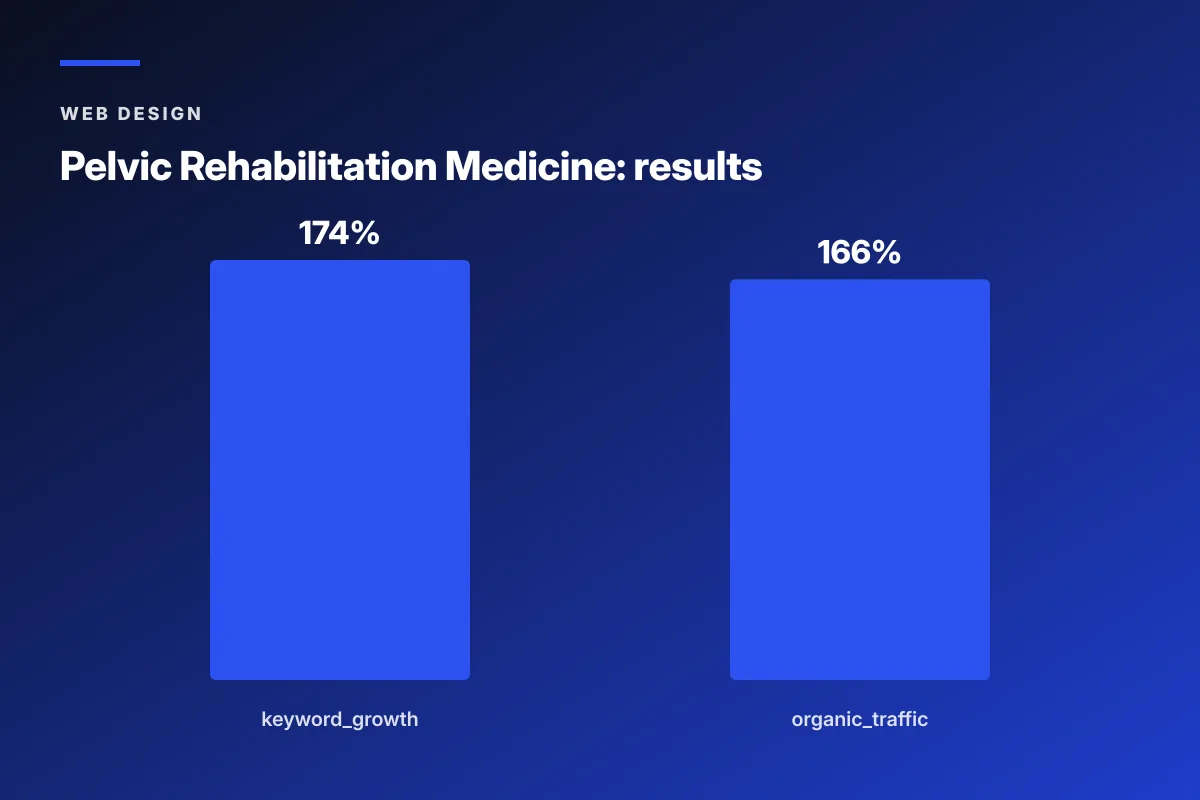
Pelvic Rehabilitation Medicine, a specialty medical group with 14 locations, went through an accessibility remediation as part of a full redesign with Redefine Web. The pre-project site had color contrast failures on primary body text, form fields without visible labels on the booking flow, and a hero carousel with keyboard focus traps. Remediation addressed each category systematically and went live alongside a restructured content architecture. Over the 2023 to 2024 engagement, organic keyword rankings expanded 174 percent year over year and organic traffic grew 166 percent, and the accessibility posture cleared the practice’s compliance review without a follow-up demand letter.
Why the accessibility work paid back beyond compliance
The accessibility fixes had side effects on the general patient experience. Better focus states helped every keyboard user. Higher contrast helped every mobile user in sunlight. Cleaner form labels helped every visitor filling out a booking form on a phone. The audit-driven changes did not just clear a legal requirement. They gave the whole site a usability upgrade that showed up in booking rate.
Why the community platform passed accessibility from day one
The dedicated patient community platform launched alongside the site was built to WCAG 2.1 AA from wireframe stage. That decision saved a second remediation project 12 months later. The lesson is boring and correct. Design for accessibility from the first sketch, and the remediation project simply never has to happen.
How to Run a Healthcare Web Accessibility Audit
Running a healthcare web accessibility audit is a project management exercise as much as a technical one. The audit has to be scheduled, resourced, executed against a specific WCAG version, documented, and turned into a remediation plan. Skipping any of those steps produces a report nobody reads.
Choose the WCAG version and level
Audit against WCAG 2.1 AA at minimum. Include 2.2 success criteria if the site was launched or majorly redesigned after October 2023. The audit report should name the version explicitly so nobody argues about the standard later. Documentation matters.
Run the stack in the right order
Start with an automated scanner to catch the easy items. Then run keyboard-only manual tests on the highest-traffic templates. Then run screen reader tests on the booking flow, the provider bios, and the location pages. Finish with user testing on the actual booking flow. Ordering the stack this way produces the least duplicate work.
Document violations by severity and effort
Every violation should get a severity rating and an effort estimate. High severity plus low effort items go first. High severity plus high effort items get a scheduled sprint. Low severity items get batched. Practices that try to fix everything at once produce a big remediation project that never ships. Practices that sequence the work correctly clear the site in weeks, not months.
Ongoing Healthcare Web Accessibility After Launch
Accessibility does not end at launch. Every new page, every new plugin, every new campaign landing page introduces accessibility risk. Practices that treat the launch audit as a one-time event drift back below WCAG within 12 months. Best-in-class programs run a quarterly checkpoint audit and a monthly automated scan.
Monthly automated scans
A scheduled monthly scan across the whole site catches the drift that content editors introduce. New blog posts with missing alt text. New landing pages with untested color contrast. New plugins that add non-labeled form fields. The scan takes about an hour to set up and pays back forever.
Quarterly manual passes
Every quarter, run a manual keyboard and screen reader pass on the booking flow, the highest-traffic service pages, and any new templates that went live in the previous 90 days. That pass catches the issues automated scans miss and keeps the site accessible in practice, not just in the audit report.
Annual third-party audits
An annual third-party accessibility audit gives the practice a defensible position if a demand letter ever arrives. The third-party report shows good-faith compliance work and dates the practice’s accessibility posture. That documentation is the difference between a settlement conversation and a friendly remediation timeline. Practices that maintain three years of dated accessibility reports negotiate from a position of visible good faith. Practices that produce nothing when asked negotiate from a position of neglect. The paperwork alone changes the tone of the conversation.
Getting Healthcare Web Accessibility Right the First Time
Getting healthcare web accessibility right the first time is cheaper, faster, and quieter than any remediation project. The list below is the working sequence we run at Redefine Web on new healthcare projects, and it produces sites that clear third-party audits on the first pass. For the wider design view this sits inside, see our Healthcare Web Design (Pillar) reference.
- Design with a tested color palette and pre-approved contrast tokens.
- Wireframe every form with visible labels and error state affordances.
- Bake heading order, landmarks, and semantic patterns into the component library.
- Test every template with a keyboard-only pass before visual QA starts.
- Run a screen reader pass on the booking flow before code review sign-off.
- Include an automated accessibility scan in the CI pipeline for every deploy.
- Schedule the launch audit two weeks before the target date, not on launch week.
- Document the WCAG version and level in the site’s accessibility statement.
- Publish the accessibility statement in the site footer with a working contact address.
Publishing the accessibility statement
Every healthcare site should publish an accessibility statement that names the WCAG version the practice targets, describes the ongoing accessibility program, and provides a working contact for patients to report issues. The statement is not a magic shield against demand letters, but it is a documented good-faith commitment that plaintiffs’ firms take seriously. Practices without a statement look like they never thought about accessibility. Practices with a well-maintained statement look like they run a working program. For the wider technical view this sits inside, see our Core Web Vitals reference.
Assigning ownership internally
Somebody at the practice has to own accessibility. Not the developer at the agency. Not the abstract compliance officer. A named person who receives accessibility-related patient contacts, triages them, and follows up. In most practices this ends up being the marketing lead or the practice manager. The role does not need to be full-time. It does need to be assigned. For the wider build-side view this sits inside, see our Best Healthcare Website Design reference.
Where the accessibility program lives inside the practice
The accessibility program lives at the intersection of marketing, IT, and compliance. That intersection is uncomfortable at most practices because the three functions rarely coordinate. The fix is a quarterly cross-functional review meeting on the accessibility posture and an owner who calls it. Boring. Effective.
Healthcare web accessibility is the working baseline every practice site has to hit before it can call itself best-in-class. For deeper reading on the standards themselves, see the W3C WCAG 2.1 quick reference, the DOJ web accessibility guidance, and the HHS Section 1557 nondiscrimination rule for healthcare. For the design-side view this checklist sits inside, our Healthcare Website Design Services reference walks through the wider engagement. If your current site has never been audited against WCAG 2.1 AA and you want a first-pass diagnostic that surfaces the biggest violations, our team runs paid accessibility diagnostics that end in a prioritized fix list matched to the effort each item takes.
Frequently asked questions
Do healthcare websites have to be ADA compliant?
Yes. Healthcare practices are places of public accommodation under Title III of the ADA, and courts across most federal circuits have consistently held that a practice's website is an extension of the physical place of business and carries the same accessibility duty. Practices that argue the ADA does not apply to their site have almost always lost when tested in court. The Department of Justice references WCAG 2.1 AA as the technical target, so building to that standard positions the practice on the settled side of both the legal duty and the working technical measurement.
What WCAG version should healthcare websites target?
Healthcare websites should target WCAG 2.1 AA at minimum. That version is what the U.S. Department of Justice references in guidance and what plaintiffs' firms cite in demand letters. Building to WCAG 2.2 AA gives an even stronger legal position and adds nine newer success criteria that address touch targets, focus appearance, and drag operations. Building only to WCAG 2.0 A is not enough and leaves the practice exposed to accessibility complaints. The audit report should name the version explicitly so there is no ambiguity about the standard when a demand letter or review lands.
What are the most common accessibility failures on healthcare websites?
Color contrast failures on body text, form fields without visible labels, missing alt text on content images, and keyboard focus traps in booking modules or navigation menus. These four categories account for roughly 70 percent of the WCAG violations we find on a typical healthcare practice site during audit. Video without captions and PDF documents that cannot be read by assistive technology show up next, especially at larger practices with patient education content. Practices that catch these categories systematically at design and code review stages ship sites that pass audits on the first pass.
Are accessibility overlays a valid solution for healthcare websites?
No. Every serious accessibility auditor treats overlay widgets as a red flag rather than a fix. Overlays layer a script on top of an inaccessible site and claim to solve the problem in one click. In practice, they create their own accessibility bugs, do not remediate the underlying markup, and have been the target of successful lawsuits themselves. Courts have not accepted overlay adoption as evidence of good-faith accessibility compliance. If a current vendor is proposing an overlay as the accessibility solution for a healthcare site, that is a signal to change vendors before the practice inherits the exposure.
How much does an accessibility audit cost for a healthcare website?
A first-pass accessibility diagnostic for a small healthcare site costs about 1,500 to 4,000 dollars and covers automated scanning plus a manual keyboard and screen reader pass on the top templates. A full third-party WCAG 2.1 AA audit with detailed remediation guidance and a Voluntary Product Accessibility Template runs 6,000 to 25,000 dollars depending on the size and complexity of the site. Remediation costs after the audit vary widely and typically run three to five times the cost of building to standard the first time. Doing the work up front, at design and development stage, is dramatically cheaper than doing it after launch.
How often should a healthcare website be accessibility tested?
Best-in-class programs run automated accessibility scans monthly across the whole site to catch drift from new content, new landing pages, or plugin changes. Manual keyboard and screen reader passes should run quarterly on the booking flow, the top service pages, and any templates that went live in the previous 90 days. A full third-party audit should run annually to give the practice a defensible position if a demand letter arrives and to catch anything the internal program missed. Testing on launch alone is not enough because a site accessible on launch day almost always drifts within twelve months.
Book your free 30-minute strategy call.
No spam, no sales rep. We use your email to schedule your call with a senior strategist. That is it.
More from the blog
View all articles → Web Design
 Core Web Vitals Healthcare Websites Actually Need to Book Patients
Read article Web Design
 Professional Services Website Design Best Practices for 2026
Read article Web Design