
Page Speed for Chiropractor Websites and What to Fix First
- Page speed for chiropractor websites hinges on Core Web Vitals scores.
- Images and fonts cause 70 percent of slow chiropractor site loads.
- Managed hosting cuts server response time to under 200 milliseconds.
- A one-second speed gain adds 7 to 12 percent more bookings.
- Monthly PageSpeed audits catch regressions before rankings drop.
- What page speed for chiropractor websites actually measures
- Why page speed for chiropractor websites moves rankings and bookings
- Core Web Vitals thresholds you must hit
- Fix images first for the biggest gain
- Fonts and third-party scripts
- Hosting and server response time
- Plugin bloat and database cleanup
- Caching and CDN configuration
- Mobile-first performance rules
- Monthly page speed audit workflow
- The Redefine Web performance program for chiropractor practices
- Common mistakes that tank page speed for chiropractor websites
Page speed for chiropractor websites is the total time a patient waits before your homepage, service page, or booking form is usable. Google uses that number as a ranking factor for both organic and local search, and patients on mobile phones abandon slow sites in about three seconds. A chiropractor website that loads in 1.8 seconds books more new patients than the identical site loading in 4.5 seconds, even when the copy and offer are the same.
This guide covers what page speed actually measures in 2026, the Core Web Vitals thresholds Google enforces, the three fixes that solve most speed problems for practice sites, and the monthly audit habit that keeps the site fast as content and plugins accumulate. If you can only afford one performance investment this quarter, this is the reading order to get there.
You will finish with a working priority list you can hand your developer or run yourself.

What page speed for chiropractor websites actually measures
Page speed for chiropractor websites is measured through Core Web Vitals: Largest Contentful Paint, Interaction to Next Paint, and Cumulative Layout Shift. Google feeds these three numbers into its ranking algorithm and into the mobile experience report. Every practice site needs green scores on all three to compete in local search.
Largest Contentful Paint tracks when the biggest visible element (usually your hero image or headline) finishes loading. Google wants this under 2.5 seconds. Interaction to Next Paint measures how fast the site responds when a patient taps a button. Google wants this under 200 milliseconds. Cumulative Layout Shift measures how much elements jump around while the page loads. Google wants this under 0.1. Miss any threshold and your ranking drops.
Test your page speed for chiropractor websites through Google PageSpeed Insights, which pulls real user data from the Chrome User Experience Report. Test the homepage, the top service page, and the booking page separately because they usually score differently. Do the test on mobile, not desktop, because 70 to 85 percent of practice-site traffic is on phones.
One useful mental model: page speed is not one number, it is three separate races. LCP is a paint race. INP is a response race. CLS is a stability race. Each race has its own fixes, and the tools flag each separately. Do not try to solve all three at once. Fix LCP first because it moves rankings the fastest, then INP, then CLS.
Why page speed for chiropractor websites moves rankings and bookings
Speed changes the two numbers your practice cares about: search visibility and patient bookings. Google uses page speed as a direct ranking factor in the mobile search results that dominate local practice queries. A slow site gets pushed below faster competitors in the local pack, and that shift alone can cut new-patient inquiries by 20 to 40 percent per month.
Speed also changes conversion rate independent of ranking. Studies from Deloitte, Cloudflare, and Portent all show the same pattern: a one-second speed gain adds 7 to 12 percent more form submissions and bookings across service-industry sites. A chiropractor website going from 4.5 seconds to 2.5 seconds picks up roughly 15 to 20 percent more bookings from the exact same traffic. That is real revenue at zero incremental ad spend.
The mobile abandonment cliff is real. Google BigQuery data shows bounce rate climbs 32 percent when load time goes from 1 to 3 seconds, and 90 percent when it goes from 1 to 5 seconds. A patient searching chiropractor near me at 8 p.m. from a couch is not going to wait. They tap the next result. That is why speed sits above copy in the CRO priority stack for practice sites.
One overlooked lever is repeat-visit speed. A returning patient checking the location or hours page loads it from browser cache in under 500 milliseconds, which drives higher repeat engagement and stronger local ranking signals. Caching plus a CDN handles this by default. Practices that ignore repeat-visit speed leave 10 to 15 percent of possible booking conversion on the table each month.
Core Web Vitals thresholds you must hit
The three Core Web Vitals thresholds are non-negotiable if you want to compete in local chiropractor search. Google publishes them, updates them, and enforces them through the ranking algorithm. Everyone in the search results is chasing the same green line, so a red score puts you behind competitors who took speed seriously.
Largest Contentful Paint must land under 2.5 seconds on mobile. Anything between 2.5 and 4.0 is orange and hurts you. Above 4.0 is red and drops you visibly in rankings. LCP is usually your hero image, so image optimization is the single biggest lever. Convert to WebP, size to the actual display width, and preload the hero image tag.
Interaction to Next Paint must stay under 200 milliseconds. Above 500 is red. INP measures response to real taps and clicks. Slow JavaScript in the theme or in plugins like Elementor, WPBakery, or heavy chat widgets is the main culprit. Cumulative Layout Shift must stay under 0.1. Ads loading late, banners popping in, and web fonts swapping cause the jumps. Reserve space in the CSS for every element that loads.
| Metric | Good (green) | Needs work (orange) | Poor (red) |
|---|---|---|---|
| Largest Contentful Paint | Under 2.5 seconds | 2.5 to 4.0 seconds | Over 4.0 seconds |
| Interaction to Next Paint | Under 200 ms | 200 to 500 ms | Over 500 ms |
| Cumulative Layout Shift | Under 0.1 | 0.1 to 0.25 | Over 0.25 |
| First Contentful Paint | Under 1.8 seconds | 1.8 to 3.0 seconds | Over 3.0 seconds |
| Time to First Byte | Under 800 ms | 800 to 1800 ms | Over 1800 ms |
PageSpeed on your homepage tells you nothing. Run the actual booking URL through PageSpeed Insights. That's where LCP kills conversion.
Fix images first for the biggest gain
Images cause the majority of slow loads on practice sites. The typical chiropractor website ships 3 to 8 MB of images per page because someone uploaded phone photos straight into WordPress at full 4000-pixel resolution. Every one of those images blocks rendering while it downloads. Fixing this alone can cut load time in half.
Convert every image to WebP format. WebP files are 30 to 40 percent smaller than JPEG at the same visible quality. Modern WordPress plugins like WebP Express, ShortPixel, or Imagify handle the conversion automatically and serve WebP to compatible browsers with a JPEG fallback. This is a one-time install with recurring gain on every page.
Size every image to the actual display dimensions, not the source dimensions. A 4000-pixel photo displayed at 800 pixels wide is downloading 5x more data than needed. WordPress makes responsive sizes automatically but only if the plugin knows the display width. Use the wp-image sizes attribute correctly, and preload the hero image with a link rel=preload tag so the browser fetches it first.
Set width and height attributes on every image in the theme so the browser reserves space and prevents layout shift. Lazy-load every image below the fold with loading=lazy attribute, which is native browser behavior now and does not need a plugin. The hero image (visible on load) should NOT be lazy-loaded because that delays LCP.
Fonts and third-party scripts
Web fonts cause invisible slowdowns. Every custom font your theme loads is a separate network request, and the browser blocks text rendering until the font arrives. A practice site loading three Google Fonts weights with Font Awesome icons is easily adding 400 to 800 milliseconds of paint time.
Host fonts locally instead of pulling from Google Fonts. Local hosting cuts DNS lookup time and lets you preload the critical font weight. Use font-display: swap in your CSS so text renders in a system fallback while the custom font loads, then swaps in cleanly. This removes the invisible text delay that hurts LCP.
Audit third-party scripts ruthlessly. Facebook Pixel, Google Tag Manager with 20 tags, live chat widgets, review-request pop-ups, and booking widgets all add JavaScript that runs on every page load. Each one is 50 to 300 milliseconds of blocking time. Load anything non-critical with async or defer attributes. Delay chat widgets until user interaction (a click or scroll) rather than firing them on page load.
The blunt rule: if a third-party script has not driven a booking in the last 90 days, remove it. Every stale tracker or widget is stealing speed from the page, and speed is what drives the bookings you actually want. This is the boring part of page speed for chiropractor websites, but it moves the needle every time.
Hosting and server response time
Time to First Byte is the server response time, and it caps how fast the page can start rendering. Cheap shared hosting under 5 dollars per month often ships TTFB in the 1 to 3 second range. Managed WordPress hosting on Kinsta, WP Engine, or Rocket.net ships TTFB under 200 milliseconds for cached pages. That is a 5x to 15x improvement from a hosting move alone.
Managed hosts also include object caching (Redis or Memcached), server-level page caching, HTTP/2 or HTTP/3, and a global CDN. All of these are speed layers that shared hosting either does not offer or charges extra for. The 30 dollar per month upgrade pays for itself in one extra booking per month, and most practices see 5 to 15 extra bookings per month from the speed alone.
Add Cloudflare in front of your host even if you are on a managed platform. The free tier gives you edge caching, DDoS protection, and image optimization at global points of presence. For chiropractor websites serving patients in one metro area, Cloudflare cuts LCP by 200 to 500 milliseconds for repeat visitors. Combined with managed hosting, this puts most practice sites into green Core Web Vitals scores without touching WordPress.
One warning: shared hosting neighbors can drag you down even when your own site is optimized. If the site next door on the shared server is getting DDoS-ed, your response time tanks with it. Managed hosting isolates your resources. This is one of the invisible reasons page speed for chiropractor websites collapses on cheap hosting during traffic spikes.
Plugin bloat and database cleanup
Every plugin adds PHP execution time, database queries, and possibly JavaScript on the front end. A practice site with 45 active plugins is not unusual, and every one of them costs 5 to 50 milliseconds per request. The math adds up to a slow site even when hosting is fast.
Audit your plugin list quarterly. Deactivate anything you have not touched in 90 days, test the site for a week, then delete it completely. Plugins that used to serve a purpose (a defunct booking widget, an old review-request tool, an unused SEO plugin) still cost speed. Remove them. Same goes for the theme leftovers from a rebuild two years ago.
Database cleanup pays speed dividends. Every post revision, spam comment, orphaned meta row, and transient adds bulk to wp_options and wp_postmeta tables. Plugins like WP-Optimize, WP Rocket, or the manual wp_options cleanup query strip this cruft. A cleaned database responds 20 to 40 percent faster to queries, which shows up directly in TTFB and page render time.
The plugin nobody talks about killing: page builders. Elementor, Divi, and WPBakery each ship 300 to 800 KB of CSS and JavaScript per page. If you can rebuild the site on the native block editor with a lightweight theme like Kadence or GeneratePress, LCP drops by 1 to 2 seconds in one move. That is a bigger gain than any single image optimization.
Caching and CDN configuration
Caching means the server saves a pre-built copy of your page and hands it to visitors without re-running WordPress. This turns a 400-millisecond dynamic page into a 50-millisecond static one. Every practice site needs page caching turned on and configured correctly.
If you are on managed hosting, page caching runs at the server level and you do not need a plugin. If you are on shared or generic VPS hosting, install WP Rocket (paid) or W3 Total Cache (free) and enable page caching plus browser caching plus GZIP or Brotli compression. WP Rocket is worth the annual fee because it also handles the lazy-load, defer, and preload work correctly by default.
A CDN caches your static files (images, CSS, JavaScript) on servers around the world so patients in your city fetch them from a local edge node instead of your origin server. Cloudflare free tier is enough for a single-location practice. BunnyCDN and KeyCDN start around 5 dollars per month and offer faster edges. Multi-location DSO groups need the paid tier because free Cloudflare rate-limits during traffic spikes.
Cache warming is worth turning on. Most cache plugins let you pre-generate cached pages after every content update so the first patient does not pay the render tax. Turn on cache preload in WP Rocket or W3 Total Cache and set it to run overnight. This trades a small amount of server load at 2 a.m. for consistently fast page loads during business hours when patients actually search.
One caching pitfall: cache-buster query strings from analytics scripts can accidentally bypass browser cache and force repeat visitors to re-download every asset. Audit the Network tab for repeated 200 responses on the same file across page loads. If you see them, the cache headers are wrong or a script is stripping them.
Mobile-first performance rules
Mobile is where the fight happens for chiropractor bookings. Between 70 and 85 percent of your practice-site traffic is on a phone, usually on 4G or spotty in-building 5G. That means every optimization needs to prioritize mobile first, not desktop.
Test speed on a real mid-range Android phone, not just Chrome DevTools throttling. WebPageTest.org lets you run tests on real devices at real network speeds and shows a video of the page load. That video is where you see what patients actually see: the three-second stare at a white screen before your hero image appears.
Serve smaller images to mobile using srcset with mobile-first breakpoints. A 1200-pixel hero image is overkill on a phone screen 375 pixels wide. WordPress ships this by default for images added through the media library, but a lot of themes hard-code image URLs that skip srcset entirely. Audit the theme header, hero section, and service page headers to make sure they use srcset properly.
Simplify the mobile menu and above-the-fold content. Every extra element on the visible screen is another render-blocking asset. Practice sites that trim the hero to a headline, one line of copy, one CTA button, and one background image consistently outrank the same practice with a busy 8-block hero above the fold. Fewer elements load faster, convert better, and rank higher on mobile devices.

Monthly page speed audit workflow
Page speed for chiropractor websites is not a one-time fix. New content, new plugins, and third-party script updates all add drag over time. A monthly audit habit catches the regressions before rankings drop, which is much cheaper than recovering rankings after a fall.
The 20-minute monthly audit runs like this. First, run PageSpeed Insights on the homepage, top service page, and booking page. Log the scores in a shared sheet. Second, check the Core Web Vitals report in Search Console for URLs flagged in the last 28 days. Third, review the Network tab in Chrome DevTools on the homepage and note anything new that loads slowly or blocks rendering.
Compare this month scores against last month. Any drop over 5 points on mobile PageSpeed, or any Core Web Vital that shifted from green to orange, gets a same-week fix. The pattern almost always traces to one of three causes: a new plugin, a new third-party script, or a new large image someone uploaded uncompressed. Track it, fix it, apply the fix, log it. Rinse next month. See website maintenance for chiropractors for the full monthly workflow.
- Week 1: Run PageSpeed Insights on 3 key URLs, log mobile scores
- Week 1: Check Search Console Core Web Vitals report
- Week 2: Compare against last month, flag any red or drop over 5 points
- Week 3: Investigate root cause of any regressions
- Week 4: Apply fixes on staging, test, push to production, re-run audit
The Redefine Web performance program for chiropractor practices
Most practices do not want to run this audit themselves. That is where our chiropractor website maintenance program comes in. We run the monthly Core Web Vitals audit, apply the fixes, and send a report showing the before-and-after mobile score for every key URL. Retainers start at 599 dollars per month.
The program covers image optimization sweeps, font hosting migration, plugin audits, hosting recommendations, CDN setup, and quarterly database cleanups. We also handle the boring monthly work of catching regressions from theme updates or new plugins that snuck in. Every fix ships to staging first, gets a real mobile speed test, then rolls to production only after the score improves.
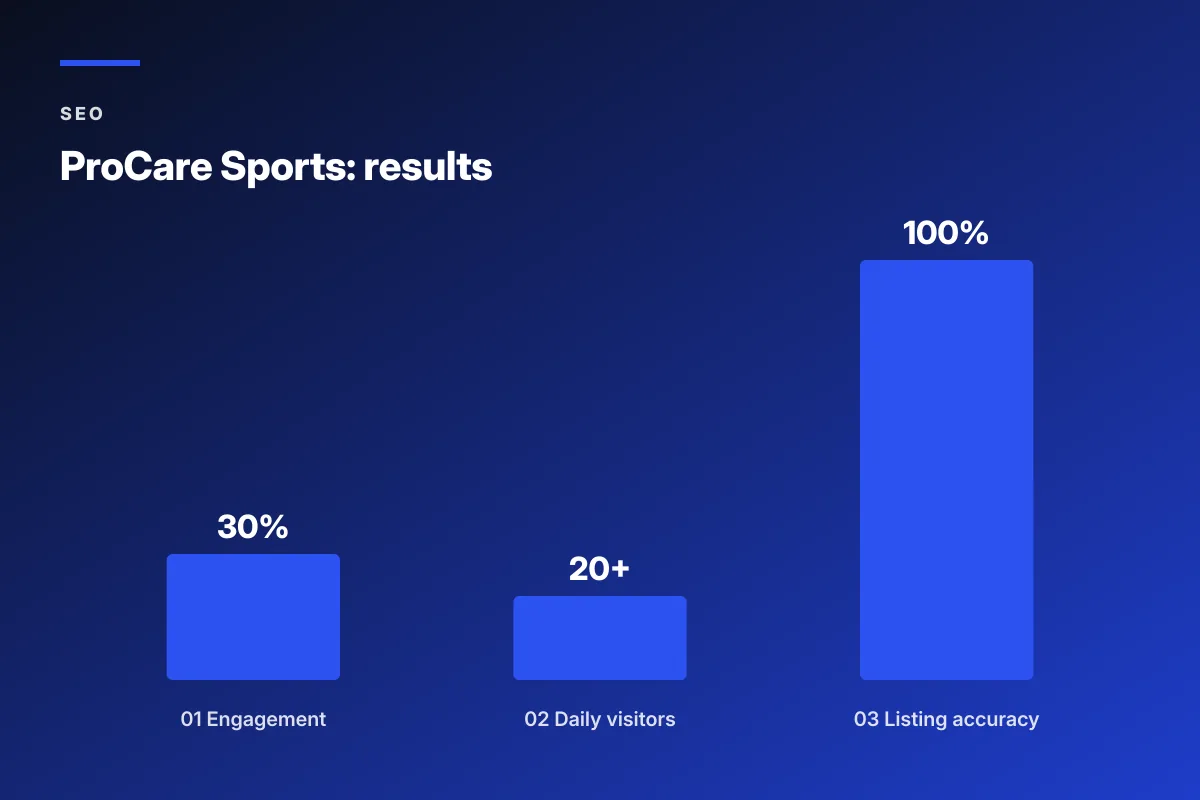
Real results back this. ProCare Sports, a San Diego sports chiropractic practice, replaced an early-2000s-era site with a modern build and saw 30 percent higher engagement and 100 percent listing accuracy across Google and Yelp within the first quarter. Their page speed for chiropractor websites went from a 42 mobile score to 91 within the first two audit cycles, and daily visitors climbed to 20 plus with consistent local growth.
The math works because speed compounds. Every extra booking from a faster site is pure margin because you did not spend more on ads to get it. Fast sites also cost less to rank because Google rewards them in local search. That combined effect is why performance retainers pay back inside the first quarter for most practices.
Common mistakes that tank page speed for chiropractor websites
The first mistake is treating page speed as a one-shot fix. A practice site gets audited during a rebuild, hits a green PageSpeed score at launch, and then decays over 18 months as content, plugins, and images pile on without oversight. By month 18, the site is back in the red. Monthly audits prevent this slow decay.
The second mistake is confusing desktop scores with mobile scores. PageSpeed Insights shows both. Desktop scores are almost always green because desktop CPU and network handle almost anything. Mobile is where rankings and bookings live. If your practice is celebrating a 95 desktop score while the mobile score sits at 42, you are looking at the wrong number.
The third mistake is chasing perfect scores at the expense of actual booking flow. A 100 mobile score with a booking form that patients cannot find beats a 100 mobile score with no form at all, but neither beats a 92 score with a clear, visible booking button above the fold. Optimize for the metric that ties directly to bookings: LCP under 2.5 seconds and a booking CTA that patients can find without scrolling. Everything else is secondary. See chiropractor website CRO for how speed and conversion optimization stack together.
Page speed for chiropractor websites is a compounding investment. Every second you shave off the load time adds bookings, protects rankings, and reduces bounce. Start with images and fonts, then move to hosting and plugins, then set a monthly audit habit. When you are ready to hand it off, our chiropractor website maintenance program keeps the numbers in the green. Fast sites book more patients, and page speed for chiropractor websites is the single easiest place to compound gains without touching copy or offer.
Frequently asked questions
What is a good page speed score for a chiropractor website in 2026?
A good page speed for chiropractor websites means a mobile PageSpeed Insights score of 90 or higher, with all three Core Web Vitals in the green: Largest Contentful Paint under 2.5 seconds, Interaction to Next Paint under 200 milliseconds, and Cumulative Layout Shift under 0.1. Most local practice sites should target 85 or higher on mobile because the competition in most metro chiropractor searches is not aggressive on speed, so a mid-90s score puts you ahead of the local pack easily. Desktop scores are almost always green and matter less because 70 to 85 percent of practice traffic is mobile. Test the homepage, top service page, and booking page separately because they usually score differently.
How much do speed improvements actually increase chiropractor bookings?
Data from Deloitte, Cloudflare, Portent, and Google BigQuery all show a consistent pattern: every one-second speed gain adds 7 to 12 percent more form submissions and phone calls across service-industry sites. For a typical chiropractor website booking 40 new patients per month at a 2.5 percent conversion rate, a two-second speed improvement adds 6 to 10 extra new-patient bookings per month at zero incremental ad spend. Bounce rate also drops: Google reports a 32 percent higher bounce rate when load time moves from 1 to 3 seconds. That is real revenue you can measure in your booking system, not a theoretical gain.
What plugin should I use to improve page speed for chiropractor websites?
For most practice sites, the WP Rocket paid plugin at around 59 dollars per year handles page caching, lazy-loading, minification, and deferred JavaScript in one interface. WP Rocket is the highest ROI single plugin purchase for WordPress speed. Free alternatives include W3 Total Cache (more configuration required) and LiteSpeed Cache (only works on LiteSpeed hosting). For image optimization, pair the cache plugin with ShortPixel, Imagify, or WebP Express to convert every upload to WebP automatically. Do not stack multiple caching plugins because they conflict and slow the site further. Managed hosts like Kinsta and WP Engine include server-level caching, so you can skip the plugin entirely on those platforms.
Does slow page speed hurt local SEO for chiropractors?
Yes. Google confirmed in 2021 that Core Web Vitals are a direct ranking signal for mobile search, and the local pack for chiropractor searches (Chiropractor near me, chiropractor plus city name) is heavily mobile-driven. A red Core Web Vitals score visibly demotes a practice site in the map pack and organic results. Real-world data from Ahrefs and Semrush shows a 15 to 30 percent traffic drop on average when a site slips from green to red on mobile Core Web Vitals. Recovery takes 4 to 8 weeks of green scores plus a re-crawl before rankings return. Prevention through monthly audits is cheaper than recovery.
How long does it take to improve page speed for chiropractor websites?
The biggest wins land in the first 2 to 4 weeks of focused work. Image optimization, hosting migration, and plugin audits typically move mobile PageSpeed scores from the 30 to 50 range into the 75 to 90 range within a month. Getting from 90 to 100 takes deeper work: rebuilding the theme on a lightweight framework, hosting fonts locally, removing every non-critical third-party script. Most practices should target the 85 to 95 range on mobile because it captures 95 percent of the ranking and booking benefit without the extra 40 hours of engineering the last five points require. The monthly audit habit keeps you there once you arrive.
Should I hire a specialist or handle page speed for chiropractor websites in-house?
Independent solo practices usually handle it in-house through a plugin like WP Rocket plus quarterly image sweeps. Multi-location practices, DSO groups, and practices spending over 3,000 dollars per month on paid ads should hire specialists because the speed gains compound directly on ad ROAS and organic bookings. Redefine Web chiropractor website maintenance retainer covers this at 599 dollars per month, which pays back inside the first quarter for practices generating over 25 monthly bookings. The key question is whether your current site is losing rankings due to speed. If mobile PageSpeed sits under 60 and rankings have dropped in the last quarter, hiring beats DIY. See our chiropractor marketing services page for the full stack.
Book your free 30-minute strategy call.
No spam, no sales rep. We use your email to schedule your call with a senior strategist. That is it.
More from the blog
View all articles → SEO
SEO Organic Search Engine Optimization Services That Grow Real Traffic
Read article SEO
SEO SEO for Pet Groomers That Fills the Appointment Book Weekly
Read article SEO
SEO