Healthcare website maintenance is the least glamorous line on your marketing budget and the one that quietly protects everything else. Skip it for 6 months and your site slows down, plugins go stale, security patches lag, Core Web Vitals slip below Google’s threshold, forms break, and phone calls stop coming in. The homepage keeps looking fine. The numbers behind it fall off a cliff. That’s the standard maintenance-neglect story on a typical clinic site.
This guide is the pillar view of the topic. What sits inside the scope of work. The monthly and quarterly checklist any decent retainer runs against. The pricing tiers from $199/mo self-managed up to $499/mo full-managed for multi-location practices. HIPAA-adjacent guardrails that keep patient data safe when the vendor touches the site. The 8 warning signs your current vendor stopped paying attention. Read straight through in ten minutes. Then run the checklist against your last invoice to see what you’re actually paying for.
What healthcare website maintenance actually covers
The work covers five workstreams that keep a clinic site fast, safe, and booking patients. Security patching. Performance tuning. Content freshness. Uptime monitoring. Monthly reporting. Every one of those workstreams runs on a fixed cadence, not on the day a plugin update alert breaks something. Vendors who charge $99 self-serve fees do part of one workstream. Vendors who charge $499/mo run every workstream on a schedule and prove it in the report.
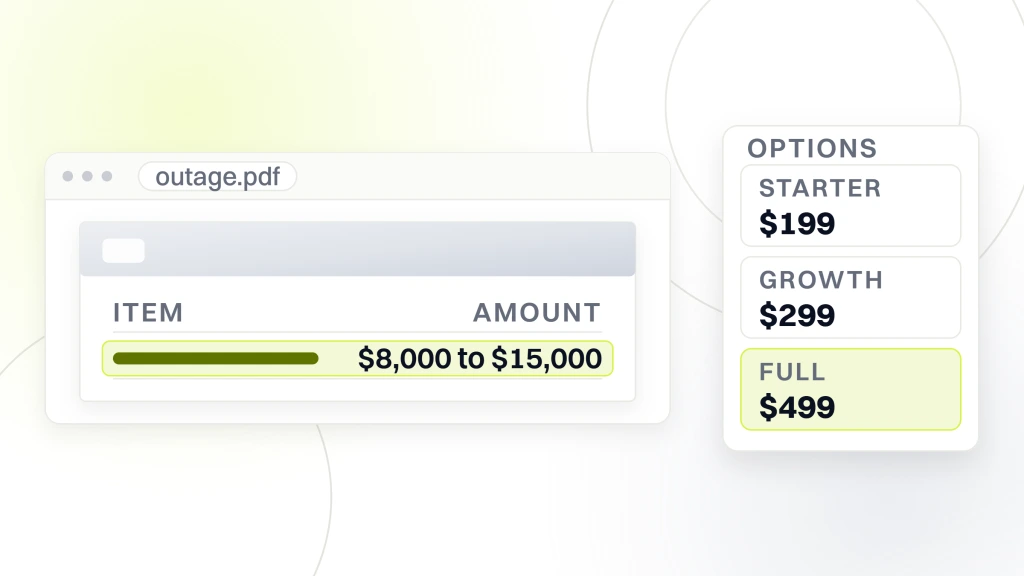
The scope of work sits inside a signed statement of work, not a sales page. Ask for the SOW before you sign. It should list weekly plugin updates, monthly WordPress core review, quarterly HIPAA-adjacent audits, and named tools like Wordfence Premium, CallRail HIPAA, and Google Looker Studio for reporting. Anything vague reads as a red flag. Practices that lose $8,000 to $15,000 a month in booked appointments during a site outage rarely find out until the numbers come in 45 days later, which is why real website monitoring matters. That’s why the scope matters.
Who owns what across the practice
The practice manager owns the content requests. The marketing lead owns campaign integration. The IT lead owns security posture and BAA files. The maintenance vendor owns execution across every workstream. Draw the RACI once, review it every 90 days, and every ticket lands with the right person. Practices that skip this step ship every request to the practice owner and burn 4 hours of exec time a week.
Security guardrails inside healthcare website maintenance
Security guardrails inside the retainer protect two different things. Site availability and patient data. Both need distinct workflows. Site availability protection uses a firewall, malware scanning, and brute-force login protection. Patient data protection uses HIPAA-adjacent controls on any tool that touches PHI even indirectly, from contact forms to chat widgets to call tracking.
Site availability protection runs Wordfence Premium or Sucuri Firewall with sensible rule sets. Login page rate-limited. Admin usernames not “admin.” Two-factor authentication on every admin account. WordPress security keys rotated every quarter. Failed login alerts routed to a real inbox. Every one of these settings goes live at build time and gets audited quarterly through the maintenance retainer. See the WordPress security keys reference for the rotation process. Skip the rotation once and the whole benefit evaporates.
- Wordfence Premium or Sucuri Firewall with configured rules
- Two-factor authentication on every admin account
- Login page rate-limited via WP Login Lockdown or equivalent
- WordPress security keys rotated every 90 days
- SSL certificate installed and HTTPS-only redirects forced
- Failed login alerts routed to a monitored inbox
- Admin username set to something other than “admin”
- Weekly malware scans with automated remediation
HIPAA-adjacent controls on the marketing site
The marketing site itself is usually not a covered entity under HIPAA since it doesn’t store patient records. But it often touches PHI through contact forms, chat widgets, and call tracking. Any tool that receives PHI needs a Business Associate Agreement (BAA) with the vendor. Use HIPAA-compliant form providers like Gravity Forms with the HIPAA add-on, or Formidable Forms with the HIPAA setup. Use HIPAA-compliant call tracking like CallRail’s HIPAA tier with a signed BAA. Skip the standard tiers, since the compliance gap outweighs the savings.
Chat widget PHI caution
Live chat widgets are the most common accidental PHI collector on healthcare sites. A patient starts a chat and shares their medical history in the second message. That conversation transcript now sits inside the chat vendor’s database. If the vendor doesn’t have a BAA with your practice, that data creates HIPAA violation exposure. Use HIPAA-compliant chat providers or a chat solution built into your EHR. Configure the widget with a prominent “do not share medical details” notice before the conversation starts.
Callout. If a maintenance vendor can’t produce a signed BAA for every PHI-touching tool within 5 business days, the scope is broken. Switch vendors before a breach forces the change on you.
Pelvic Rehabilitation Medicine case study on healthcare website maintenance
Pelvic Rehabilitation Medicine came to us with a 14-location network across 10 states running on a WordPress site that hadn’t been updated in 14 months. WordPress core sat at 2 major versions behind. Twelve plugins had known CVE vulnerabilities. Backup verification had never been performed. Core Web Vitals sat above Google’s threshold on every metric. LCP averaged 4.2 seconds on mobile. Form submissions dropped 22% year over year. Booked appointments from the site dropped in step.
We ran a full maintenance rebuild. WordPress core updated. Plugin audit and consolidation from 47 plugins down to 22. Security stack hardened with Wordfence Premium, 2FA, rate-limited login, and rotated security keys. Backup verification workflow established with monthly restore tests. Core Web Vitals optimization pass across the top 30 URLs. Weekly monitoring cadence set. Six months later, organic keyword rankings grew 174%. Organic traffic grew 166%. The Worthy Warrior patient community launched on top of the new foundation. Every one of those gains started with the maintenance workstream, not with a new marketing campaign.
What drove the recovery at Pelvic Rehabilitation Medicine
Core Web Vitals optimization drove the largest single gain. LCP dropped from 4.2 seconds to 1.9 seconds inside 6 weeks. That single change moved rankings up 4 to 8 positions on 40 of the top 100 keywords for Pelvic Rehabilitation Medicine. Plugin consolidation eliminated 3 render-blocking scripts that had been hurting INP. Security hardening blocked 2 attempted brute-force logins during the first month. Backup verification caught 1 corrupt backup and gave the team a chance to restore working coverage before an actual restore was needed.
Transferable tactics for any healthcare site
Every tactic transfers. WordPress core update discipline works for dental, chiropractic, med spa, mental health, and specialty medical sites identically. Core Web Vitals optimization math holds across every WordPress theme. Security hardening steps work identically. HIPAA-adjacent controls apply the same way across every healthcare specialty. Apply the same maintenance workstream discipline to any healthcare WordPress site and the same recovery curve follows inside 3 to 6 months.
Every practice owner has the same relationship with their WordPress dashboard. They log in once a year to check a plugin update notification. They see 47 plugins with pending updates. They read the phrase “critical security update” three times. They panic. They click “update all” without a backup. Two plugins conflict. The site white-screens. They call the developer who built the site 4 years ago. That developer no longer answers. They Google “WordPress white screen of death” at 11 pm on a Tuesday. Somewhere, a chiropractor is manually restoring a database from a cPanel backup he doesn’t fully understand.
Healthcare website maintenance pricing tiers you should recognize
Maintenance pricing usually breaks into three clean bands at Redefine Web. Starter maintenance at $199/mo covers automated backups, weekly plugin updates, monthly WordPress core review, uptime monitoring, and a monthly report. Growth maintenance at $299/mo adds Core Web Vitals monitoring, HIPAA-adjacent audits, and 2 hours of content updates. Full maintenance at $499/mo adds 6 hours of content updates, quarterly strategy reviews, and priority response inside 4 business hours. Every tier includes off-server backup storage and a 99.9% uptime SLA.
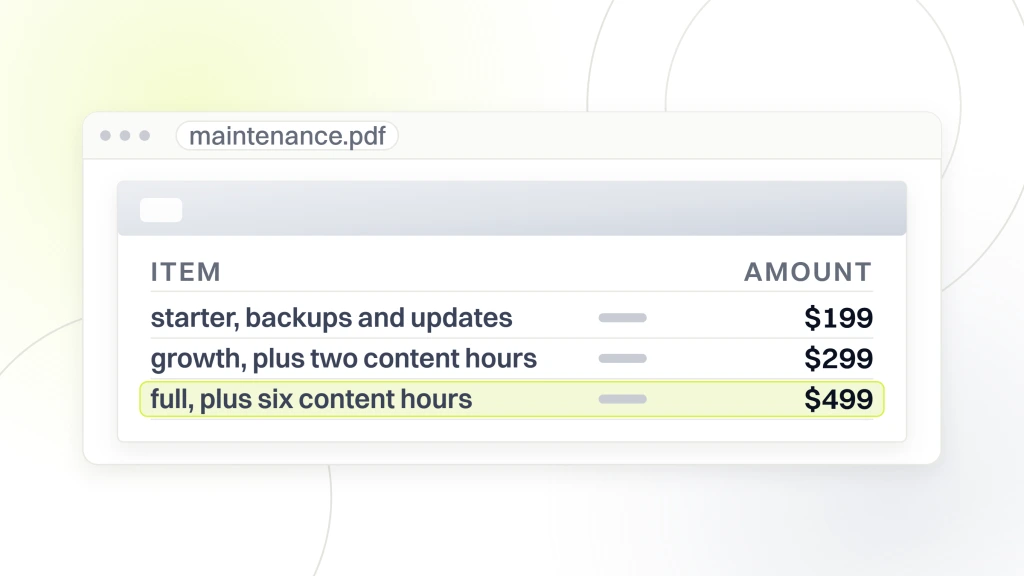
Match the tier to the site size and stakes. Single-location practice with under 5,000 monthly sessions runs fine on the $199/mo Starter tier. Multi-location practice with 20,000-plus sessions needs the $299/mo Growth tier at minimum. Multi-state DSO or MSO with compliance concerns runs the $499/mo Full tier. Don’t overbuy for a small site. Don’t underbuy for a large one. The gap between the right tier and the wrong tier shows up as either wasted budget or a site outage during business hours.
What sits inside each tier
Starter includes automated daily backups, weekly malware scans, weekly plugin updates, monthly WordPress core review, and uptime monitoring. Growth adds Core Web Vitals monitoring, HIPAA-adjacent audits every 90 days, and 2 hours of content updates a month. Full adds 6 hours of content updates, dedicated account management, quarterly strategy reviews, and priority ticket response. Every tier includes off-server backup storage and a monthly report delivered by the 5th business day of the following month.
Hidden costs to watch
Watch for hidden costs that inflate the real price. Emergency response fees outside business hours. Change requests over the allotted content update hours. Premium plugin license renewals like Wordfence Premium, Gravity Forms, and Yoast Premium. SSL certificate renewals if not included. CDN bandwidth overages. Every one of those items should be listed in the SOW with either included or add-on pricing. Any vague “contact us for pricing” line usually means the vendor charges premium rates when the moment comes.
Callout. Retainers under $199/mo rarely cover plugin updates, backups, and HIPAA-adjacent audits together. Under-tier plans cost more when a form breaks for 3 weeks.
Monthly checklist for healthcare website maintenance
The monthly checklist runs 20 items. Each item takes 5 to 30 minutes. Applied consistently, the checklist protects the site from 90% of the drift that hurts poorly-maintained sites over a 12-month stretch. The full checklist walks through security, performance, content freshness, and reporting in one pass.
- WordPress core update check and application
- Plugin update review with staging test
- Theme update review with staging test
- Backup verification with random restore test
- Uptime report review
- Core Web Vitals check in PageSpeed Insights
- Google Search Console report review
- 404 error report review with redirects added
- Form submission test on top 3 pages
- Call tracking spot check
- Malware scan review
- Wordfence or Sucuri report review
- SSL certificate expiration check
- Domain expiration check
- Analytics data review for anomalies
- Content update hours applied
- Provider bio review for accuracy
- Contact info review across the site
- Client-facing status report drafted
- Next month’s priorities set
Quarterly deeper audits
Every 90 days the maintenance team runs deeper audits. Full accessibility scan with axe or WAVE. HIPAA-adjacent audit on any PHI-touching tool. Provider bio review with the practice manager. Content freshness review on the top 30 clinical pages. Sitemap validation in Google Search Console. Schema markup validation on every schema type. Redirect chain audit to catch any 301-to-301 chains. Every audit produces a punch list of items that roll into the next month’s content update hours.
Annual full audit
Every 12 months the maintenance team runs a full audit. Full site crawl with Screaming Frog. Full backlink audit with Ahrefs or Semrush. Full technical SEO audit. Full accessibility audit. Full security audit including penetration testing on high-value accounts. Full hosting review with cost and performance benchmarking. Every audit produces a prioritized punch list for the next year of maintenance. That annual rhythm turns the retainer into a strategic function rather than reactive firefighting.
Warning signs your healthcare website maintenance vendor stopped paying attention
Warning signs your vendor stopped paying attention are consistent across the industry. Any three of them together mean it’s time to have a hard conversation or start vetting replacements. Read the last 3 monthly reports side by side and see how many of the eight signs show up.
- Monthly report hasn’t changed format in 6-plus months
- Plugins are more than 2 major versions behind current
- Core Web Vitals have declined for 3 consecutive months
- Backup verification hasn’t been performed in 90 days
- Any HIPAA-adjacent tool lacks a signed BAA on file
- Response time on tickets exceeds 48 hours consistently
- Content update hours roll over month after month unused
- No proactive recommendations in the last 6 months
Having the hard conversation with the vendor
Set up a 30-minute call with the vendor. Walk through the 8 warning signs. Ask which ones apply. Ask what changes to expect in the next 60 days. Get commitments in writing via email. If the vendor pushes back or blames the practice for the issues, that answers the question about whether the relationship is worth continuing. Good vendors welcome the accountability call. Bad vendors avoid it and hope you forget.
Vendor transition without downtime
Switching vendors without downtime takes 30 days. New vendor gets read-only access first. Runs a full audit. Documents current state. Then gets admin access with the old vendor as backup for the first 14 days. Old vendor gets a formal notice with a defined offboarding date. All credentials transferred. All tool subscriptions transferred. Backup verification completed by the new vendor before the old vendor loses access. That workflow protects the site through the transition without the outage risk of a hard cutover.
Callout. Fire a maintenance vendor once three of the eight warning signs land in the same monthly report. Waiting a fourth month usually costs more in booked appointments than the switch fee.
Content update workflow inside healthcare website maintenance
Content update hours are the most frequently unused line item inside a maintenance retainer. Practices pay for 2 to 6 hours a month and use maybe 30 minutes. Those unused hours don’t roll over indefinitely at most vendors. They evaporate. Build a workflow that actually uses the hours and the retainer pays back on content, not just security.
Batch content requests into a monthly submission window. Practice manager collects requests from providers and admins. Submits them by the first business day of the month. Maintenance vendor executes across the month. Sample content requests include provider bio updates, new service page additions, insurance carrier changes, seasonal promotions, and blog post publishing. Practices that batch requests use 80 to 100% of their content hours. Practices that submit ad hoc use 20 to 40%.
Provider bio update workflow
Provider bios need updates on a predictable cadence. New clinician joins, new certification earned, new specialty added, headshot refreshed, or clinician leaves the practice. Every one of those events triggers a bio update. Set a standing bio audit every 90 days. Confirm every bio is accurate. Confirm every headshot is current within 24 months. Confirm every credentials list matches the actual licenses on file. That single 30-minute quarterly audit catches most stale bio content before it hurts trust with prospective patients.
Seasonal content and promotion workflow
Seasonal content needs a lead time longer than most practices expect. Back-to-school physicals content needs to publish in mid-July. Flu season content publishes in mid-August. Holiday injury spikes content publishes in mid-November. Submit seasonal content requests 60 days before the promotional window opens. That lead time gives the maintenance vendor room to write, design, edit, and publish without last-minute compression that produces sloppy work.
Monthly reporting inside healthcare website maintenance
Monthly reporting is where most retainers get judged. A weak monthly report reads like an automated PDF nobody actually looks at. A strong monthly report gets read in 5 minutes by the practice owner and drives real conversations at the next planning meeting. The five-section structure below is the format we use across every retainer.
Structure the monthly report in five sections. Executive summary in 3 bullets. Uptime and security status. Core Web Vitals trend against Google’s threshold. Content updates completed with hours used versus allotted. Next month’s priorities. Every section fits on a single page. Total report length 4 to 6 pages including screenshots. Delivered by the 5th business day of the following month. Read during a 15-minute call between the account manager and the practice owner.
Reporting tools that speed the work
Google Looker Studio pulls data from Google Search Console, PageSpeed Insights API, and Google Analytics 4 automatically. Set up a template once and monthly report drafting drops from 4 hours to 45 minutes. UptimeRobot and Better Uptime both export monthly uptime data cleanly. Wordfence and Sucuri both export monthly security scan data. Use every automation available. Save the manual writing time for the executive summary and next-month priorities where practice owners actually read.
Stakeholder alignment during reporting
Different stakeholders read the monthly report differently. Practice owner reads the executive summary. Practice manager reads the content updates section. IT director reads the security and uptime section. Marketing lead reads the Core Web Vitals section. Structure the report so every stakeholder finds their section in under 30 seconds. That alignment builds trust across the whole practice team. See the Google Looker Studio documentation for reporting template setup.
Where to start on healthcare website maintenance this Monday
Start Monday morning with the backup verification test. Ask your current maintenance vendor to restore a recent backup to a staging environment. Set a 5-day deadline. That single request tells you whether the vendor actually maintains working backups. If they can’t produce a restored backup in 5 days, you have your answer about the maintenance quality.
Then run PageSpeed Insights on your homepage and top 3 service pages. Note the LCP, INP, and CLS numbers. Any regression above Google’s threshold gets added to a fix backlog. Then log into WordPress and note how many plugins are more than 2 versions behind current. Any count above 5 means the vendor isn’t doing weekly updates. When you’re ready to run the full program with a team that documents every workstream and reports monthly, our Healthcare website maintenance services guide covers the full stack. For the monthly checklist detail, our Maintenance checklist guide walks through every item. For the Core Web Vitals side, our Core Web Vitals guide covers the ranking math. For the technical SEO layer that pairs with maintenance, our Technical SEO guide walks through indexing and security. For the fully integrated program, our Healthcare marketing hub shows the full stack.