
Dental website management is the ongoing service that patches, backs up, edits, monitors, and reports on a dental practice site every month so it stays fast, secure, and booking patients. It’s the quiet part of dental marketing until the site goes down at 5:47 pm on a Thursday. Then it becomes the only part that matters.
Most practices file this under “the IT person” or “our marketing agency” without a clear picture of what gets done each month or what the invoice pays for. This guide walks through the tier-by-tier scope, the monthly checklist, the pricing benchmarks, the vendor questions, and the red flags that separate real management from a monthly charge for nothing.
Redefine Web manages roughly 120 dental sites across solo practices, small groups, and DSO networks. The patterns in this guide reflect what keeps sites fast, secure, and booking patients. Practices that treat it as a real service line outperform the ones that treat it as an afterthought on every metric worth measuring.
Key takeaways
- Weekly patch cadence with staging tests avoids most site breakage.
- Standard $299 tier fits most dental practices with real marketing.
- Use the edit hours every month or they lose their value.
- Backup retention window is the fix window on any incident.
- Monthly report with commentary proves the work is happening.
Pricing tiers for dental website services
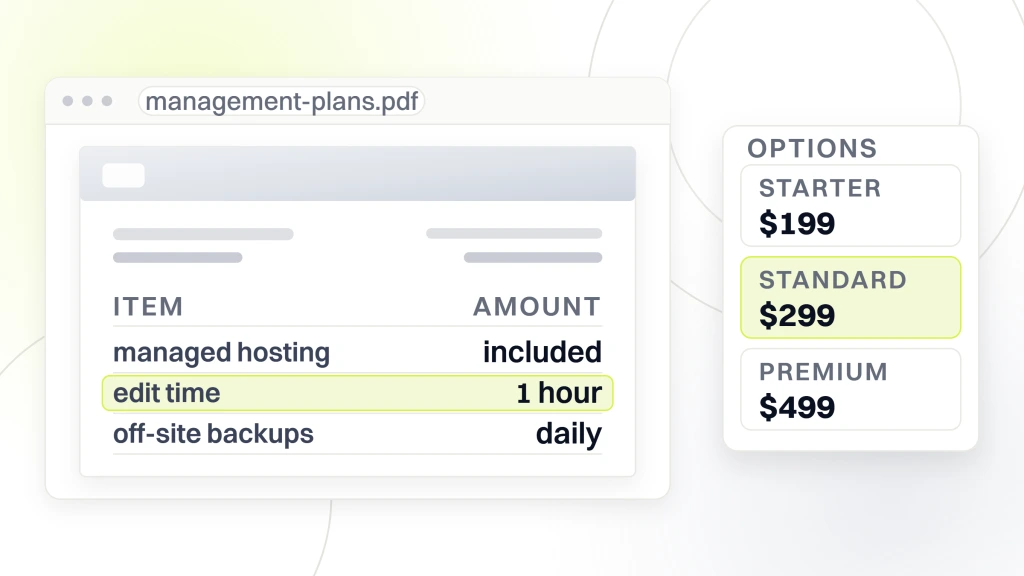
Dental website services pricing swings widely because agencies bundle different things under the word “management.” Some include hosting. Some include content edits. Some include SEO monitoring. Some include none of it. Redefine Web publishes three flat monthly tiers that fold hosting, patches, backups, and edit time into one number.
Starter tier ($199 per month)
Managed WordPress hosting, weekly plugin and core updates, daily off-site backups, uptime monitoring, and 1 hour per month of edit time. This tier keeps the lights on. It does not include monthly SEO monitoring, quarterly accessibility checks, or performance tuning. Fits a stable, low-traffic solo practice site that does not change often. Practices on starter who need frequent edits pay by the hour on top.
Standard tier ($299 per month)
Everything in starter plus 3 to 4 hours of edit time, monthly Lighthouse and Search Console review, quarterly accessibility check against WCAG 2.2 AA, and a monthly performance report with commentary. Fits solo practices and small groups that actively market. This is the tier most dental practices belong on. Below this tier, the site stagnates. Above it, the practice pays for management time it never uses.
Premium tier ($499 per month)
Everything in standard plus 6 to 10 hours of edit time, monthly SEO refinement, quarterly content additions, custom development hours, and a documented service level agreement. Fits multi-location groups, DSOs, and high-cosmetic practices with heavy marketing volume. Below this tier, a busy DSO account cannot scale. Practices that need this tier but try to save on standard usually end up rebuilding the site every 2 years because nothing was maintained properly. For the SEO angle on ongoing work, see our dental seo services.
In-house vs outsourced dental website management
Some dental practices try to run dental site management in-house through the office manager or a family member who “knows WordPress.” That runs fine for about 6 months, then breaks quietly. In-house dental site management fails on weekends and vacations. The trade-offs between in-house and outsourced work are real, and neither wins in every case.
When in-house dental site management works
A dental practice with a full-time marketing coordinator who has real WordPress skills, a documented process, and a backup person can run website management in-house. That usually costs $60,000 to $95,000 fully loaded in salary plus training plus tooling. The math only works if the practice generates enough marketing volume to justify the seat. In practice, that means multi-location groups or high-ticket cosmetic practices with 40 to 80 new patient inquiries per month.
When outsourced wins
Solo practices and small groups almost always come out ahead outsourcing. A $299 per month management retainer buys the equivalent of about 4 hours per week of a WordPress specialist, plus tooling access, plus the vendor network. Building that in-house costs 10 to 15 times more. Real dental site management includes weekend on-call, and the outsourced vendor carries the on-call coverage that a single in-house person cannot.
Hybrid arrangements
Some practices split the work. The outsourced vendor handles hosting, security, and quarterly performance. The in-house marketing coordinator handles day-to-day content edits, blog posts, and offer swaps. This works when both sides have clear scope documents. It fails when the split is verbal and the vendor and the coordinator each think the other is handling something specific. Our dental marketing agency vs in-house covers the wider agency-versus-internal decision.
How dental website management connects to SEO
Website management and dental SEO overlap far more than most practices realize. Every management task feeds an SEO signal, and every SEO gain has to be defended through ongoing management. Treating the two as separate line items usually ends with the practice paying for both and getting the benefit of neither.
Technical SEO overlap
Page speed, mobile usability, schema markup, XML sitemap, robots.txt, redirects, and canonical tags all live at the management-SEO overlap. A management vendor who does not touch these leaves the SEO agency to do it, and the SEO agency usually cannot without host access. Practices with the two functions under one team move faster and cleaner on technical SEO fixes. Practices with them separated wait weeks for basic tag changes.
Content refresh and dental website maintenance drift
SEO rankings decay if the content stops getting maintained. Dental website maintenance covers that decay directly. Prices change. Insurance networks change. New treatments come in. A management retainer that includes 3 to 4 hours of content edit time per month covers the small updates that keep top pages ranking. Practices that never touch content post-launch lose 15 to 25% of ranking per year to competitors who maintain theirs.
Search Console as the shared dashboard
Google Search Console tells the management side what is broken and tells the SEO side what is winning. A monthly Search Console review catches crawl errors, mobile usability issues, and Core Web Vitals regressions before they hurt rankings. This is a 30-minute job every month that pays back in ranking retention. Sites that never review Search Console usually have 40 to 200 crawl errors sitting quietly, and they never know. See our dental marketing attribution for the wider reporting stack.
Security and compliance under dental website management
Security and compliance in this scope cover patch cadence, WAF configuration, TLS grading, HIPAA-tier data handling, ADA accessibility, and privacy policy maintenance. Practices that reduce this to “we have SSL” underestimate the surface area. Real management means someone owns every layer.
Patch cadence and vulnerability response
WordPress plugins publish CVEs (Common Vulnerabilities and Exposures) every week. A management vendor that follows a strict dental website maintenance checklist subscribes to the WordFence or Patchstack alert feed and applies critical patches within 48 hours. Non-critical patches roll on the weekly cycle. Sites without this cadence sit exposed to known vulnerabilities for weeks or months. Every dental site compromise we investigate traces back to a plugin CVE that could have been patched.
HIPAA-adjacent data handling
Even marketing sites that avoid PHI still handle patient-identifiable data (names, phone numbers, appointment requests). Management should confirm that no marketing pixel or session recording is collecting form-field content in violation of HIPAA marketing guidance. Meta pixel and Google Ads pixel both crossed OCR enforcement in 2023 for health-adjacent data collection. The management vendor has to know what fires on which pages. Our hipaa marketing compliance dental covers the pixel side.
ADA accessibility maintenance
ADA accessibility is not a one-time audit. Every new page, every new PDF, every new plugin can introduce a defect. Real management includes quarterly accessibility scans against WCAG 2.2 AA and remediation of the findings. Sites that pass audit at launch and never re-scan usually drift back to fail state within 12 to 18 months. Practices in high-litigation states (New York, Florida, California, Illinois, Pennsylvania) can see demand letters as a result.
Real world dental website management benchmarks
The table below tracks the benchmarks we see across roughly 120 dental sites under active management. Numbers vary by size, complexity, and specialty, but the ranges give a working sanity check. Practices sitting well outside a range in either direction should ask why before assuming the vendor is delivering the full scope on the contract.
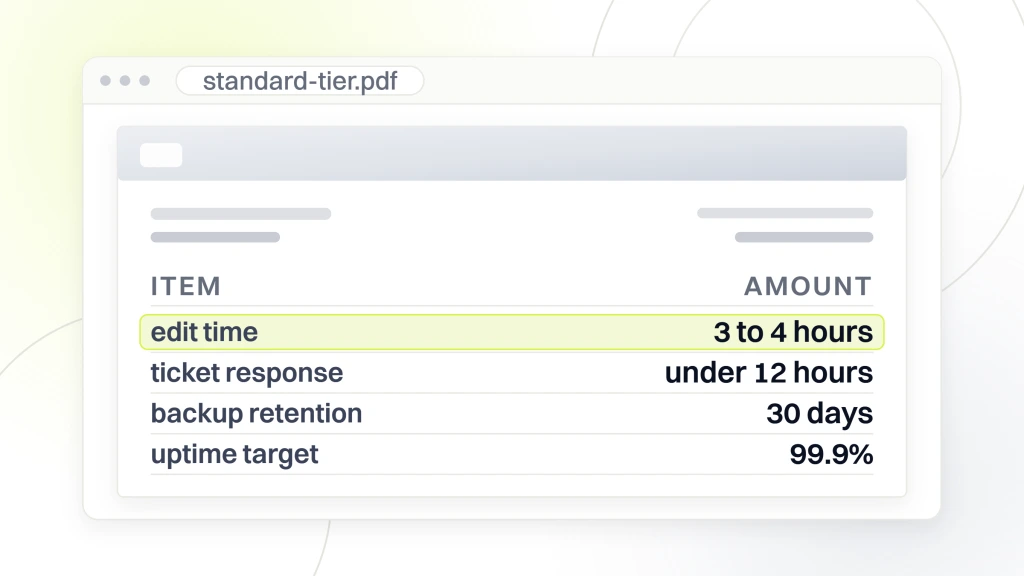
| Metric | Starter ($199) | Standard ($299) | Premium ($499) |
|---|---|---|---|
| Edit hours included | 1 | 3 to 4 | 6 to 10 |
| Weekly patch cadence | Auto only | Auto plus staged | Staged plus tested |
| Uptime target | 99.9% | 99.9% | 99.9% with written SLA |
| Backup retention | 7 to 14 days | 30 days | 30 to 90 days |
| Response time on ticket | Under 48 hours | Under 12 hours | Under 2 hours |
| Content edits per month | 0 to 2 | 4 to 10 | 15 to 40 |
| SEO monitoring | None | Monthly | Monthly plus refinement |
The single biggest factor that moves a dental site up the value chain across these tiers is not the monthly cost. It’s the edit time included and how that edit time gets deployed. Practices on the $299 standard tier that use their 3 to 4 edit hours actively (adding team members, refreshing offers, publishing new blog posts, tightening service pages) see 20 to 40% higher organic growth than practices on the same tier that let the hours expire.
The second biggest factor is response time on tickets. A vendor that responds in under 12 hours to a broken form or a spam attack contains the damage before it eats a week of leads. A vendor that responds in 48 to 72 hours turns a small issue into a big one. The third factor, often invisible until it matters, is the backup retention window. Sites that get compromised or have a bad deployment need to restore from a backup that predates the incident. A 7-day retention window means the fix window is 7 days. A 30 or 90 day window buys enough room to catch a slow-onset issue like a corrupted theme file. Practices picking a tier should look at all three factors together, not just the monthly invoice number.
Case study Smile Design Dentistry DSO management program
Smile Design Dentistry, a 50+ location DSO, came to Redefine Web with 50+ separate WordPress sites spread under 6 vendors picked up through acquisitions. Update cadence was inconsistent. Some sites had crawl errors sitting for months. The accessibility posture varied by location. Legal wanted a consolidated management program in place before the next quarterly audit.
What we consolidated
50+ location sites moved onto a single WP Multisite instance under one management program. Weekly patch cadence, daily backups with 30-day retention plus off-site, uptime monitoring across all locations, quarterly accessibility scans, and monthly performance reports per location. One dedicated account manager owned the DSO, with escalation paths defined per location.
The scope covered per location
Each location got 4 hours per month of content edit time, priority ticket response under 2 hours, and a monthly performance report that surfaced any Core Web Vitals regressions. The DSO marketing team submitted content and offer updates centrally, and we distributed them across the network with location-specific customization. Response cadence became predictable enough that the marketing team could plan campaigns 6 weeks ahead.
The result across the network
Cost per call across PPC dropped 30% as page speed rose. PPC conversion rate climbed 20% because faster pages held mobile patients on the booking flow. Google Search Console crawl errors dropped 94% inside 45 days. The DSO now runs one management contract instead of six, and leadership gets a single quarterly performance report instead of chasing six vendors. For the retainer that supports this scope, see our dental website maintenance.
Vendor selection questions for dental website management
Choosing a vendor for dental website development and ongoing management comes down to three things. What’s included versus what costs extra. How fast the vendor responds. And whether the vendor can prove the work gets done. The questions below separate real vendors from monthly-invoice vendors on the pitch call.
Questions to ask on the pitch
Ask about patch cadence and whether plugin updates get staged first. Ask about backup retention and whether a restore has been tested in the last quarter. Ask about ticket response SLA. Ask how many edit hours are included and what counts as an edit. Ask what the monthly report shows. Ask what’s out of scope. Ask how you get your data if you leave. Real vendors answer in specifics. Fake vendors talk about “dedicated care.”
Red flags on the sales call
The vendor cannot describe patch cadence in specifics. The vendor charges extra for basic edits. The contract runs 24 months with a big renewal jump. The monthly report is a screenshot of Google Analytics. The vendor cannot show a sample performance report from another dental client. Any two flags means the vendor is selling a subscription, not a service.
What real management deliverables look like
A monthly management report should include uptime for the month, Core Web Vitals scores for the top 10 pages, tickets closed and hours used, security incidents (usually zero), backups verified, plugin updates applied, and a specific recommendation for the next month. If the report is 2 pages of screenshots without commentary, the work is probably not happening. See our dental marketing tools for the reporting stack we run.
Scaling dental website management across multiple locations
Website management scales differently for dental practices at 3 locations, 15 locations, and 50 locations. Systems built for a solo practice break under network volume. Multi-location groups that scale without rethinking the management approach usually end up with 50 sites needing attention and one contractor who cannot keep up.
WP Multisite vs separate installs
WP Multisite consolidates network-wide plugin updates, security patches, and backups under a single admin. That saves 20 to 40 hours per month at 10+ locations compared to separate WordPress installs. The trade-off is that Multisite is harder to migrate away from later. Groups planning long-term consolidation should start on Multisite. Groups running independent brands per location usually stay on separate installs.
Central content vs local overrides
Multi-location groups need central offer control (a network-wide promo) with local overrides (each office keeps its own team photos, hours, and testimonials). Management systems that only support one side create friction. Groups with true central-plus-local publishing keep brand consistency and location authenticity at the same time.
Per-location reporting
DSO leadership teams need to see per-location performance without opening 50 dashboards. Management reports should roll up Core Web Vitals, uptime, form submissions, and phone calls into one view with location-level drill down. Groups without rolled reporting usually make bad decisions on where to invest budget because the data is scattered. Our dso dental marketing covers multi-location reporting in more depth.
Turn dental website management into a growth engine
This work sits among the least glamorous line items in a dental marketing budget and among the most consequential. Get it right, and the site keeps producing patients quietly for years. Get it wrong, and every other marketing dollar bleeds off through slow pages, broken forms, and unpatched vulnerabilities the practice never sees. Practices that pick the tier matching their real needs, then hold the vendor to specific deliverables, outperform practices that pick on price alone.
For Google’s Core Web Vitals thresholds behind this work, see the Core Web Vitals reference. For HIPAA hosting basics see the HHS security guidance. And for the DOJ accessibility position on healthcare sites read the ADA web guidance. Ready to move it from a line item to a growth engine? Book a scoping call and we’ll map the right tier to your practice in one 30-minute conversation.